
Where Does Each Meeting Platform Save Your Transcript?
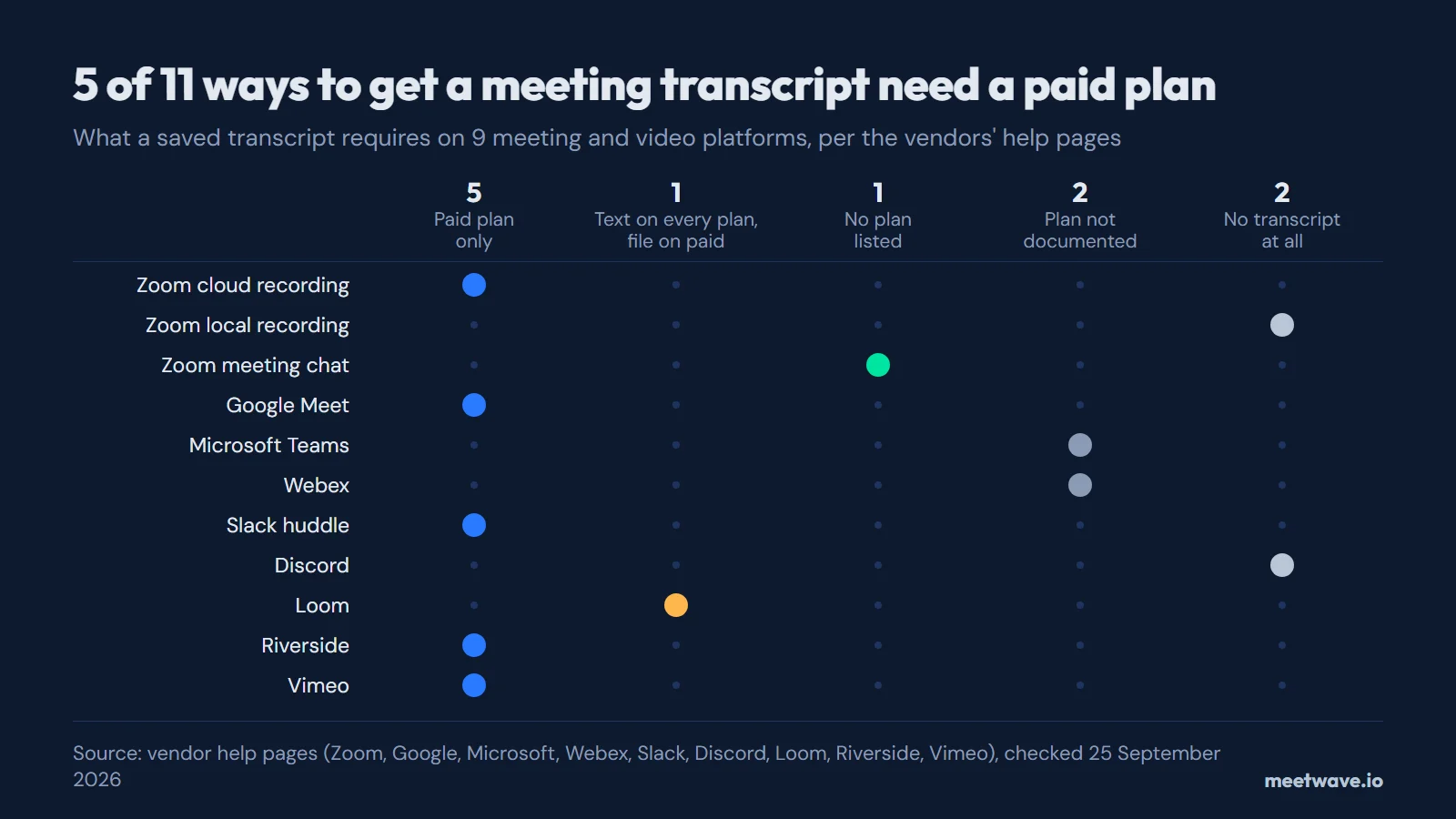
Of 11 ways to get a transcript on 9 meeting and video platforms, checked in each vendor's help pages on 25 September 2026, 5 keep a saved transcript only on a paid plan: Zoom cloud recordings, Google Meet, Slack huddles, Riverside and Vimeo. Loom lets every plan view and copy the text but keeps the .srt download for paid plans. Microsoft and Webex do not name a plan on their transcript pages. Discord and a Zoom local recording save no transcript at all.
Key numbers
- Of 11 transcript sources on 9 platforms, 5 keep a saved transcript only on a paid plan, checked on 25 September 2026 (how we counted).
- Zoom saves a .vtt transcript only for Pro, Business, Education or Enterprise accounts with cloud recording and the audio transcript turned on (2026, Zoom Support).
- Google Meet transcripts need one of 8 Workspace editions, from Business Standard to Workspace Individual, and are saved in the organizer's Drive in a "Google Meet" folder (2026, Google Meet Help).
- Teams meeting recordings and transcripts expire after 120 days by default under the admin's expiration policy (2026, Microsoft Learn).
- Webex transcribes recordings in English only, usually within twice the meeting's length and in rare cases up to 24 hours (2025, Webex Help).
- Discord Clips save 30-second, 60-second or 2-minute video clips, and Discord has no transcript feature (2026, Discord Support).
Where each platform keeps the transcript
The table below has one row per way to get a transcript: Zoom has three, because a cloud recording, a local recording and the saved chat each leave a different file in a different place. Each cell was read on the vendor's own help page; the Checked column links to it (Sources).
| Platform | Plan for a saved transcript | File you get | Where it's saved | Who can open it | Kept for | Turn it into text | Checked |
|---|---|---|---|---|---|---|---|
| Zoom meeting transcripts | Pro, Business, Education or Enterprise, with cloud recording and audio transcript turned on | .vtt | Web portal → Recordings & Transcripts → Cloud recordings, as a separate VTT file next to the recording | You, in your own recordings list; people you share the recording with, if you let viewers see the transcript | No default limit stated; after a downgrade to a free account, cloud recordings are deleted after 30 days | VTT to text converter | 25 Sep 2026docs 1docs 2 |
| Transcribe a Zoom recording | Any plan, Basic (free) included, can record to the computer — but computer recordings have no audio transcription | No transcript: an .mp4 video and an .m4a audio file | Documents/Zoom on the recording computer | Not documented by Zoom | Not documented by Zoom | Transcribe the audio file | 25 Sep 2026docs 1docs 2 |
| Zoom chat transcript | No plan listed for saving chat to the computer; the cloud Chat file needs a licensed user with cloud recording | .txt of the chat messages, not of what was said | Documents/Zoom, in a folder named after the meeting, date and time; or a Chat file next to a cloud recording | Participants the host allows to save chat; auto-save works for the host only | Not documented by Zoom | Zoom chat converter | 25 Sep 2026docs 1docs 2 |
| Google Meet transcript | Business Standard, Business Plus, Enterprise Starter, Enterprise Standard, Enterprise Plus, Teaching and Learning Upgrade, Education Plus or Workspace Individual | Not documented by Google (it says "a separate transcript file") | The organizer's Google Drive, "Google Meet" folder; from July 2026 the old "Meet Recordings" folder is renamed "Legacy Meet Recordings" | Emailed to the host, co-hosts and whoever turned it on; attached to the Calendar event, which invitees in the host's organization can open | Not documented by Google | — | 25 Sep 2026docs |
| Microsoft Teams transcript | Not documented by Microsoft on its transcript help pages | .docx or .vtt | The organizer's OneDrive; for channel meetings, the team's SharePoint site | Organizers and co-organizers can download; others only with their permission | 120 days by default under the admin's expiration policy (at most 30 days by default for A1 users) | Teams transcript converter | 25 Sep 2026docs 1docs 2docs 3 |
| Webex meeting transcript | Not documented by Webex; the meeting must be recorded to the cloud | Not documented by Webex | User Hub, beside the cloud recording | The host, who can download, edit and share it | Not documented by Webex | — | 25 Sep 2026docs 1docs 2 |
| Slack huddle transcript | Paid plans; members only, not guests | No file: the transcript is embedded in the AI notes canvas | A canvas in the huddle thread | Anyone in the channel or DM; AI notes do not work in huddles with external people or guests | Not documented by Slack | — | 25 Sep 2026docs |
| Discord call transcript | None: Discord does not provide a recording or transcript feature | No transcript; Clips saves 30-second, 60-second or 2-minute video clips | Clips are stored only on your computer | No transcript to open | No transcript to keep | Transcribe the audio file | 25 Sep 2026docs 1docs 2 |
| Loom video transcript | Every plan can view and copy it; the .srt download needs Business, Business + AI or Enterprise | Copy to clipboard, or an .srt caption file | Transcript in the video's side panel; .srt from … → Download captions | .srt: creators and admins on Business or Business + AI, members and admins on Enterprise | Not documented by Loom | SRT to text converter | 25 Sep 2026docs |
| Riverside transcript | Pro, Grow, Webinar or Business | .txt or .srt | Project → Recordings → Tracks → Transcript → Download | Account owner, admins, directors and editors | Not stated for transcripts; recordings move to archive storage 2 years after recording and can be restored | SRT to text converter | 25 Sep 2026docs 1docs 2 |
| Vimeo transcript | A paid plan | .srt, .vtt or .ttml | Library → the video → Languages → ⋮ → Download | People with edit access to the video | Not documented by Vimeo | SRT to text converter | 25 Sep 2026docs |
Source: each vendor's help pages, linked in the Checked column and under Sources; “Not documented” means the page was read and does not say. Download this table as CSV (CC BY 4.0: free to reuse with a link to this page).
Which platforms need a paid plan
A saved transcript is a paid feature on most platforms. Zoom asks for Pro or higher (Zoom Support), Google Meet for Business Standard or one of 7 other editions (Google Meet Help), Slack for a paid plan (Slack Help), Riverside for Pro, Grow, Webinar or Business (Riverside Help Center) and Vimeo for a paid plan (Vimeo Help Center). Figure 1 shows all 11 rows.
Figure 1. What a saved transcript requires, per source. Source: vendor help pages, checked 25 September 2026.
Loom is the one split case: every plan can view and copy the transcript, but the .srt caption download needs Business, Business + AI or Enterprise (Atlassian Support). Microsoft's and Webex's transcript pages describe who downloads the file and where it lands, but not which licence you need (Microsoft Support, Webex Help). The table says "Not documented" there rather than guessing.
What file you get, and how to turn it into text
No two platforms hand you the same thing. Zoom gives a .vtt, Teams a .docx or .vtt, Riverside a .txt or .srt, Vimeo a .srt, .vtt or .ttml, and Slack no file at all, only a canvas (Slack Help). Figure 2 lines them up.
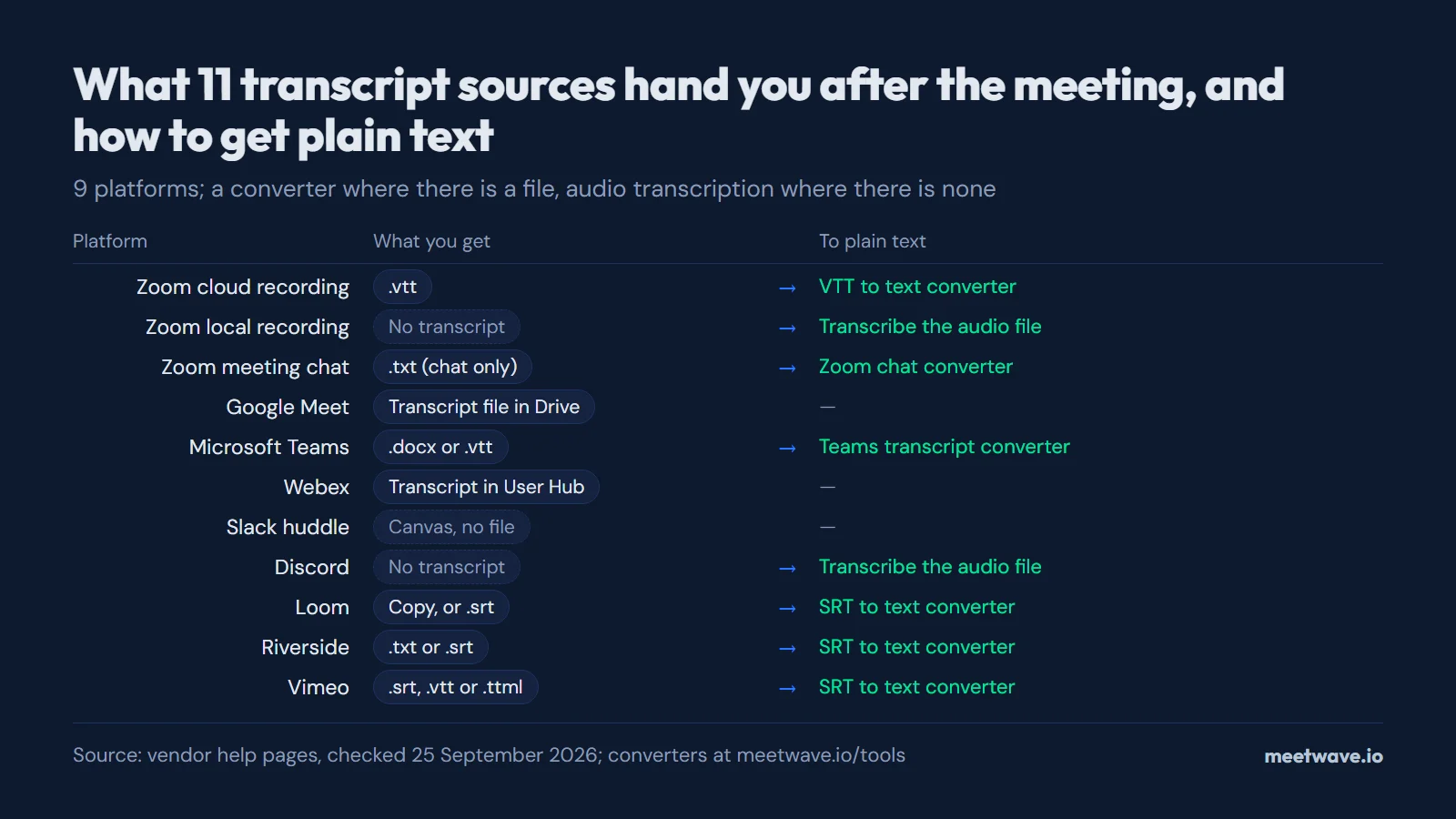 Figure 2. What each source gives you after the meeting. Source: vendor help pages, checked 25 September 2026.
Caption files carry a timestamp line for every few seconds of speech. To read one as a document, run a Zoom .vtt through the VTT to text converter, a Teams .docx or .vtt through the Teams transcript converter, a Riverside, Loom or Vimeo .srt through the SRT to text converter, and a saved Zoom chat through the Zoom chat converter. All four run in the browser.
When the platform saves nothing
Discord has no transcript feature (Discord Support), and a Zoom recording saved to the computer has no audio transcription (Zoom Support). What you have is audio, and the way to text is to transcribe the audio file.
For calls you have not had yet, MeetWave records them itself. No bot joins your calls: the Chrome extension records web calls on macOS, Windows, Linux and ChromeOS, and the Windows desktop app also captures system audio from any app.
How we calculated
"Checked" means a person opened every page listed under Sources on 25 September 2026 and read the fact on it; search snippets and third-party guides were not used. Each row is one way to get a transcript, so Zoom's cloud recording, local recording and saved chat are three rows, and the 11 rows cover 9 companies.
A row counts as "paid plan only" when the vendor's page names paid plans as the requirement for a saved transcript (5 rows). Loom counts as partly free. The Zoom chat file counts as "no plan listed", because the requirements list only the desktop app. "Not documented" means the page was read and does not say; those cells are counted neither as yes nor as no (Teams and Webex plans, 2 rows). The same rows are published as a CSV file under CC BY 4.0.
FAQ
Where did my Zoom transcript go?
It is next to the cloud recording in the Zoom web portal, under Recordings & Transcripts, as a separate .vtt file — and only if the meeting was recorded to the cloud on a paid plan with the audio transcript on (Zoom Support). A recording saved to your computer has none (Zoom Support).
Does Google Meet save transcripts on a free Gmail account?
No. Google lists 8 Workspace editions that have transcripts, from Business Standard to Workspace Individual, and a personal Gmail account is not one of them (Google Meet Help).
Can I download a Teams transcript if I'm not the organizer?
By default only the organizer and co-organizers can download it as a .docx or .vtt; they can give others permission (Microsoft Support).
Does Discord transcribe calls?
No. Discord's own help center says it "does not currently provide a recording or transcript feature" (Discord Support).
Sources
- Zoom Support — Using audio transcription for cloud recordings (2026). Accessed 2026-09-25.
- Zoom Support — Enabling cloud recording (2026). Accessed 2026-09-25.
- Zoom Support — Starting a computer recording (2026). Accessed 2026-09-25.
- Zoom Support — Finding your computer and cloud recordings (2026). Accessed 2026-09-25.
- Zoom Support — Saving in-meeting chat (2026). Accessed 2026-09-25.
- Zoom Support — Chatting in a Zoom meeting (2026). Accessed 2026-09-25.
- Google Meet Help — Use transcripts with Google Meet (2026). Accessed 2026-09-25.
- Microsoft Support — Start, stop, and download live transcripts in Microsoft Teams meetings (2026). Accessed 2026-09-25.
- Microsoft Learn — Teams meeting recording and transcript storage and permissions in OneDrive and SharePoint (2026). Accessed 2026-09-25.
- Microsoft Learn — Manage Teams recording expiration policy (2026). Accessed 2026-09-25.
- Webex Help — Get a post-meeting transcript by recording your meeting or webinar (2024). Accessed 2026-09-25.
- Webex Help — Turn on recording transcripts in meetings, webinars, and events (2025). Accessed 2026-09-25.
- Slack Help — Use AI to take huddle notes in Slack (2026). Accessed 2026-09-25.
- Discord Support — Clips (2026). Accessed 2026-09-25.
- Discord Support — Stage Channel Guidelines (2026). Accessed 2026-09-25.
- Atlassian Support — Loom video transcription and closed captions (2026). Accessed 2026-09-25.
- Riverside Help Center — Download transcript of full recording (2026). Accessed 2026-09-25.
- Riverside Help Center — Access archived recordings (2026). Accessed 2026-09-25.
- Vimeo Help Center — How to view or download my video's transcript (2026). Accessed 2026-09-25.
Got the file. Next call, get the notes too.
Free plan: 600 minutes a month. No card.
Still comparing tools?
See how MeetWave stacks up against the tools most teams evaluate alongside it.
- MeetWave vs NottaSee how MeetWave compares to Notta for meeting transcription
- MeetWave vs KrispSee how MeetWave compares to Krisp for meeting notes
- MeetWave vs JamieSee how MeetWave compares to Jamie AI for bot-free meeting notes