How to Transcribe a Discord Call (Discord Has No Transcript Feature)
To transcribe a Discord call, record it yourself and then transcribe the recording, because Discord has no call transcript, call recording or voice-channel captions on any plan, Nitro included (checked October 3, 2026). Its only native capture, Clips, saves at most two minutes of a stream as a video with no text. On Windows, record the Discord app's system audio together with your microphone; on any computer, open discord.com in Chrome and record the tab with an extension; or invite a recording bot to the server.
Key numbers
- Discord Clips save 30 seconds, 60 seconds or 2 minutes of a stream as a video file with no text output (Discord Support — Clips, updated 2026).
- Clips run only on Windows in early access and need at least an Nvidia GTX 980 or 1600-series, any RTX, or an AMD Radeon RX 500 graphics card (Discord Support — Clips, 2026).
- Nitro costs $9.99 a month and raises the upload limit to 1 GB per file; its perks page lists no call recording or transcription (Discord — Nitro, checked 2026-10-03).
- A request for live captions in voice channels has been open on Discord's feedback forum since November 2023 with no official status as of October 2026 (Discord Feedback — Live Captions in Voice Channels, 2023).
It is easy to assume Discord has some version of the saved transcripts Zoom generates after a meeting, given how much it is used for group calls and, increasingly, for work conversations. It does not, and it is not a hidden setting.
Why Discord Doesn't Transcribe Calls
Discord was built as a chat and voice platform for communities, not as a meeting tool. Voice and video channels are for live conversation, and nothing is archived when a call ends. Text channels keep full searchable message history; voice channels keep nothing.
Live captions are not built in either. The request for them on Discord's own feedback forum dates from November 2023 and carries no status from Discord. Third-party caption bots exist because the native feature does not.
What Discord Does Have
| Feature | Exists in Discord? | Produces a transcript? |
|---|---|---|
| Voice channels | Yes | No |
| Video calls | Yes | No |
| Live captions for voice | No | — |
| Cloud call recording | No | — |
| Full-call local recording | No | — |
| Clips (short stream capture) | Yes | No |
| Message and text chat history | Yes | Not applicable to voice |
Nitro, Discord's paid subscription, adds bigger uploads, better streaming quality and custom emoji. The Nitro page lists $9.99 a month and 1 GB uploads, and nothing about call recording or transcription; no paid tier adds either.
Clips Is Recording, But Not the Kind You Need
Clips is the one place Discord records audio, which is why it gets mistaken for a recording feature. While someone streams in a voice channel, a keybind saves the preceding moments as a video file on their computer. Discord's Clips article caps the length at 30 seconds, 60 seconds or 2 minutes.
Clips can include other participants' voices, and Discord lets each person decide whether their voice may be captured. It runs only on Windows in early access, needs a supported graphics card, and works only while a stream is running.
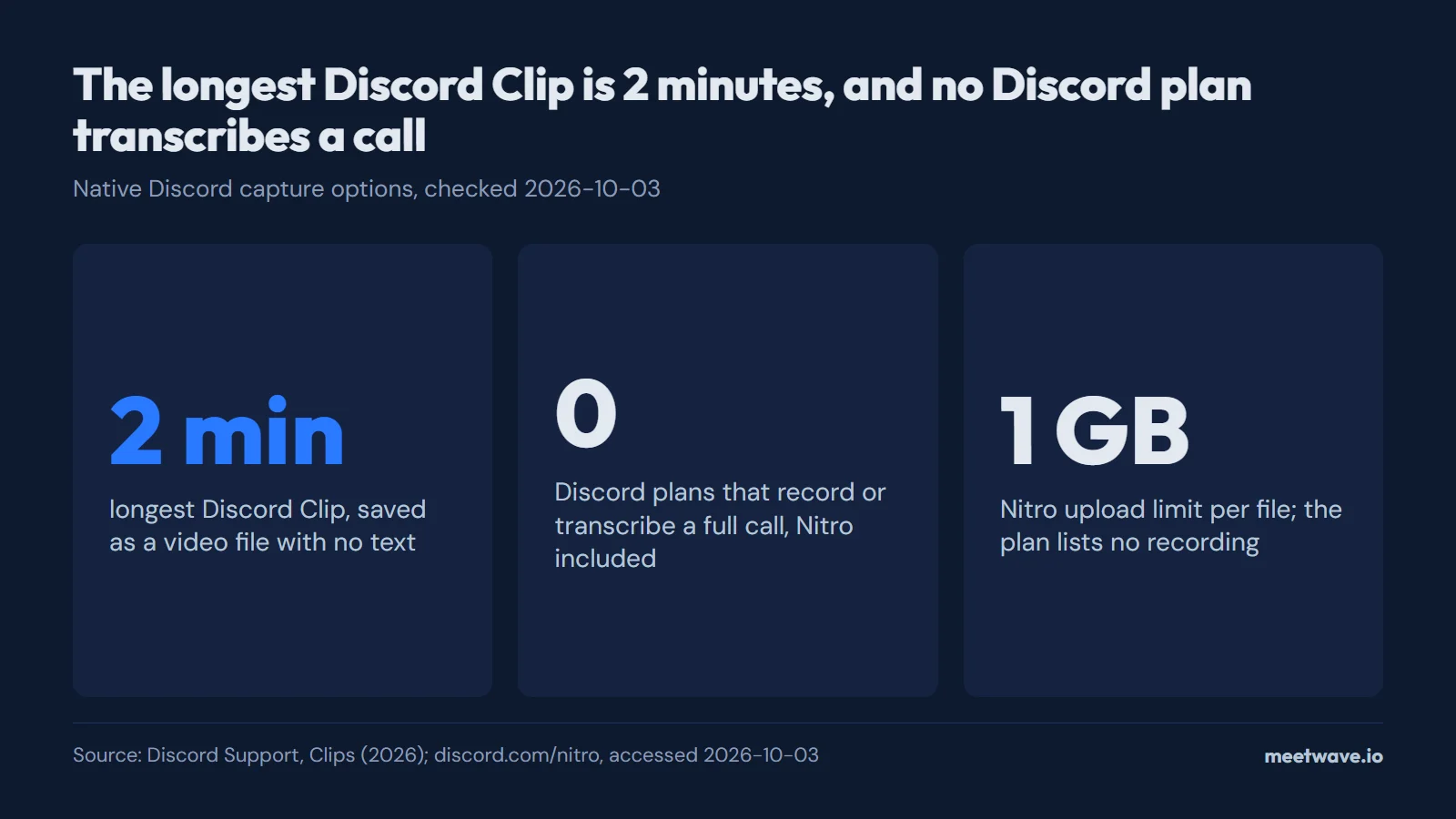
Figure 1. Discord's native capture tops out at a 2-minute Clip, and no plan, Nitro included, records or transcribes a call. Source: Discord Support, Clips (2026); discord.com/nitro, accessed 2026-10-03.
None of that documents a conversation. As Figure 1 shows, the longest clip is shorter than most single points made in a meeting, capture is retroactive and manual, and the output is a video with no text. For call documentation, Clips is not a partial solution but an unrelated one.
Record It Yourself on Windows or in Chrome
Since Discord keeps no audio, a transcript starts with a recording you make yourself. The most dependable route is on Windows: the Discord desktop app plays everyone's voices through your computer, so a recorder that captures system audio and your microphone gets both sides of the call, and nothing joins the voice channel. On a Mac, Linux or a Chromebook, open the call at discord.com in Chrome and record the browser tab instead.
On Windows (Discord desktop app):
- Start a system-audio recorder before you join the voice channel or call.
- Join the call in the Discord app as usual; the recorder captures what your speakers play plus your microphone.
- Stop the recording when the call ends, then transcribe the file. If you only have the audio file, the audio-to-text converter turns it into text.
In Chrome (discord.com, any operating system):
- Open discord.com/app in Chrome and join the voice channel there instead of in the desktop app.
- Open your recording extension's popup and start recording that tab. A tab recorder captures the tab's audio and your microphone.
- Stop the recording when you leave the call.
MeetWave covers both routes. No bot joins your calls: the Chrome extension records web calls on macOS, Windows, Linux and ChromeOS, and the Windows desktop app also captures system audio from any app. That includes the Discord desktop app. The extension can record any Chrome tab from its popup, but it detects calls on its own only on Google Meet, Teams and the Zoom web client, so on discord.com you press record yourself. On the Free plan you get the summary and action items of each call (600 minutes a month); the full transcript needs a paid plan.
Rules on recording apply to the act of recording, whatever tool you use: check the law where you and the other people are, and tell everyone on the call that you are recording. Whether AI note takers show up in the participant list covers what others can see.
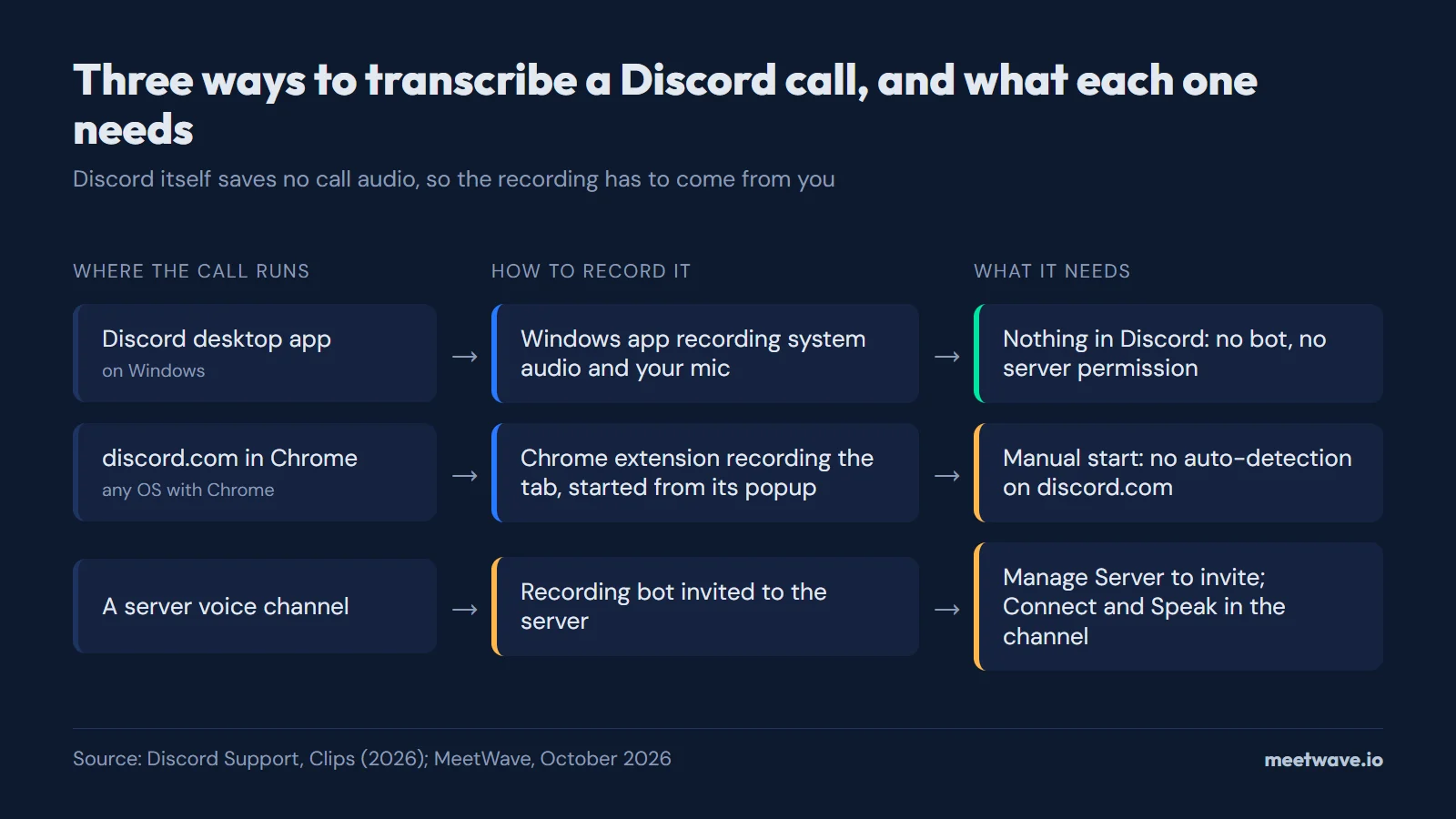 Figure 2. Three ways to record a Discord call for a transcript, and what each one needs. Source: Discord Support, Clips (2026), accessed 2026-10-03.
Figure 2 sums up the choice: the Windows route needs nothing from Discord, the Chrome route needs a manual start, and the bot route needs server permissions.
Discord Transcript Bot vs Botless Recording: Which to Pick
A Discord transcript bot joins the voice channel as a visible member and records the voice stream; botless recording captures the same conversation from your own computer, with nothing added to the channel. The bot route suits open community calls where visibility is a feature; the botless route suits work calls where a bot in the member list changes the conversation.
| Transcript bot in the channel | Botless (system audio or tab) | |
|---|---|---|
| Visible in the voice channel | Yes, listed as a member | No — nothing joins the call |
| Needs server permissions | Yes — invite the bot, grant Connect/Speak | No — no Discord permissions involved |
| Works in DMs and group calls | Usually no — most bots are server-only | Yes — it records what plays on your device |
| Who controls the recording | Whoever manages the bot; audio often passes through the bot vendor's servers | You start and stop it |
| Audio quality | Depends on the bot's capture of Discord's voice stream | What you hear is what gets recorded |
| Transcript | Varies by bot; many only record | Depends on the transcription step you pair it with |
Two caveats cut both ways. Bots announce themselves, which doubles as notice: everyone in the channel can see that recording is happening. With botless recording, telling people is on you. And a bot that records per-user audio tracks can label speakers more reliably than a single mixed capture, where speaker separation depends on the transcription step.
For work discussions on Discord, such as client calls, team syncs or interviews, botless is usually the better fit: no server admin to convince and no bot in the member list.
Related Reading
For the full picture by platform and operating system, start with how to record online meetings. For a chat-and-call platform that does have native transcription, see our guide on Slack huddle transcripts, and how to record meetings without a bot covers the system-audio approach in more detail.
FAQ
How do I transcribe a Discord call?
Record the call yourself, then transcribe the recording: Discord has no transcript feature on any plan. On Windows, record system audio and your microphone during a call in the Discord app; on any computer, join at discord.com in Chrome and record the tab; on a server, a recording bot is a third option (Discord Support — Clips).
Does Discord have a transcript feature?
No. Discord does not transcribe voice or video calls in any form, on any plan, including Nitro, whose perks page lists no recording or transcription.
Can Discord record calls?
Not in any way that captures a full conversation. Clips can save the last 30 seconds to 2 minutes of a stream as a local video file, but no feature records a call from start to finish, and there is no cloud recording.
Does Discord have live captions in voice channels?
No. A request for native captions has been on Discord's feedback forum since November 2023 without shipping. The caption options that exist are third-party bots or operating-system tools.
Do I need admin permissions to add a transcript bot to a Discord server?
You need the Manage Server permission to invite any bot, and the bot needs Connect and Speak in the voice channel. On a server you do not control, that usually closes the bot route, and recording on your own computer is the option that needs no one else's approval.
Can I record a Discord call that runs in the browser?
Yes, with a Chrome extension that records tabs: open discord.com in Chrome, join the call, and start recording the tab from the extension's popup. Discord does not offer this itself; the Windows and Chrome steps are in the "Record It Yourself" section above.
Sources
- Discord Support — Clips (2026). Accessed 2026-10-03.
- Discord — Discord Nitro (2026). Accessed 2026-10-03.
- Discord Feedback — Live Captions in Voice Channels for deaf/HoH (2023). Accessed 2026-10-03.
Still comparing tools?
See how MeetWave stacks up against the tools most teams evaluate alongside it.
- MeetWave vs FellowSee how MeetWave compares to Fellow for meeting notes and AI summaries
- MeetWave vs GranolaSee how MeetWave compares to Granola for bot-free meeting notes
- MeetWave vs TactiqSee how MeetWave compares to Tactiq for meeting transcripts
More on this: Meeting transcripts by platform







