
Best Bot-Free AI Note Takers in 2026: 12 Tools Compared by How They Record
A bot-free AI note taker records a meeting from your own device, through a desktop app or a browser extension, so no extra participant joins the call. We checked 12 such tools on 25 September 2026. Most bot-free modes run on macOS and Windows: 11 of the 12 name macOS and 9 name Windows, while 2 name Linux and 1 names ChromeOS. Fathom's bot-free mode is a Mac-only beta. Free options run from a 7-day trial on Krisp to unlimited recordings on Fathom.
Key numbers
- Of 12 bot-free AI note takers checked on 25 September 2026, 11 name macOS for their bot-free mode, 9 name Windows, 2 name Linux and 1 names ChromeOS (how we counted).
- Fathom's bot-free capture is a beta for Mac only in 2026; on Windows, Fathom records through its bot (Fathom, updated 4 September 2026).
- Tactiq's free plan includes 10 transcripts a month and Jamie's 10 AI notes a month, while Fathom's free plan has unlimited recordings (Tactiq, Jamie, Fathom, checked 2026-09-25).
- Krisp offers a 7-day free trial of its meeting notes, not an ongoing free plan (Krisp pricing, 2026).
- Of 11 list articles ranking for "bot free note taker" on 24–25 September 2026, 7 were written by a note-taker vendor, and all 7 put their own product first (how we counted).
- 1 of those 11 lists mentions Linux, and none mentions ChromeOS or Chromebooks (how we counted, 2026).
How bot-free note takers record a meeting
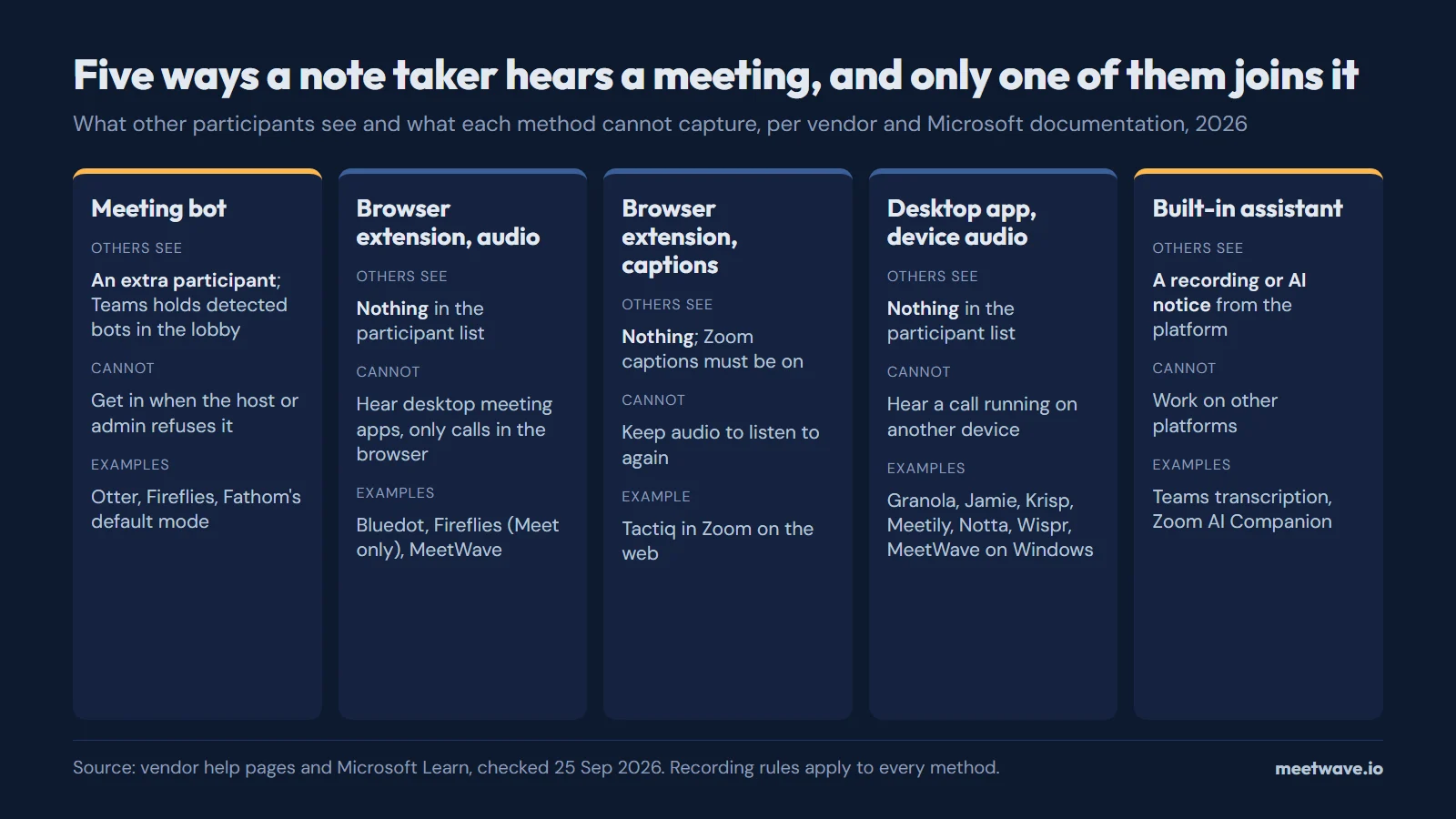
"Bot-free" covers four different mechanisms, and the one that matters is not whether a bot joins but what the tool can hear. A browser extension hears the call in its tab; a desktop app hears whatever plays on that computer; a captions reader keeps text but no audio (Tactiq Help). The three criteria for calling a tool bot-free are in our definition, and the bots themselves, by name, are in the list of AI notetaker bots.
| Method | What other participants see | Works with | Cannot | Examples (vendor's own description) |
|---|---|---|---|---|
| Meeting bot | An extra participant; Teams now holds detected bots in the lobby | Any platform the bot supports, even when you are absent | Get in when the host or the admin refuses it | Fireflies for Zoom and Teams, Fathom's default mode, Notta Bot |
| Browser extension, audio | Nothing in the participant list | Calls that run in a browser tab | Hear a desktop meeting app | Bluedot, Fireflies for Google Meet, MeetWave |
| Browser extension, captions | Nothing in the list; the platform's captions must be on | Zoom on the web | Keep audio you can play back | Tactiq in Zoom |
| Desktop app, device audio | Nothing in the list | Any app that plays sound on that computer | Hear a call on another device | Granola, Jamie, Krisp, Meetily, Notta Desktop, Wispr, Fathom's Mac beta |
| Built-in platform assistant | A recording or AI notice from the platform | Its own platform only | Work on other platforms | Teams transcription, Zoom AI Companion |
Source: vendor pages linked in the table of tools below; Microsoft Learn, Manage external bots (updated 2026-07-20). Checked 2026-09-25.
Figure 1 shows the same five methods side by side (Microsoft Learn).
Figure 1. Five capture methods and what other participants see. Source: vendor help pages and Microsoft Learn, checked 25 September 2026.
The 12 tools at a glance
The table lists the 12 tools alphabetically. Each cell links the vendor page it was read on and the date; a price is the vendor's US list price in its own currency, as its page showed it on 25 September 2026 (how we counted). Fireflies' pricing page returned no plan limits or prices on that day, so its cells say so rather than repeat an older number (Fireflies).
| Tool | How it records without a bot | OS named for the bot-free mode | Free plan | Cheapest paid plan |
|---|---|---|---|---|
| Bluedot | Chrome extension or desktop app: "Record every meeting without bots using the Bluedot desktop app"checked 25 Sep 2026 | macOS, Windows (macOS 12.3+ on Apple Silicon, Windows 10+)checked 25 Sep 2026 | 5 meetings, lifetimechecked 25 Sep 2026 | Basic $14/user/mo billed annually, audio onlychecked 25 Sep 2026 |
| Fathomvs MeetWave | Bot-free capture is Mac-only and in beta; on Windows, Fathom records through its bot todaychecked 25 Sep 2026 | macOS (beta)checked 25 Sep 2026 | Unlimited recordings and basic AI summarieschecked 24 Sep 2026 | Premium $20/mo, or $16/mo billed annuallychecked 24 Sep 2026 |
| Fellowvs MeetWave | Bot for Zoom, Teams and Google Meet, or bot-free desktop app (Mac, Windows) and iOS app that capture audio from your devicechecked 25 Sep 2026 | macOS, Windowschecked 25 Sep 2026 | 5 AI notes (lifetime), 5 AI recordings (lifetime)checked 24 Sep 2026 | Team $7/user/mo billed annually ($11/user/mo billed monthly); Business $15/user/mo billed annually ($23/user/mo billed monthly)checked 24 Sep 2026 |
| Fireflies (Chrome extension)vs MeetWave | Bot for Zoom and Teams; bot-free Chrome extension for Google Meet in Chrome onlychecked 25 Sep 2026 | None named (names Chrome, not an operating system)checked 25 Sep 2026 | Not shown: its pricing page returned no plan limits on this checkchecked 25 Sep 2026 | Not shown: its pricing page returned no prices on this checkchecked 25 Sep 2026 |
| Granolavs MeetWave | Bot-free desktop app for Mac and Windows, using your computer audio; the Chrome extension "Granola Companion" works with the desktop appchecked 25 Sep 2026 | macOS, Windows, iOS, Androidchecked 25 Sep 2026 | Basic (free): 30 days of meeting historychecked 25 Sep 2026 | Business $14/user/mo; Enterprise $35/user/mochecked 25 Sep 2026 |
| Jamievs MeetWave | Bot-free: runs on your device, no meeting bot joins the callchecked 25 Sep 2026 | macOS, Windows, iOS (iPhone)checked 25 Sep 2026 | Free: 10 notes/month, 30 min per meetingchecked 24 Sep 2026 | Plus €21/mo billed annually, 20 meetings/month, up to 2h per meeting; Pro €39/mo, unlimited meetings, up to 5h per meetingchecked 25 Sep 2026 |
| Krispvs MeetWave | Works at the audio level on your device, so no bot joins the meetingchecked 25 Sep 2026 | macOS, Windowschecked 25 Sep 2026 | Meeting AI: 7-day free trial, no ongoing free tierchecked 24 Sep 2026 | Core $8/mo billed annually ($16/mo billed monthly); Advanced $15/mo billed annually ($30/mo billed monthly)checked 24 Sep 2026 |
| Meetily | Desktop app that captures audio from your device; open source under the MIT licensechecked 25 Sep 2026 | macOS, Windows, Linux (Linux: build from source)checked 25 Sep 2026 | Community Edition: free and open sourcechecked 25 Sep 2026 | Pro $10/user/mo billed annuallychecked 25 Sep 2026 |
| MeetWave | No bot joins your calls: the Chrome extension records web calls on macOS, Windows, Linux and ChromeOS, and the Windows desktop app also captures system audio from any app. | macOS, Windows, Linux, ChromeOS (Chrome extension); Windows (desktop app) | 10h of recording analysis/month, 25 AI summaries/month | Pro $16.00/mo, or $11.00/mo billed annually (up to 5 prior meetings in memory; 20 on Pro+) |
| Nottavs MeetWave | Notta Bot for Zoom, Google Meet, Teams and Webex, or bot-free Notta Desktop on Windows 10 (1903+) and macOS 13+checked 25 Sep 2026 | macOS, Windows (macOS 13+, Windows 10 (1903+) and 11)checked 25 Sep 2026 | 120 min/month, 3 min per recordingchecked 24 Sep 2026 | Pro $8.17/mo billed annually (1,800 min/month, 5h per recording); Business $16.67/mo billed annually, unlimited (annual price only — its page did not show a verified monthly figure)checked 24 Sep 2026 |
| Tactiqvs MeetWave | Live capture via Chrome/Edge browser extension, no bot; native macOS app in beta for Zoom desktop callschecked 24 Sep 2026 | macOS (beta app for Zoom and Teams desktop; the extension names browsers only)checked 25 Sep 2026 | 10 transcripts/month, 5 AI creditschecked 24 Sep 2026 | Pro $8/user/mo billed annually; Team $16.67/user/mo; Business $29.17/user/mochecked 24 Sep 2026 |
| Wispr Flow Notetaker | Records on your device, so nothing joins the callchecked 25 Sep 2026 | macOS, Windowschecked 25 Sep 2026 | Flow Free, "with generous weekly usage"checked 25 Sep 2026 | Pro $12/user/mo billed annuallychecked 25 Sep 2026 |
Read on each vendor’s own pages; the dates show when. Prices are US list prices in the vendor’s currency, as its page shows them. An OS counts only where the vendor names it for recording without a bot. Found something out of date? Tell us.
Which operating systems each tool documents
macOS is the default: 11 of the 12 tools name it for recording without a bot, and 9 name Windows. 2 tools name Linux, one of them Meetily through a build from its source code, and 1 names ChromeOS (Meetily, how we counted). Figure 2 shows the full matrix.
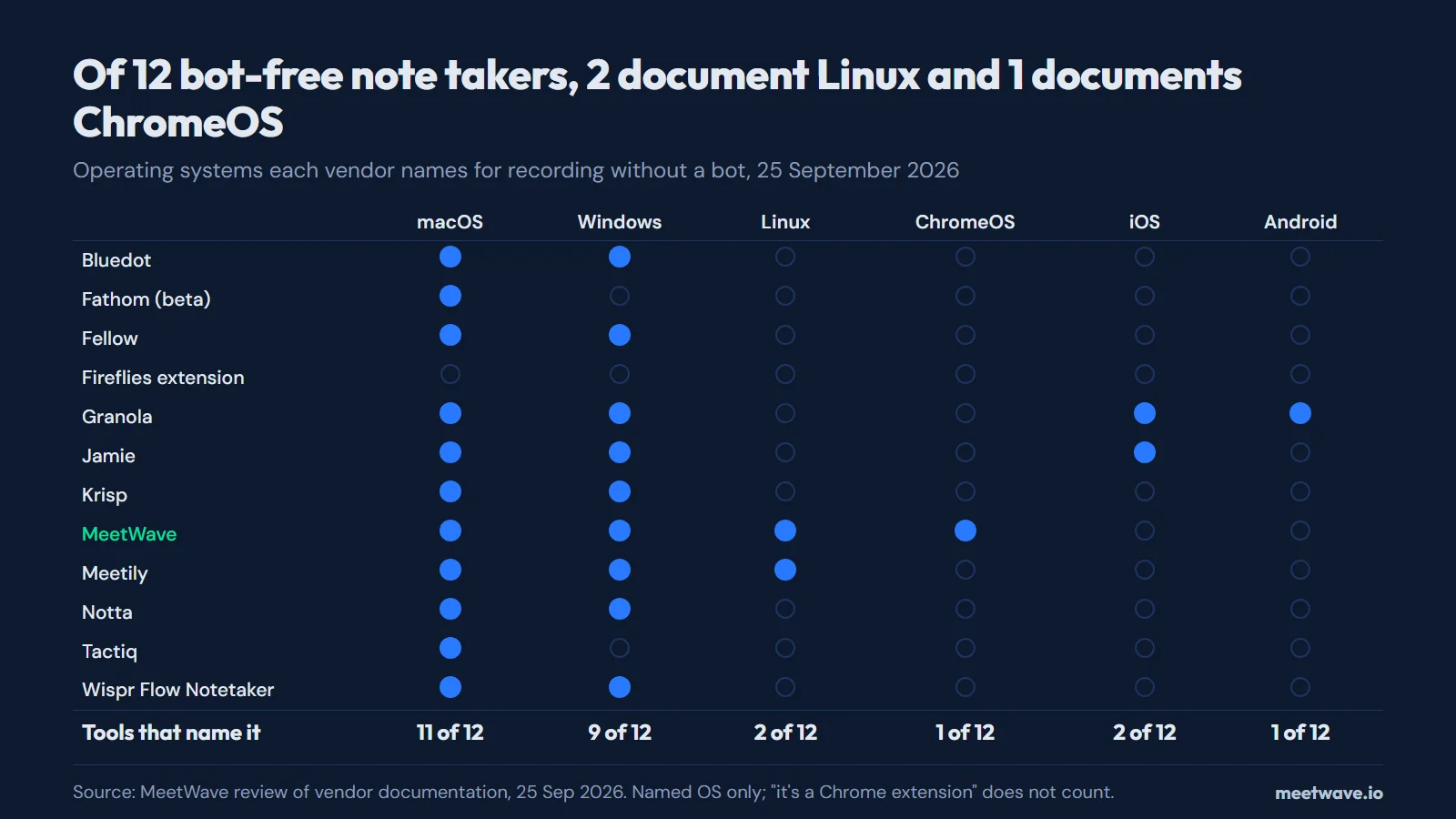 Figure 2. Operating systems each vendor names for its bot-free mode. Source: MeetWave review of vendor documentation, 25 September 2026.
A Chrome extension may well work on a Chromebook without the vendor saying so. We counted only what the vendor writes, because that is what a buyer can check (how we counted).
Each tool in one paragraph
Bluedot
Bluedot records through a Chrome extension or a desktop app, and says it records "every meeting without bots" (Bluedot). The desktop app runs on macOS 12.3 or later on Apple Silicon and on Windows 10 or later. It suits someone who wants the same tool in the browser and on the desktop. Its limits: the free plan is 5 meetings in total, and the cheapest paid plan records audio only (Bluedot pricing).
Fathom
Fathom joins calls as a bot by default, and its bot-free capture is a beta that runs only on a Mac (Fathom). On a Mac it covers Zoom, Google Meet, Microsoft Teams and Slack Huddles without a bot, and the free plan has unlimited recordings (Fathom pricing). On Windows the bot is still the way in. Comparison: Fathom side by side.
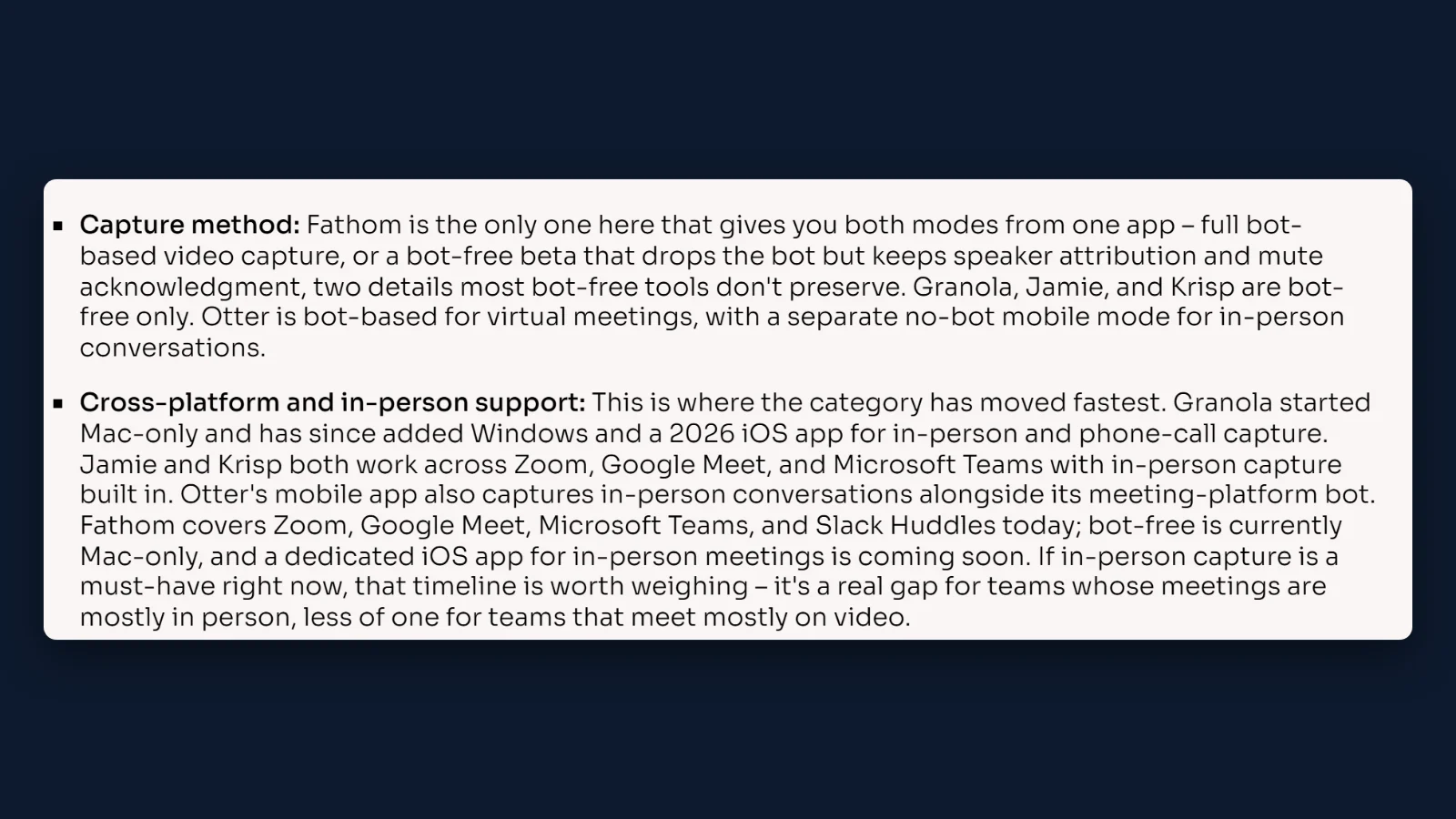 Figure 3. Fathom's own guide says its bot-free mode is currently Mac-only. Source: screenshot of Fathom, How Bot-Free AI Note Takers Work, 25 Sep 2026.
Fellow
Fellow offers both: a bot for Zoom, Teams and Google Meet, or botless recording through its desktop app on Mac and Windows (Fellow). It suits a team that wants to choose bot or no bot per meeting under one account. The free plan is 5 AI notes and 5 AI recordings per user, for life (Fellow pricing). Comparison: Fellow side by side.
Fireflies (Chrome extension)
Fireflies is a bot for Zoom and Teams; its Chrome extension records without the bot, but "only works with Google Meet in Chrome" (Fireflies guide). For Zoom or Teams, Fireflies' own answer is its Notetaker bot. It suits a Google Meet user who already has a Fireflies account. The bot's name in the participant list is in the Fireflies bot entry; comparison: Fireflies side by side.
Granola
Granola is a desktop app that "uses your computer audio, so doesn't invite a bot", and it names macOS, Windows, iOS and Android (Granola). It is one of 2 tools in this census that name 4 operating systems (how we counted). The free Basic plan keeps 30 days of meeting history (Granola pricing). Comparison: Granola side by side.
Jamie
Jamie "runs directly on your device and does not require a meeting bot", on Mac, Windows and iPhone (Jamie). Its site says storage and processing stay in the EEA, Switzerland and the UK, which matters to European teams. The free plan is 10 AI notes a month with a 30-minute limit per meeting, and paid plans are priced in euros (Jamie pricing). Comparison: Jamie side by side.
Krisp
Krisp works "at the audio level on your device", so it records any conferencing app without a bot, on Windows and macOS (Krisp). It suits people who spend the day on calls in different apps. There is no ongoing free plan for meeting notes, only a 7-day trial (Krisp pricing). Comparison: Krisp side by side.
MeetWave
MeetWave records through two surfaces: a Chrome extension that records web calls on macOS, Windows, Linux and ChromeOS, and a Windows desktop app that also captures system audio from any app. It is the one tool of the 12 that names ChromeOS (how we counted). Recordings are uploaded to your MeetWave account and transcribed on our servers; the audio, transcript and summary are stored encrypted in your account, so you can reopen them on any computer at app.meetwave.io. Want everyone on the call to know? The Chrome extension can post a recording notice in the meeting chat — one switch in its settings. Its limits: no Mac or mobile app, and outside Windows it records browser calls only, not desktop meeting apps.
Meetily
Meetily is open source under the MIT license and captures audio from your device; its site says "Your recordings and audio never leave your device" (Meetily). It ships installers for macOS and Windows, and on Linux you build it from source. It suits someone who wants the recording to stay on their own computer and can run open-source software. The Community Edition is free; Pro adds speaker identification and exports.
Notta
Notta has both a bot, Notta Bot, and Notta Desktop, which records without one: "nothing joins, no participant entry appears" (Notta). Notta Desktop needs macOS 13 or later, or Windows 10 (version 1903 or later) or Windows 11. The free plan gives 120 minutes a month, with up to 3 minutes per conversation (Notta pricing). Comparison: Notta side by side.
Tactiq
Tactiq is a Chrome and Edge extension; in Zoom on the web it captures Zoom's live captions, so Zoom's automated captions must be switched on (Tactiq Help). A macOS app in beta covers the Zoom and Teams desktop apps, and a Windows version is only being explored (Tactiq Help). The free plan is 10 transcripts and 5 AI credits a month (Tactiq pricing). Comparison: Tactiq side by side.
Wispr Flow Notetaker
Wispr's notetaker "records on your device, so nothing joins the call", on Mac and Windows; iPhone and Android are on its roadmap (Wispr). It comes from the makers of the Flow dictation app. The free tier, Flow Free, has "generous weekly usage" without a stated number. The same page tells users to "always tell everyone on the call that you're recording".
When another tool is the better pick
The right tool follows from your operating system and your meeting platform; the table above answers most cases (how we counted).
- On a Mac and want unlimited free recordings: Fathom, in its bot-free beta.
- Want the audio to stay on your own computer: Meetily, open source, with a Linux build from source.
- Need a phone app as well: Granola (iOS and Android) or Jamie (iPhone).
- Your team is in Europe and wants EEA processing: Jamie.
- Calls run in many different apps, all day: Krisp, which works at the audio level.
- Only Google Meet, in Chrome, and you already use Fireflies: the Fireflies extension.
- Mostly Zoom on the web, and text is enough: Tactiq.
- Want a bot for some meetings and none for others: Fellow or Notta.
What bot-free capture cannot do
Bot-free capture changes who is in the participant list; it does not change three things (Microsoft Learn).
- It cannot record a meeting you are not in. A bot attends as a participant and can record without you; a bot-free tool needs your device in the call. If a colleague sends you their recording, you can transcribe a recording you already made instead.
- An extension hears the browser, not desktop apps. Fireflies' extension covers Google Meet in Chrome only, and Tactiq's extension works when you join Zoom in Chrome or Edge, "not inside the Zoom Desktop app" (Tactiq Help).
- It does not replace consent. Rules on recording apply to the act of recording, not to the method; who sees what, and what that means for interviews and consent, is in do AI note takers show up in the participant list.
The mechanics per platform are in how to record meetings without a bot.
If your employer or university blocks meeting bots
Since June 2026 Teams has been rolling out bot detection that holds detected bots in the lobby, and an admin option to block them outright reaches general availability in October 2026 (Microsoft 365 roadmap 566201). A bot-free tool never joins the meeting, so a policy about joining bots does not describe it. Your organization's rules about recording still apply to it. The timeline, the admin setting and what users can do are in does Teams block AI notetaker bots.
Who writes the "best bot-free note taker" lists
Most lists you will find are written by a vendor ranking its own product. Of 11 list articles ranking for "bot free note taker" on 24–25 September 2026, 7 came from a note-taker vendor and all 7 put their own product first; 1 mentioned Linux and none mentioned ChromeOS (how we counted). Figure 4 shows the count.
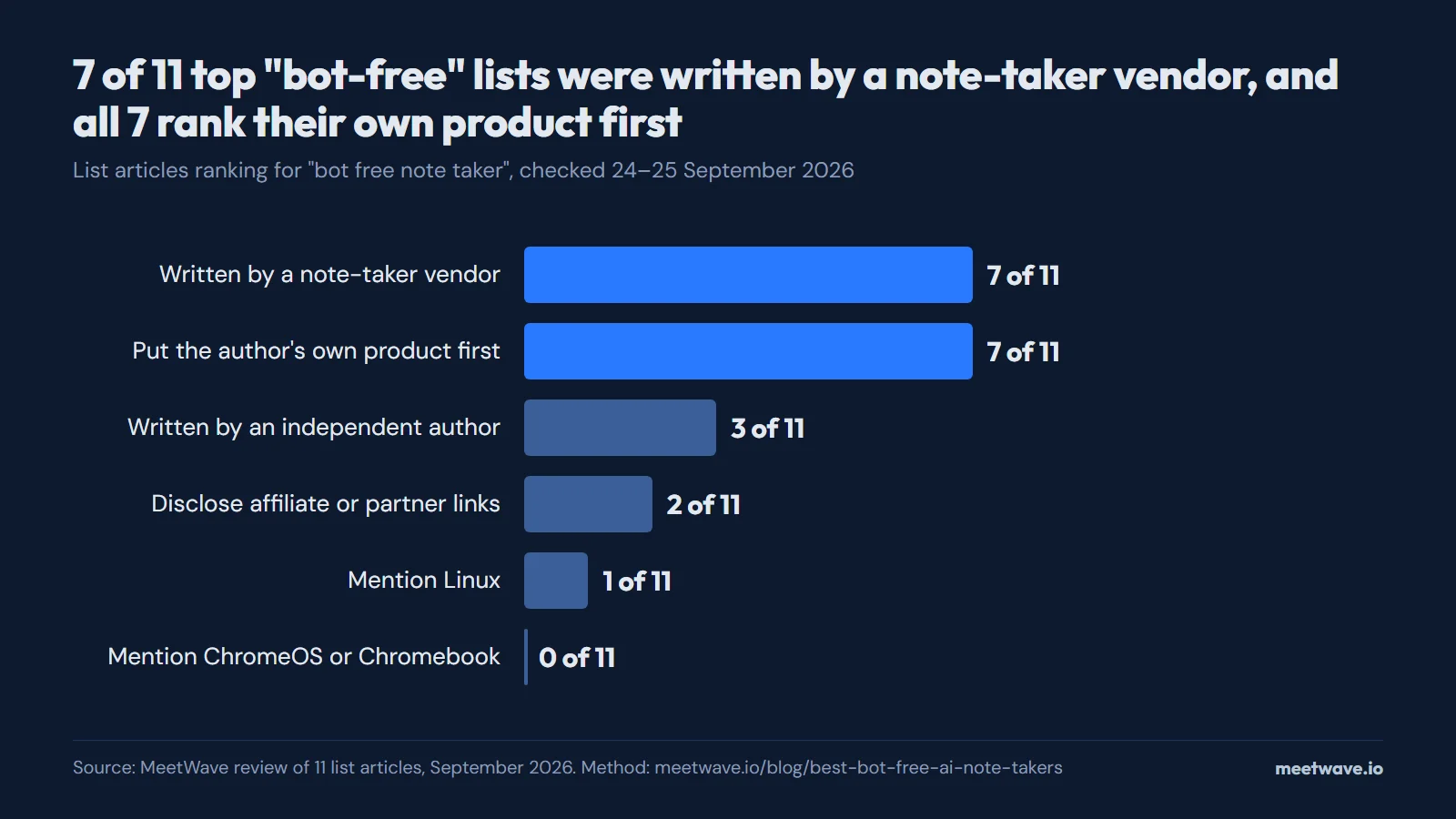 Figure 4. Who wrote the top bot-free lists, and what they left out. Source: MeetWave review of 11 list articles, 24–25 September 2026.
How we calculated
Operating systems (census A). On 25 September 2026 we opened each vendor's pricing, download, feature or help page and recorded the operating systems it names for recording without a bot. "Names" means the page says it: a Chrome extension whose page names only browsers counts for no OS. Bluedot's desktop page carries machine-readable metadata listing Linux and ChromeOS, but its text names only macOS and Windows, so we counted those two (Bluedot). This is documentation, not a hands-on test: a tool can work on an OS it does not list. We did not sign up for any competitor.
List articles (census B). We took the list articles found for "bot free note taker" on 24 September 2026 through a web search API, and the list articles on the first page of one Google search for the same phrase on 25 September 2026 (US English settings). Product pages, a Chrome Web Store listing and a Reddit thread on that page were not lists and were left out; one page from 24 September (ticnote.com) could no longer be found. For each of the remaining 11 we recorded the publisher, whether it sells a note taker, which product it lists first, whether it discloses affiliate or partner links, and whether its text contains "Linux", "ChromeOS" or "Chromebook".
| List article | Publisher sells a note taker | First in the list | Affiliate links disclosed | Linux / ChromeOS |
|---|---|---|---|---|
| HappyScribe, 5 Best Bot-Free AI Note Takers | Yes | HappyScribe | No | No / No |
| HappyScribe, …for Microsoft Teams | Yes | HappyScribe | No | Yes (for Krisp) / No |
| Fellow | Yes | Fellow | No | No / No |
| Fathom | Yes | Fathom | No | No / No |
| Krisp | Yes | Krisp | No | No / No |
| Wispr | Yes | Wispr Notetaker | No | No / No |
| tl;dv | Yes | tl;dv | No | No / No |
| The Business Dive | No | Fellow | Yes | No / No |
| Towards AI | No | Summary AI | Yes | No / No |
| Pratixa Gami on Medium | No | TwinMind | No | No / No |
| meetingnotes.com | Not stated | tl;dv | Not stated | No / No |
Source: the 11 pages linked in the table, opened 24–25 September 2026.
FAQ
Is there a free AI note taker that doesn't join the meeting?
Yes. Fathom's bot-free beta on a Mac comes with unlimited free recordings, Tactiq's free plan gives 10 transcripts a month and Jamie's 10 AI notes a month; Meetily's Community Edition is free and open source (Fathom pricing, Tactiq pricing, Jamie pricing, Meetily).
What's the best AI note taker that doesn't join the call as a bot?
It depends on your operating system and your meeting app: on a Mac most tools work, on Windows 9 of the 12 do, and on Linux or a Chromebook the list is 2 and 1 (how we counted). The shortlist by situation is in when another tool is the better pick.
Can other participants tell that a bot-free note taker is recording?
Not from the participant list: a bot-free tool adds no one to it. Telling people is up to the person recording, and the rules are in do AI note takers show up in the participant list.
What if my employer or university blocks meeting bots?
A bot policy covers participants that join the meeting, and a bot-free tool does not join; your organization's rules on recording still cover it. What Teams changed in 2026 is in does Teams block AI notetaker bots.
Do bot-free note takers work on Linux or a Chromebook?
Rarely by the vendor's own account: of 12 tools checked on 25 September 2026, 2 name Linux and 1 names ChromeOS, and Figure 2 shows which (how we counted). Meetily's Linux version is built from source (Meetily).
Can a bot-free tool record a meeting I'm not attending?
No. A bot attends as a participant and can record when you are absent; bot-free capture needs your device in the call (Fathom).
Sources
- Fathom — How Bot-Free AI Note Takers Work (2026). Accessed 2026-09-25.
- Fathom — Pricing (2026). Accessed 2026-09-25.
- Bluedot — Desktop app and Pricing (2026). Accessed 2026-09-25.
- Fellow — Botless recording and Pricing (2026). Accessed 2026-09-25.
- Fireflies — Learn about the Fireflies Chrome extension (2026). Accessed 2026-09-25.
- Granola — Home and Pricing (2026). Accessed 2026-09-25.
- Jamie — Home and Pricing (2026). Accessed 2026-09-25.
- Krisp — AI meeting assistant and Pricing (2026). Accessed 2026-09-25.
- Meetily — Home (2026). Accessed 2026-09-25.
- Notta — Bot-free recording and Pricing (2026). Accessed 2026-09-25.
- Tactiq — How to use Tactiq with Zoom, Tactiq Mac app and Pricing (2026). Accessed 2026-09-25.
- Wispr — The 5 best bot-free AI notetakers in 2026 (2026). Accessed 2026-09-25.
- Microsoft Learn — Manage external bots and their access to meetings (2026). Accessed 2026-09-25.
- Microsoft 365 roadmap — Block all identified external bots automatically from joining your meetings, ID 566201 (2026). Accessed 2026-09-25.
Comparing note-takers? Test the one without a bot.
Free plan: 600 minutes a month. No card.
Still comparing tools?
See how MeetWave stacks up against the tools most teams evaluate alongside it.
- MeetWave vs Fireflies.aiSee how MeetWave compares to Fireflies.ai for meeting intelligence
- MeetWave vs tl;dvSee how MeetWave compares to tl;dv for meeting intelligence
- MeetWave vs FathomFree AI meeting assistant and note taker focused on sales teams