
Teams Now Sends AI Notetaker Bots to the Lobby: What Changed in 2026 and How Admins Can Block Them
Microsoft Teams does not block AI notetaker bots by default. Since June 2026 it has been rolling out bot detection that holds detected external bots in the lobby until the organizer admits them, even when everyone else joins without waiting. A separate policy that turns detected bots away outright (Microsoft 365 roadmap ID 566201, message MC1459141) reaches general availability in October 2026 and stays off until an admin enables it.
Key numbers
- Teams detects external meeting bots and holds them in the lobby by default; the policy value is RequireApprovalWhenDetected (Microsoft Learn, Set-CsTeamsMeetingPolicy, updated 2026-09-04).
- Microsoft announced bot detection on 13 March 2026 in MC1251206; general availability runs from early June to the end of October 2026 (Message Center archive, updated 2026-09-22).
- The option to block detected bots outright, roadmap ID 566201 and message MC1459141, is off by default and reaches general availability in October 2026 (Microsoft 365 roadmap, Message Center archive, updated 2026-09-09).
- The University of Minnesota blocked unlicensed third-party AI apps, naming Fireflies.ai, Otter.ai and Read.ai, from joining university Zoom meetings from 26 February 2026 (IT@UMN, 2026).
- At least 5 of the 18 Big Ten universities publish IT guidance that blocks (1) or does not approve (4) third-party AI notetakers in university meetings (MeetWave review, September 2026; how we counted).
What Teams does with meeting bots in 2026
Two different changes arrived in 2026, and only the second one blocks anything. Detection is on by default and sends bots to the lobby; blocking is an admin setting that is off until someone turns it on (Message Center archive, MC1459141). Microsoft published them in three messages and one documentation page.
| Date | Microsoft message | What it does | Default and timing |
|---|---|---|---|
| 13 Mar 2026 | MC1251206, roadmap 558107: "Identify external bots joining your Teams meetings" | Detects external bots, marks them and holds them in the lobby; the organizer admits or denies them | "enabled by default for all tenants"; general availability early June to end of October 2026 (updated 22 Sep 2026) |
| 22 Jun 2026 | Roadmap 566201: "Block all identified external bots automatically from joining your meetings" | Adds "the option to automatically block all identified bots" | Rolling out, rollout start September 2026 (last modified 1 Sep 2026) |
| 26 Jun 2026 | Microsoft Learn: Teams Bot Identification Program | Registered bot vendors add a self-identification marker to their join requests | Public preview, at its current capacity (updated 26 Aug 2026) |
| 21 Aug 2026 | MC1459141: "Admin policy to automatically block identified external meeting bots from joining meetings" | Detected bots are turned away instead of waiting in the lobby | "Off. No changes occur unless an administrator enables the policy." Targeted release mid to late September, general availability early to late October 2026 (updated 9 Sep 2026) |
Source: MC1251206, Microsoft 365 roadmap 566201, MC1459141 (Message Center archive at mc.merill.net; the admin center copy needs a sign-in), Microsoft Learn, Teams Bot Identification Program. Checked 2026-09-25.
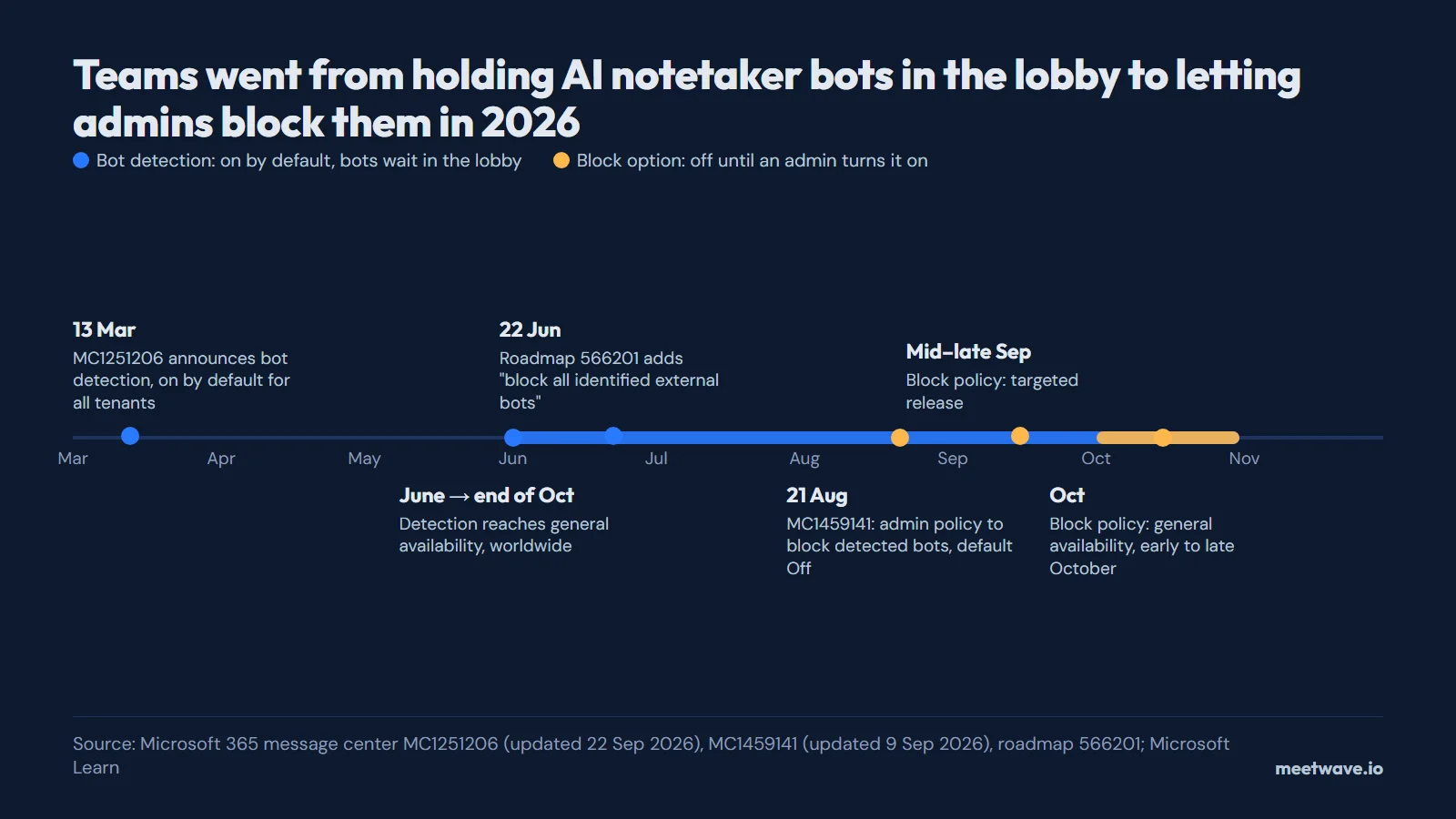
The dates moved twice. MC1459141 first planned the block for August and was pushed to October, and MC1251206 stretched detection to the end of October, so a news story that says Teams "automatically" blocks bots "in August" is wrong on both words (Message Center archive). Figure 1 puts the four entries on one line.
Figure 1. Detection first, an opt-in block second. Source: Microsoft 365 message center MC1251206 and MC1459141, roadmap 566201, Microsoft Learn, 2026.
The roadmap entry still lists September as its rollout start, as Figure 2 shows; the later message MC1459141 moved general availability to October (Microsoft 365 roadmap).
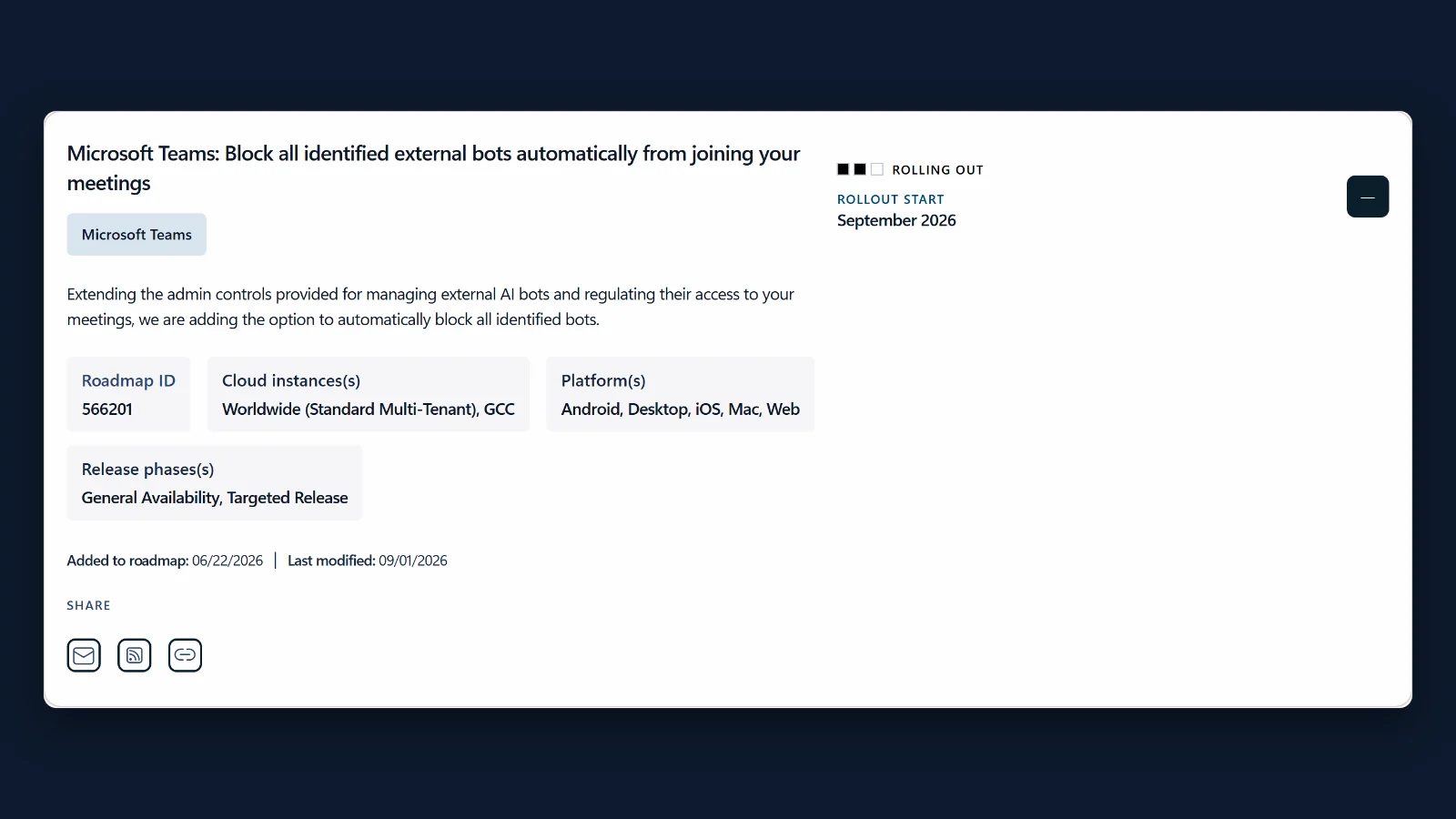 Figure 2. The roadmap card for the block option. Source: screenshot of Microsoft 365 roadmap, ID 566201, 25 Sep 2026.
How bot detection works
Teams identifies bots while they join, using "a combination of infrastructural and behavioral signals", and places them in the lobby "irrespective of the lobby configuration for the meeting" (Microsoft Learn, updated 2026-07-20). The organizer, or a presenter if the meeting allows it, has to admit each one explicitly and is warned about the risk first. Microsoft names two limits of its own: "Some external bots may not be detected", and detection "may occasionally misclassify human participants as bots". A person wrongly held can be admitted and marked "This is not a bot".
Microsoft also runs a Teams Bot Identification Program for vendors that build meeting bots. A registered vendor adds a self-identification marker to its join requests so Teams can recognise the bot as a registered participant; the public preview "has reached its current bot provider capacity" (Microsoft Learn, updated 2026-08-26). Microsoft's pages do not list which vendors are in it.
For admins: how to block AI notetaker bots in Teams
Today an admin can choose between two values; the block option is the third, arriving with MC1459141 (Microsoft Learn).
- Open the Teams admin center, then Meetings → Meeting policies, and pick the org-wide default or a custom policy.
- In Meeting join & lobby, find Manage external bots and their access to meetings.
- Keep When detected, require approval before joining (the default), or choose Do not detect bots to switch detection off.
- When your tenant receives MC1459141, the same setting gains an option that blocks identified bots; Microsoft's documentation had not named its PowerShell value on 25 September 2026 (Message Center archive).
- Let only organizers and co-organizers admit people from the lobby, so a presenter cannot let a bot in by mistake (Microsoft Learn).
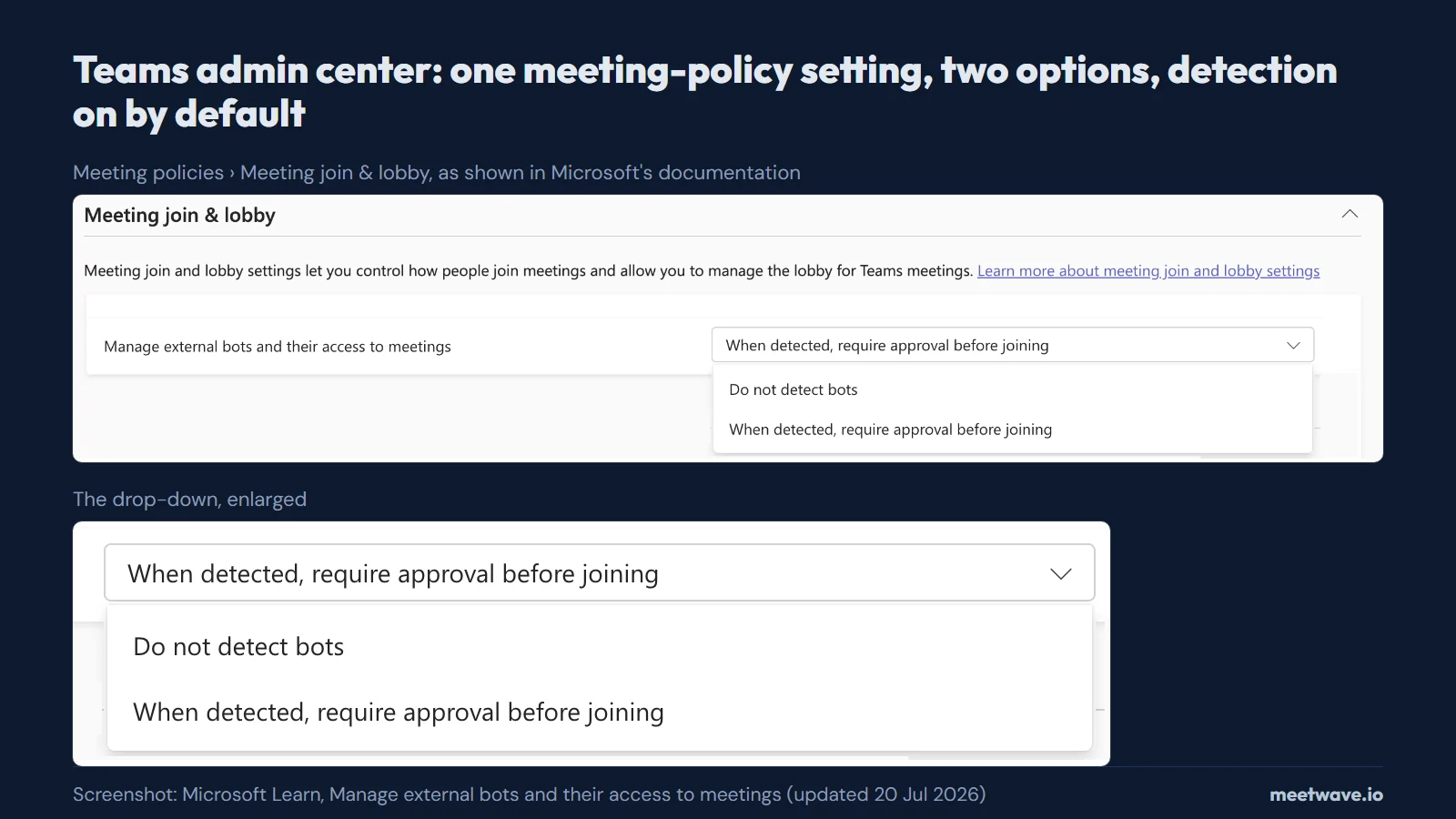 Figure 3. The bot setting in a Teams meeting policy, as Microsoft documents it. Source: screenshot from Microsoft Learn, Manage external bots, 25 Sep 2026.
In PowerShell the parameter is ExternalBotAccessMode on the meeting policy, with the values AllowAllBots and RequireApprovalWhenDetected (Set-CsTeamsMeetingPolicy, updated 2026-09-04):
Set-CsTeamsMeetingPolicy -Identity Global -ExternalBotAccessMode RequireApprovalWhenDetected
Microsoft's own how-to page shows the events-policy cmdlet, Set-CsTeamsEventsPolicy, in its examples and calls the first value AllowBots; the parameter and the value AllowAllBots are documented on the meeting policy (Microsoft Learn). The setting applies to meetings organized by users under that policy, not to meetings they join in other organizations.
For users: your notetaker bot is stuck in the lobby or refused
A bot waiting in the lobby is Teams working as configured, not a fault in your note taker (Microsoft Learn).
- Ask the organizer to admit it. Detected bots wait until someone with admit rights lets them in, whatever the lobby setting.
- If your organization blocks bots, ask IT what is allowed. Do not try to disguise a bot as a person; ask which recording or note-taking tools are approved.
- Use the transcript Teams already makes, if your policy allows it. Built-in transcription is controlled by your admin's policies; who can start it and download it is in how to get a Teams meeting transcript.
- Clean up the file afterwards. Drop a Teams .docx or .vtt transcript into the converter below, or convert a Teams transcript to clean text on its own page, and you get plain text with speaker names.
Bot-free recorders and bot policies
Microsoft's policy manages external bots "when they attempt to join meetings" (Microsoft Learn). A recorder that runs on your own device does not join the meeting, so this policy does not describe it; your organization's rules on recording, and the law on consent where you and the others are, still apply. MeetWave, for example, records from your own computer and never joins the meeting. Want everyone on the call to know? The Chrome extension can post a recording notice in the meeting chat — one switch in its settings. A comparison of 12 such tools, by operating system and free plan, is in the best bot-free AI note takers.
Universities blocked notetaker bots first
Universities acted before the platforms did. UC Riverside blocked "Spinach AI, Read AI, and Fireflies AI" from meetings hosted by university Zoom accounts from 10 October 2025, leaving Zoom AI Companion as its only approved AI tool for Zoom meetings (UCR ITS, 29 September 2025). Figure 4 shows the notice.
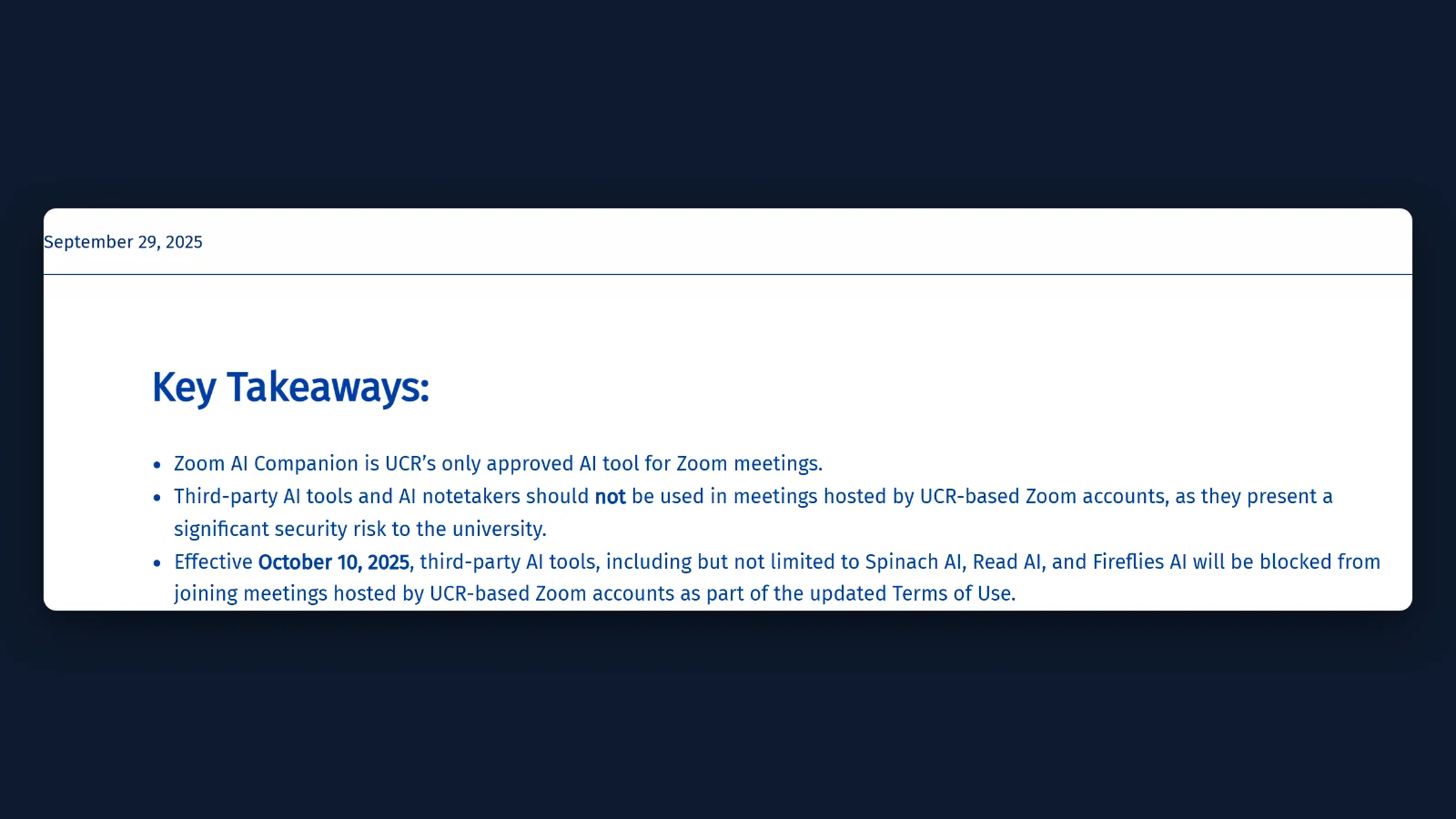 Figure 4. UC Riverside's key takeaways on AI notetakers in Zoom. Source: screenshot of UCR Information Technology Solutions, 25 Sep 2026.
Blocking by hand is hard, which is why the platforms added their own setting. UW–Madison wrote in 2025 that it had "limited admin tools to sustainably block bots from joining UW-Madison Zoom meetings", and that an account-wide setting was "not consistently blocking" newer bots (UW–Madison KB 149383, updated 2025-04-09). The University of Minnesota switched its block on in Zoom and Google Workspace on 26 February 2026 (IT@UMN).
Across the 18 Big Ten universities, we found public guidance on third-party AI notetakers at 8, and 5 of those block or do not approve them (how we counted). Figure 5 shows the split.
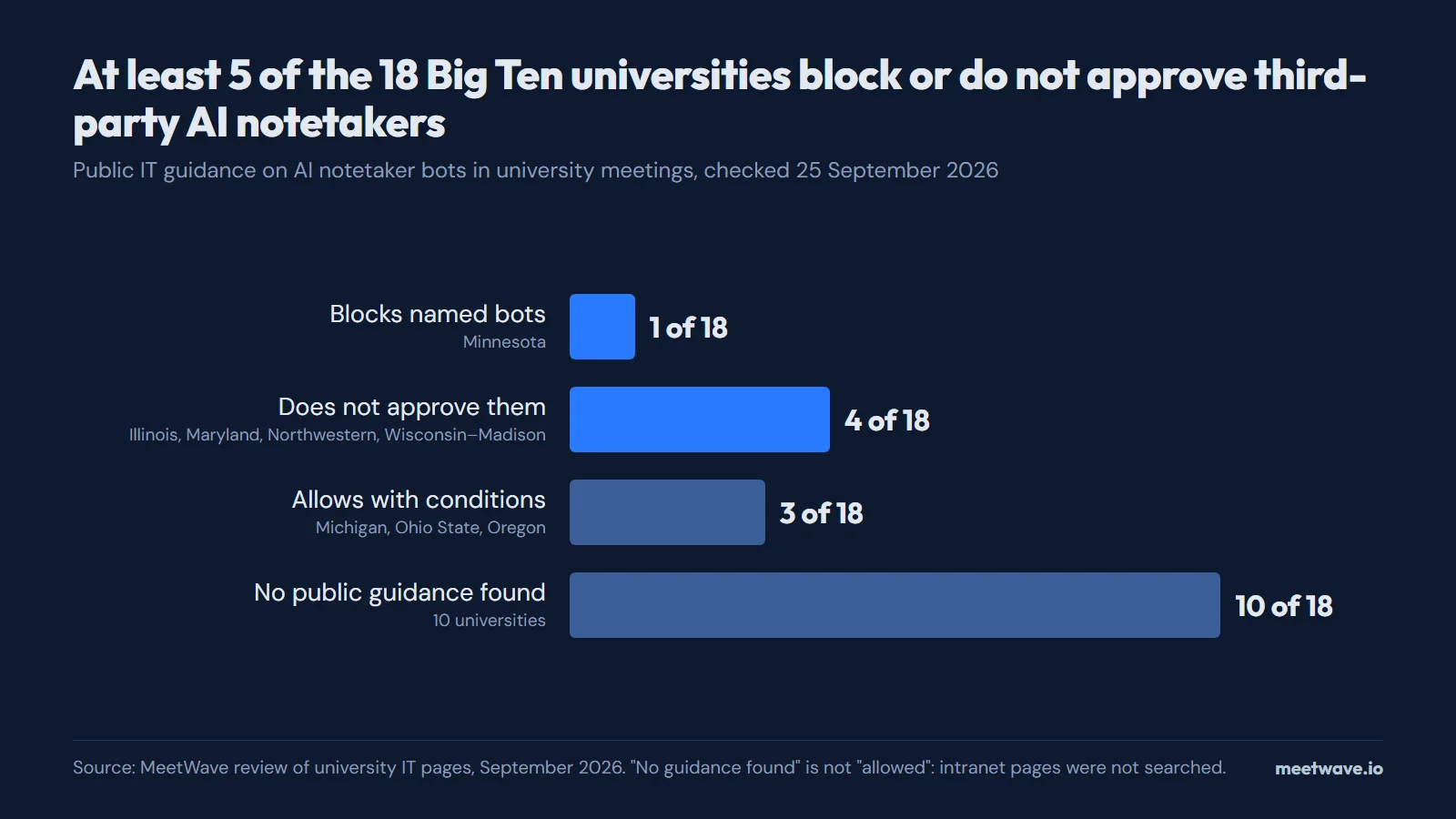 Figure 5. Big Ten IT guidance on third-party AI notetakers. Source: MeetWave review of university IT pages, 25 September 2026.
| University | What its IT page says | Class | Page date |
|---|---|---|---|
| Minnesota | Blocks unlicensed third-party AI apps, naming Fireflies.ai, Otter.ai and Read.ai, from joining UMN Zoom meetings | Blocks | 28 Jan 2026 |
| Illinois | Such tools "should not be used in Illinois calls or meetings unless they are being provided by Illinois" | Not approved | Updated 8 Apr 2026 |
| Maryland | Otter.ai, Fireflies.ai and read.ai "should never be used in Zoom meetings discussing UMD business" | Not approved | 27 Mar 2024 |
| Northwestern | Lists "Third-party AI Tools/Bots, that should not be used", Fireflies.ai among them | Not approved | Not shown |
| Wisconsin–Madison | Zoom's own assistant "is the only UW–Madison approved bot for use within Zoom" | Not approved | Updated 28 Aug 2026 |
| Michigan | Hosts "can decide whether to keep any third-party bots that join" | With conditions | Not shown |
| Ohio State | Warns about Otter.ai so staff "can make an informed decision" and points to approved tools | With conditions | 22 Aug 2025 |
| Oregon | Lists Otter.ai among AI services, for low-risk data only | With conditions | Not shown |
Source: the university pages linked in the table, opened 25 September 2026. The other 10 are listed under How we calculated.
How we calculated
Microsoft timeline. On 25 September 2026 we opened Microsoft Learn's pages on managing external bots and on the Bot Identification Program, the Set-CsTeamsMeetingPolicy reference, the Microsoft 365 roadmap entry 566201, and the message center posts MC1251206 and MC1459141 in the public archive at mc.merill.net, and took each date and default from those pages. Where two pages disagree, the table shows both and says which is newer.
Big Ten census. The sample is the 18 members of the Big Ten Conference in September 2026, a fixed public list not chosen for the result (Big Ten Conference). For each university we searched its IT and security sites for AI notetakers, Otter.ai, Read.ai and meeting bots, read the most relevant public page, and put it in one class: blocks (a technical block of named bots), not approved (told not to use them, no block described), allowed with conditions, or no guidance found. "Blocks + not approved" gives the 5. For Indiana, Iowa, Michigan State, Nebraska, Penn State, Purdue, Rutgers, UCLA, USC and Washington we found no public page on third-party notetakers; some of their knowledge bases need a sign-in or would not load, so "no guidance found" does not mean "allowed". UW–Madison disables other bots only on its HIPAA Zoom instance, so it is counted as not approved rather than blocks. One US athletic conference is not all universities.
FAQ
Does Microsoft Teams block Otter, Fireflies or Read.ai?
Not by name. Teams detects external bots by their signals and holds them in the lobby by default; it refuses them only if an admin turns on the block option from MC1459141 (Microsoft Learn, Message Center archive).
How do I stop AI notetaker bots from joining my Teams meetings?
As an organizer, leave detected bots in the lobby and let only organizers and co-organizers admit people. As an admin, keep When detected, require approval before joining in the meeting policy, and enable the block option once it reaches your tenant (Microsoft Learn).
Why is my AI notetaker stuck in the Teams lobby?
Because the default policy, RequireApprovalWhenDetected, keeps detected bots in the lobby until someone admits them, even in meetings where people join without waiting in the lobby (Set-CsTeamsMeetingPolicy).
Does the Teams bot policy apply to people outside my organization?
It applies to meetings hosted in your organization, whoever sends the bot. In a meeting another organization hosts, that organization's policy decides (Microsoft Learn).
Can I still record a Teams meeting if my company blocks bots?
Usually with Teams' own recording and transcription, if your policies allow them (Microsoft Support). Recording from your own device is a question for your company's recording rules and the people in the call; the tools that do it are compared in the best bot-free AI note takers.
Sources
- Microsoft Learn — Manage external bots and their access to meetings hosted in your organization (2026). Accessed 2026-09-25.
- Microsoft Learn — Set-CsTeamsMeetingPolicy (2026). Accessed 2026-09-25.
- Microsoft Learn — Teams Bot Identification Program (2026). Accessed 2026-09-25.
- Microsoft 365 roadmap — Block all identified external bots automatically from joining your meetings, ID 566201 (2026). Accessed 2026-09-25.
- Message Center archive — MC1251206, Identify external bots joining your Teams meetings (2026). Accessed 2026-09-25.
- Message Center archive — MC1459141, Admin policy to automatically block identified external meeting bots (2026). Accessed 2026-09-25.
- Microsoft Support — Start, stop, and download live transcripts in Microsoft Teams meetings (2026). Accessed 2026-09-25.
- UC Riverside ITS — Updates to UCR's Zoom Meeting & Webinar Terms of Use (2025). Accessed 2026-09-25.
- UW–Madison KB — UW-Madison Zoom: Third-party AI Assistant Bots (2025). Accessed 2026-09-25.
- UW–Madison KB — Managing third-party meeting bots (2026). Accessed 2026-09-25.
- IT@UMN — Upcoming change to third-party AI app access (2026). Accessed 2026-09-25.
- University of Illinois — Answers article 137806 (2026). Accessed 2026-09-25.
- University of Maryland DIT — Artificial Intelligence (AI) Note-Taking Services in Zoom (2024). Accessed 2026-09-25.
Got the file. Next call, get the notes too.
Free plan: 600 minutes a month. No card.
Still comparing tools?
See how MeetWave stacks up against the tools most teams evaluate alongside it.
- MeetWave vs Otter AISee how MeetWave compares to Otter AI for meeting intelligence
- MeetWave vs Fireflies.aiSee how MeetWave compares to Fireflies.ai for meeting intelligence
- MeetWave vs tl;dvSee how MeetWave compares to tl;dv for meeting intelligence