Best Note Taker for Microsoft Teams in 2026
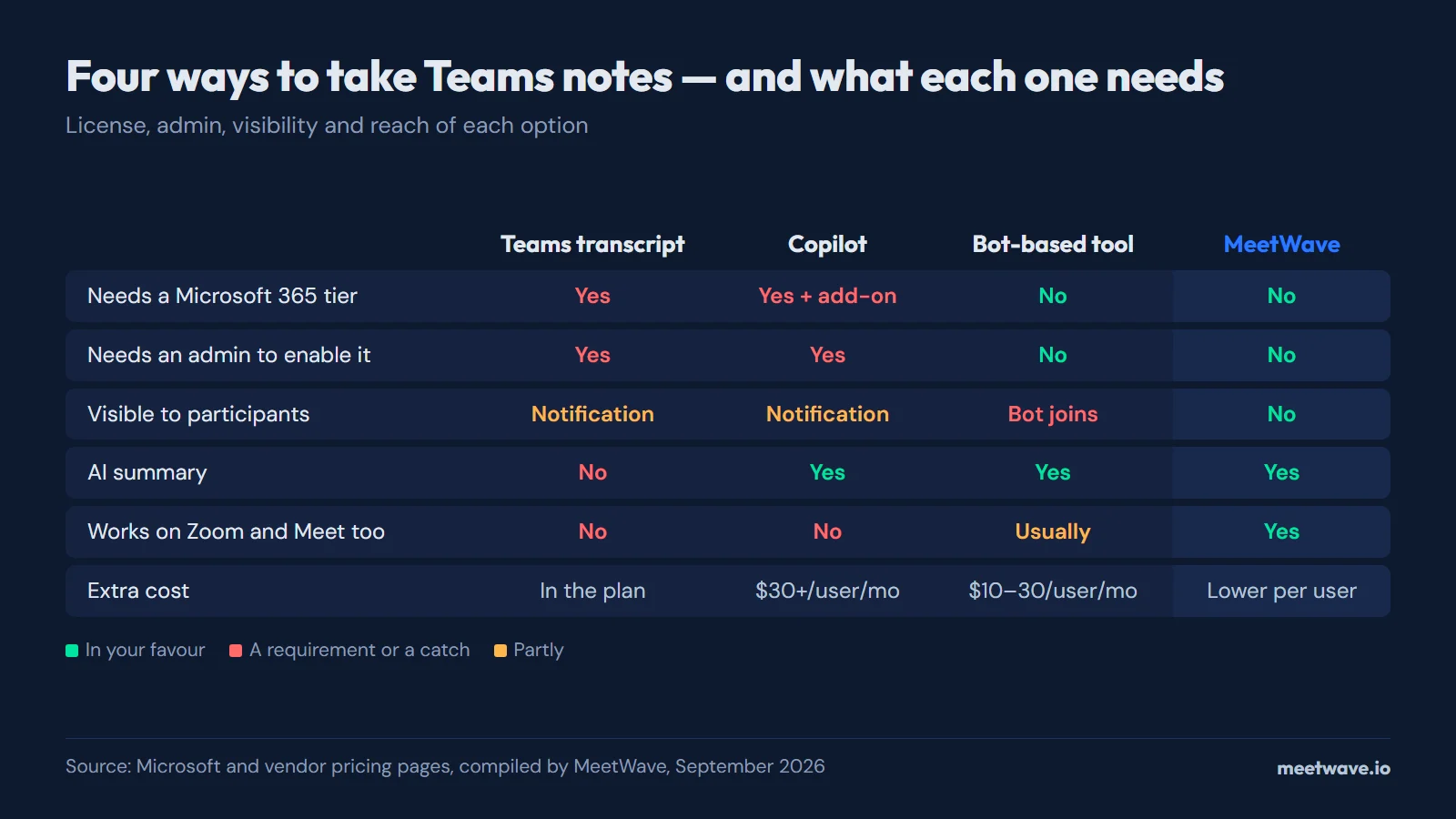
The best note taker for Microsoft Teams depends on your license: native transcription (included from Teams Essentials up) gives a raw text log, Microsoft Copilot adds real summaries for about $30 per user per month, and third-party bots work on any plan but join visibly. Recording the call yourself — a Chrome extension for Teams in the browser, or a Windows desktop app for the Teams client — works on any license, puts nothing extra in the participant list, and returns a structured summary instead of a transcript.
How to Take Teams Notes Without a Bot Joining
- Add the MeetWave Chrome extension. It records Teams meetings inside the browser tab and works on any OS with Chrome — one click, no installer. If you use the Teams desktop client, install the Windows desktop app instead.
- Grant microphone and system audio permissions. These are operating-system or browser permissions — Teams never sees them.
- Select your Teams microphone. In MeetWave's settings, pick the same input you use for Teams calls.
- Join your Teams meeting normally. MeetWave runs quietly in the system tray — no bot, no notification.
- Click Record in MeetWave. Start it at the beginning of the call.
- Stop recording when the meeting ends. Processing begins immediately.
- Review the structured summary. Pull out decisions and action items within a few minutes.
Most people searching for a Teams note taker want the same thing: walk out of a meeting with a clear record of what was decided, what was committed to, and what needs to happen next. Whether native Teams features, Microsoft Copilot, or a third-party tool actually delivers that depends on your Microsoft 365 license, your IT admin's settings, and how you define "useful output." This guide breaks down each option honestly.
How Microsoft Teams Transcription Works
Microsoft Teams transcription is started manually during a meeting — select More actions (…) → Record and transcribe → Start transcription — and it only works when the meeting organizer has a qualifying Microsoft 365 license and a Teams admin has enabled transcription in the meeting policy. Every participant sees a "Transcription has started" banner the moment it begins.
Transcripts are included from Teams Essentials up — see which Microsoft 365 plans include Teams transcription. A greyed-out button is usually a policy or role problem rather than a license one: transcription must be allowed for both the organizer and the person starting it, under Meetings → Meeting policies → Transcription in the Teams admin center.
You can also get a transcript as a by-product of recording: starting a meeting recording with transcription enabled produces both the video and the transcript together.
Where the Teams Transcript File Lands After the Meeting
After the meeting the transcript sits in the meeting chat under Recap, and the file lives in the organizer's OneDrive. Only the organizer and co-organizers can download it by default — the details are in who can download a Teams transcript.
How to Transcribe a Teams Meeting Without a License or Admin Rights
If the Start transcription option is missing or greyed out, you cannot fix it from inside the meeting — the gate is the organizer's license and the tenant's admin policy. You have three realistic options: ask a licensed organizer to start it, turn on live captions (visible to you only, never saved), or record the audio yourself at the system level.
The third option is the only one entirely in your control. A system-audio recorder captures the sound your computer plays during the call, independent of Teams: no license check, no admin policy, no notification banner. MeetWave does this through its Chrome extension if you join Teams meetings in the browser, or through its Windows desktop app if you use the Teams desktop client — the extension records the call inside the browser tab and works on any OS with Chrome. The audio is then transcribed locally and turned into a structured summary. The full comparison against Teams' native output is in our Teams meeting transcript guide.
What Microsoft Teams Offers Natively
Teams has built-in meeting notes and transcription, but they are separate features gated by different license tiers.
Teams Meeting Notes
Teams includes a built-in "Meeting notes" feature accessible from the meeting controls. During a call, participants can open a shared notes panel and type directly into it. The notes persist after the meeting and are accessible from the chat tab.
The limitation is that these are manual notes. Someone still has to type them. The feature solves the "where do notes live" problem but not the "who writes them" problem.
Teams Transcription
Teams can automatically transcribe meeting audio. The transcript appears in real time alongside the meeting and saves to a .docx or .vtt file after the meeting ends.
Requirements:
- Microsoft 365 Business Standard, Business Premium, or any Enterprise E-series plan
- Transcription must be enabled by your Teams admin in the Microsoft Teams admin center
- The meeting must be organized by someone with a qualifying license
When all those conditions are met, any meeting participant can start transcription from the meeting controls by selecting More then Start transcription. All participants see a visible notification that transcription is active.
The transcript output is a raw text log with speaker labels and timestamps, delivered to the meeting chat and the Recap tab and downloadable as .docx or .vtt (see the file-location section above). It is not structured into summaries, action items, or decisions. That is still manual work after the meeting.
Microsoft Copilot in Teams
Microsoft 365 Copilot (included in Microsoft 365 Copilot add-on plans, around $30/user/month in 2026) adds AI-generated meeting summaries to Teams. After a meeting, Copilot can produce:
- A meeting recap with key discussion points
- A list of action items and who owns them
- A brief summary suitable for sharing with stakeholders who missed the call
Copilot in Teams is the most capable native option. But it has real limits:
License cost. Copilot is a paid add-on on top of existing Microsoft 365 licenses. For individuals or small teams, the cost is significant.
Admin enablement required. Your IT admin must enable Copilot and configure which meeting types are covered. In many organizations this has not been rolled out universally.
Microsoft cloud dependency. All audio is processed on Microsoft's servers. For meetings covering legal strategy, personnel matters, or competitive intelligence, some organizations have data governance concerns with cloud-processed audio.
Generic output. Copilot's summaries are useful but not role-specific. A sales call recap, a job interview summary, and a project standup all get similar treatment. There is no way to configure Copilot to extract objections and deal signals from a sales call specifically.
Teams-only. Copilot works for Teams meetings. If your week includes Zoom calls with a client, Google Meet calls with a contractor, and Teams calls internally, Copilot only covers one of those. For the Zoom calls, you're back to tracking down Zoom's own transcript after the meeting.
Third-Party Bot-Based Note Takers for Teams
Tools like Otter.ai, Fireflies, tl;dv, and Fathom join your Teams meeting as a visible bot participant in bot mode. They record and transcribe in real time and typically deliver a summary within minutes of the meeting ending. Most now also record without a bot in some setups — Otter and tl;dv through desktop apps, Fathom in a Mac-only beta — while Fireflies' bot-free extension covers Google Meet only. Teams holds the external bots it detects in the lobby until someone admits them, and from October 2026 admins can block them outright (does Teams block AI notetaker bots); the list of AI notetaker bots shows what each is called.
These tools work well for teams that want live transcripts, CRM integration, or shared team access to recordings. They are visible to all participants, and all audio is uploaded to the tool's cloud servers.
For a detailed comparison of this category across platforms, see best AI meeting notes tools.
The Privacy-First Alternative: Local Recording Without a Bot
There is a third approach that most comparisons skip: capturing system audio directly on your device, without any bot joining the meeting.
MeetWave records both your microphone and the audio coming through your speakers — via the MeetWave Chrome extension, which records web calls in the browser tab and works on any OS with Chrome, or via the Windows desktop app. It works identically whether the meeting is on Microsoft Teams, Zoom, Google Meet, or any other platform. Because it captures audio at the system or browser level, Teams has no visibility into it. No recording notification fires in Teams. No bot appears in the participant list.
After the meeting:
- Audio is transcribed automatically, with speaker labels.
- You choose a role-specific summary format: sales call, consulting session, job interview, team standup, or executive brief.
- The structured summary appears in MeetWave's meeting notes output within a few minutes.
The output is not just a raw transcript. It is a structured document with decisions highlighted, action items attributed to specific people, open questions flagged, and a narrative summary of what was covered. For the meetings that matter most, this is significantly more useful than a text log.
Comparing Your Options for Teams Note Taking
| Feature | Teams Native Transcript | Microsoft Copilot | Bot-Based Tool | MeetWave |
|---|---|---|---|---|
| Requires Microsoft 365 license tier | Yes | Yes + Copilot add-on | No | No |
| Requires admin enablement | Yes | Yes | No | No |
| Visible to participants | Yes (notification) | Yes (notification) | Yes (bot) | No |
| Raw transcript | Yes | Yes | Yes | Yes |
| AI summary | No | Yes | Yes | Yes |
| Role-specific formats | No | No | Partial | Yes |
| Works on Zoom and Google Meet too | No | No | Usually | Yes |
| Stored in your own MeetWave account | No | No | No | Yes |
| Cost | Included in qualifying plan | $30+/user/month extra | $10–$30/user/month | Lower per-user cost |
When to Use Each Approach
Teams native transcription makes sense when you have a qualifying license and IT has it enabled, you want a searchable record linked to the Teams channel, and the meeting content is not sensitive.
Microsoft Copilot makes sense when your organization has already deployed it, the per-seat cost is acceptable, and you primarily work in Teams.
Bot-based tools make sense when you need real-time live captions during the meeting, CRM auto-logging is a hard requirement, or your team wants shared access to recordings in a central place.
MeetWave makes sense when you attend meetings across multiple platforms, you want structured role-specific summaries rather than generic recaps, privacy matters for the meetings you are recording, or you do not have a qualifying Microsoft 365 license.
Setting Up a Note-Taking Workflow for Teams
If you go with MeetWave, setup takes under 10 minutes:
- Add MeetWave — the Chrome extension if your Teams meetings happen in the browser, or the Windows desktop app for the Teams desktop client.
- Grant microphone and system audio permissions when prompted.
- Select the microphone you use for Teams calls.
- Join your Teams meeting normally. MeetWave runs in the system tray.
- Click Record in MeetWave at the start of the call.
- When the meeting ends, stop recording. Processing begins immediately.
- Review the structured summary and pull out action items.
For the full step-by-step, the Teams meeting transcript guide covers how native transcription and local recording compare in detail.
How to Build a Microsoft Teams Notetaker (Developer Route)
Building your own Teams notetaker means using the Microsoft Graph API, and there are two viable architectures: fetch the transcript Teams already generated after the meeting, or build a real-time bot that joins the call and processes audio itself. The first takes days; the second takes weeks and a tenant admin's blessing.
Route 1 — fetch existing transcripts via Graph. Register an app in Microsoft Entra ID, get admin consent for the OnlineMeetingTranscript.Read.All application permission (or per-meeting resource-specific consent), then call GET /users/{id}/onlineMeetings/{meetingId}/transcripts and pull each transcript's content as .vtt. Change notifications can push you new transcripts as meetings end — that endpoint is a metered Graph API, billed per use. The hard constraint: this route reads transcripts Teams created, so someone still needs the license, the admin policy, and to actually start transcription in the meeting. If nobody pressed the button, there is nothing to fetch.
Route 2 — a real-time meeting bot. Build a calls-and-meetings bot on the Graph cloud communications API with application-hosted media: an Azure bot registration, the real-time media SDK (which must run on Windows Server infrastructure you host), admin consent to join meetings in the tenant, and your own speech-to-text pipeline on the raw audio streams. This is what commercial bot vendors run under the hood, and it is a genuine engineering project, not a weekend script.
If you just need the transcript without building anything, that is the case MeetWave already covers: it records the meeting audio locally — no Graph app registration, no admin consent, no bot infrastructure — and hands you the transcript and a structured summary a few minutes after the call.
Frequently Asked Questions
Does Microsoft Teams have a built-in AI note taker?
Teams has two relevant features. Basic transcription is included from Teams Essentials up (which Microsoft 365 plans include Teams transcription) and produces a raw text log. Microsoft Copilot, a paid add-on, produces AI-generated meeting summaries. Neither requires a separate app, but both require specific licenses and admin configuration.
Can I take notes in Microsoft Teams without everyone knowing?
Teams' native transcription and Copilot both notify all participants when active. Bot-based tools appear as visible participants. MeetWave, which captures system audio at the Windows level, does not trigger any notification inside Teams.
What is the best free note taker for Microsoft Teams?
MeetWave offers a free tier that covers basic recording and transcription. Otter.ai also offers a free tier with 300 minutes per month. Teams' native transcription is included in qualifying Microsoft 365 plans, which your organization may already pay for.
Do I need IT permission to use a third-party note taker with Teams?
For bot-based tools and Microsoft Copilot, yes. Bot-based tools require you to authorize them to join meetings on your behalf, and some organizations restrict which third-party apps can connect to Teams. MeetWave does not connect to Teams at all. It captures audio at the operating system level and requires no Teams integration or IT configuration.
Does Teams automatically generate meeting notes?
No. Teams does not automatically produce meeting notes without action from a participant. Transcription requires someone to manually start it during the meeting. Microsoft Copilot can generate summaries automatically after meetings, but requires an additional license and admin deployment.
How do I get Teams to summarize a meeting?
With Microsoft Copilot deployed and enabled, open the meeting chat after the call ends and ask Copilot to summarize the meeting. Without Copilot, you can use Teams' native transcript as input to a separate AI tool. Alternatively, MeetWave handles this automatically after every recorded meeting.
What is the difference between Teams transcription and Copilot?
Teams transcription produces a raw text log of what was said, with speaker labels and timestamps. It is available on Business Standard plans and above. Microsoft Copilot generates a structured summary with key points and action items. Copilot requires an additional $30+ per user per month add-on on top of existing Microsoft 365 licensing.
Is there a note taker for Teams that works on Zoom too?
Bot-based tools like Otter.ai and Fireflies support multiple platforms including Teams and Zoom. MeetWave captures system audio regardless of which platform the meeting is on, so it works identically on Teams, Zoom, Google Meet, or any other call — through the Chrome extension for calls that run in the browser, or through the Windows desktop app.
Where does the Microsoft Teams transcription file go after the meeting?
It appears in the meeting chat and in the Recap tab of the meeting event in the Teams calendar, downloadable as a .docx or .vtt file. The file itself is stored in the meeting organizer's OneDrive for Business, which is why only the organizer or an admin can delete it.
Can I transcribe a Teams meeting without a Microsoft 365 license?
Not with Teams' own transcription — that requires a business plan with transcription (which Microsoft 365 plans include Teams transcription) and a policy that allows it for the organizer. Without those, your options are asking a licensed organizer to start transcription, or recording the audio yourself at the system level with a tool like MeetWave and transcribing that recording.
Why is Start transcription greyed out in my Teams meeting?
Either the meeting organizer's license does not include transcription, or a Teams admin has left the transcription toggle off in the meeting policy (it is off by default in many tenants). Both are outside your control as a participant — the fix is on the organizer's and admin's side, not in your own settings.
For a broader look at meeting transcription options across all platforms, see our Teams meeting transcript guide and our guide to recording meetings without a bot. To start capturing Teams meetings with structured AI summaries, MeetWave's meeting recorder works without IT setup — as a Chrome extension for meetings joined in the browser, or as a Windows desktop app.
Still comparing tools?
See how MeetWave stacks up against the tools most teams evaluate alongside it.
- MeetWave vs Otter AISee how MeetWave compares to Otter AI for meeting intelligence
- MeetWave vs Fireflies.aiSee how MeetWave compares to Fireflies.ai for meeting intelligence
- MeetWave vs tl;dvSee how MeetWave compares to tl;dv for meeting intelligence
More on this: Alternatives







