Best Granola Alternatives in 2026, by Why You're Leaving
The best Granola alternative depends on why you are leaving, because Granola already records without a bot on macOS and Windows. If you need a browser, Linux or a Chromebook, MeetWave's Chrome extension records web calls on all four systems. If you want the recording itself, tl;dv keeps the video, while Granola does not save audio. If the free plan's 30 days of history is the problem, tl;dv has a free plan with unlimited recordings. If training is the worry, Jamie says it never trains on your meetings. One paid seat costs $12 to $29 a month.
If you want MeetWave and Granola side by side instead of a list, see the detailed one-to-one comparison with Granola, where every Granola fact carries the date we checked it. The same dated facts for ten note takers are in the comparison table.
Granola alternatives compared
Seven tools answer the reasons people give for leaving Granola; the table puts them next to Granola itself. Every row links the vendor page the facts were read on, on 27 October 2026, and the cheapest paid plan is the monthly price where the page offers monthly billing (Granola pricing, bot-free census).
| Tool | How it records | Records on | Free plan | Cheapest paid plan | Checked |
|---|---|---|---|---|---|
| Granola | Desktop app, device audio, no bot | macOS, Windows; iOS, Android apps | Basic: 30 days of meeting history | Business $14 per user a month | 2026-10-27 |
| MeetWave | Chrome extension or Windows app, no bot | Chrome on macOS, Windows, Linux, ChromeOS; Windows app | 10 hours of analysis, 25 summaries a month | Pro $16 a month, $11 billed annually | our pricing |
| Tactiq | Chrome or Edge extension, no bot | Chrome or Edge; no OS named | 10 transcripts a month | Pro $12 a month, $8 billed annually | 2026-10-27 |
| Bluedot | Chrome extension or desktop app, no bot | Mac, Windows; iOS, Android apps | 5 meetings, lifetime | Basic $18 a month, $14 billed annually | 2026-10-27 |
| tl;dv | Bot, or desktop app with system audio | Mac, Windows; iOS, Android apps | Unlimited recordings, AI notes on 10 meetings | Pro $29 a month, $18 billed annually | 2026-10-27 |
| Fathom | Bot, or bot-free beta on a Mac | Mac (bot-free); bot elsewhere | Unlimited recordings and transcription | Premium $20 a month, $16 billed annually | 2026-10-27 |
| Otter | Bot, or desktop app without a bot | Mac, Windows; iOS, Android apps | 300 transcription minutes a month | Pro $16.99 a month, $8.33 billed annually | 2026-10-27 |
| Jamie | Desktop app on your device, no bot | Mac, Windows, iPhone | 10 AI notes a month, 30 minutes each | Plus $24 a month, billed annually | 2026-10-27 |
Source: each vendor's pricing page, linked from the date in the last column, plus Granola, tl;dv desktop app, Otter desktop, Bluedot and Jamie, checked 27 October 2026.
Why people leave Granola
Granola is not the tool to leave over a bot: it "uses your computer audio, so doesn't invite a bot", and it names macOS, Windows, iOS and Android (Granola, checked 27 October 2026). The reasons to switch are narrower, and each one comes from Granola's own pages. Figure 1 maps them to the tools below.
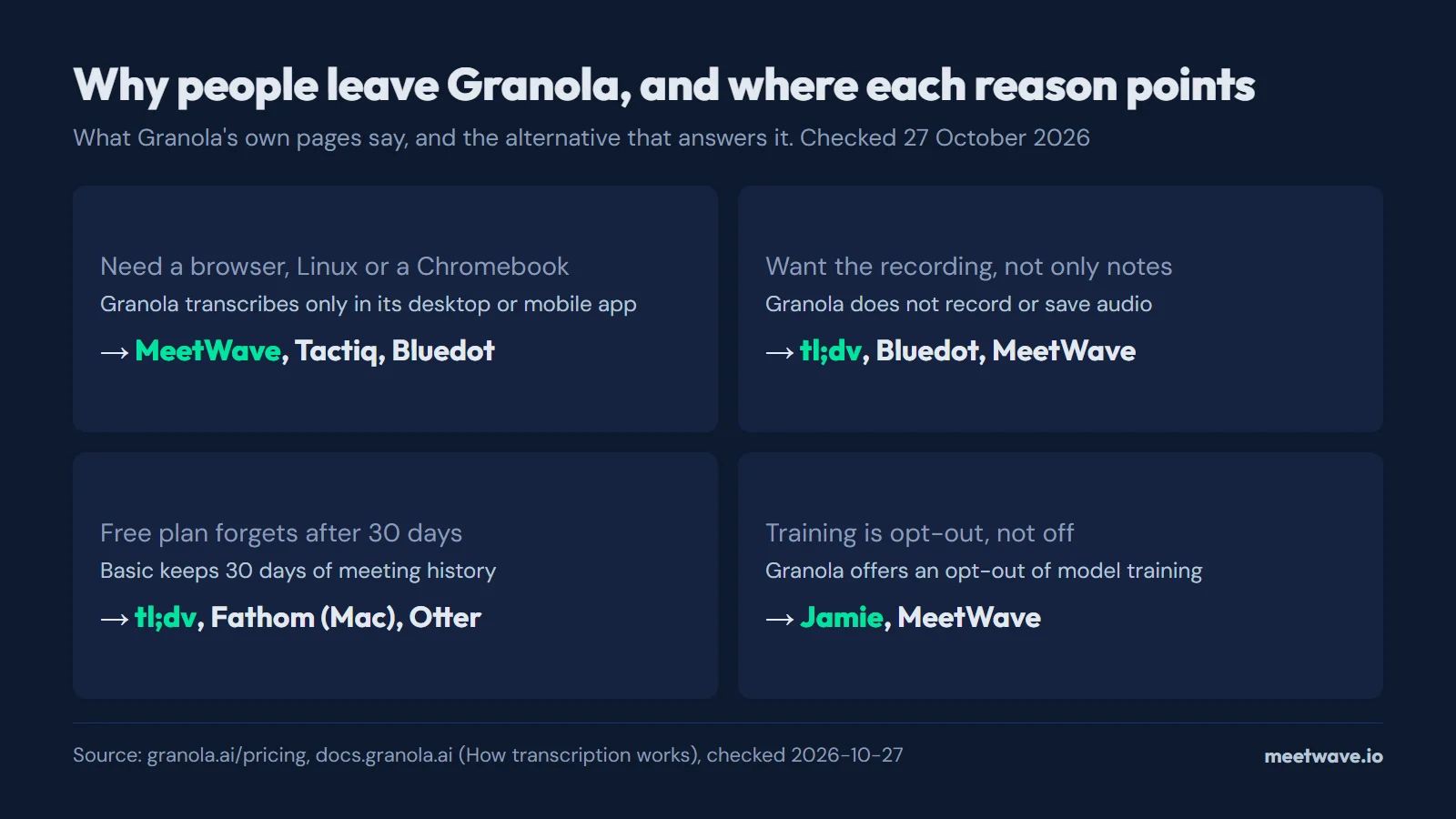 Figure 1. Four reasons to leave Granola, each from Granola's own pages, and the tools that answer them. Source: granola.ai/pricing and docs.granola.ai, checked 27 October 2026.
It needs an installed app. "Transcription requires the Granola desktop app (macOS or Windows) or the mobile app (iPhone or Android)", and the web app at notes.granola.ai "cannot capture or transcribe meetings" (Granola Docs, How transcription works). On a Linux machine, a Chromebook or a work laptop where you cannot install software, Granola does not record.
It keeps notes, not recordings. Granola "does not record or save audio or video at any point during the call", and it does not import pre-recorded audio files (Granola Docs). If you need to replay a moment or upload a file you recorded elsewhere, that has to come from another tool.
The free plan forgets. Granola Basic keeps 30 days of meeting history; unlimited history starts with Business at $14 per user a month (Granola pricing, checked 27 October 2026). Older notes stay reachable only after you upgrade or export them.
Training is opt-out. Every Granola plan lists "Opt out of model training any time", and Enterprise adds an opt-out for everyone in the team (Granola pricing). The setting exists, so training applies until you switch it off.
The alternatives, by reason
MeetWave — for a browser, Linux or a Chromebook
MeetWave records web calls from its Chrome extension on macOS, Windows, Linux and ChromeOS, and its Windows desktop app captures system audio from any meeting app, with no bot in the call (MeetWave Chrome extension). The audio, transcript and summary are stored encrypted in your MeetWave account, and your meetings are never used to train AI models. The free plan includes 10 hours of analysis and 25 summaries a month; Pro is $16 a month, or $11 billed annually (MeetWave pricing). The limits: no Mac desktop app (on a Mac it records web calls in Chrome), no mobile app and no live transcript during the call.
Tactiq — a free browser extension for live transcripts
Tactiq is a Chrome extension, also offered as an Edge add-on, that transcribes Google Meet, Zoom and Teams calls without a bot (Tactiq, checked 27 October 2026). The free plan has 10 transcripts a month; Pro is $12 a month, or $8 billed annually (Tactiq pricing). It is built around the transcript; AI actions draw on a monthly credit allowance of 5 on Free and 10 on Pro.
Bluedot — an extension plus desktop and phone apps
Bluedot "never invites a bot to your meeting", recording through its Chrome extension or its Mac and Windows apps, with iOS and Android apps for in-person meetings (Bluedot, checked 27 October 2026). Its free plan is 5 meetings for the lifetime of the account. Basic is $18 a month ($14 billed annually) for audio only and 1 hour per recording; video and unlimited length start with Pro at $25 a month ($20 billed annually) (Bluedot pricing).
tl;dv — when you want the video
tl;dv records video, not only notes: by bot, or with its desktop app for Mac and Windows, which "records directly from your system audio, with no meeting bot required" (tl;dv desktop app, checked 27 October 2026). The free plan has unlimited video recordings and transcription, with AI notes on 10 meetings. Pro is $29 a month, or $18 billed annually, and adds unlimited AI notes and uploads (tl;dv pricing).
Fathom — the biggest free plan, on a Mac
Fathom's free plan has unlimited recordings and transcriptions, with a choice of bot or bot-free capture (Fathom pricing, checked 27 October 2026). Bot-free capture is a beta for Mac only; on Windows Fathom joins as a bot, and its changelog says "The full Fathom experience is coming to PC" without a date (Fathom what's new). Premium is $20 a month, or $16 billed annually. If you are leaving Fathom rather than Granola, see Fathom alternatives.
Otter — bot-free desktop, phone apps and file imports
Otter's desktop app records Slack Huddles, Zoom, Google Meet and in-person conversations without a bot, and it offers the app for Mac and Windows (Otter desktop, checked 27 October 2026). Unlike Granola, Otter imports recorded files: 3 lifetime imports on Basic, 10 a month on Pro. Basic includes 300 transcription minutes a month; Pro is $16.99 a month, or $8.33 billed annually, with 1,200 minutes and up to 90 minutes per meeting (Otter pricing).
Jamie — data in the EU, no training
Jamie runs on your device with no bot, on Mac, Windows and iPhone, keeps storage and processing "within the EEA, Switzerland, and the UK", and says audio is "never stored" and "never used to train models" (Jamie, checked 27 October 2026). The free plan has 10 AI notes a month, up to 30 minutes per meeting. Plus is $24 a month billed annually, for 20 notes of up to 2 hours; the page lists no monthly price (Jamie pricing).
What a paid seat costs
On monthly billing, the cheapest paid seat among these tools runs from $12 (Tactiq Pro) to $29 (tl;dv Pro), with Granola Business at $14 per user a month (Tactiq pricing, tl;dv pricing, Granola pricing, checked 27 October 2026). Figure 2 shows all seven; Jamie is left out because its page lists only annual billing. Granola's page states its price without a billing period.
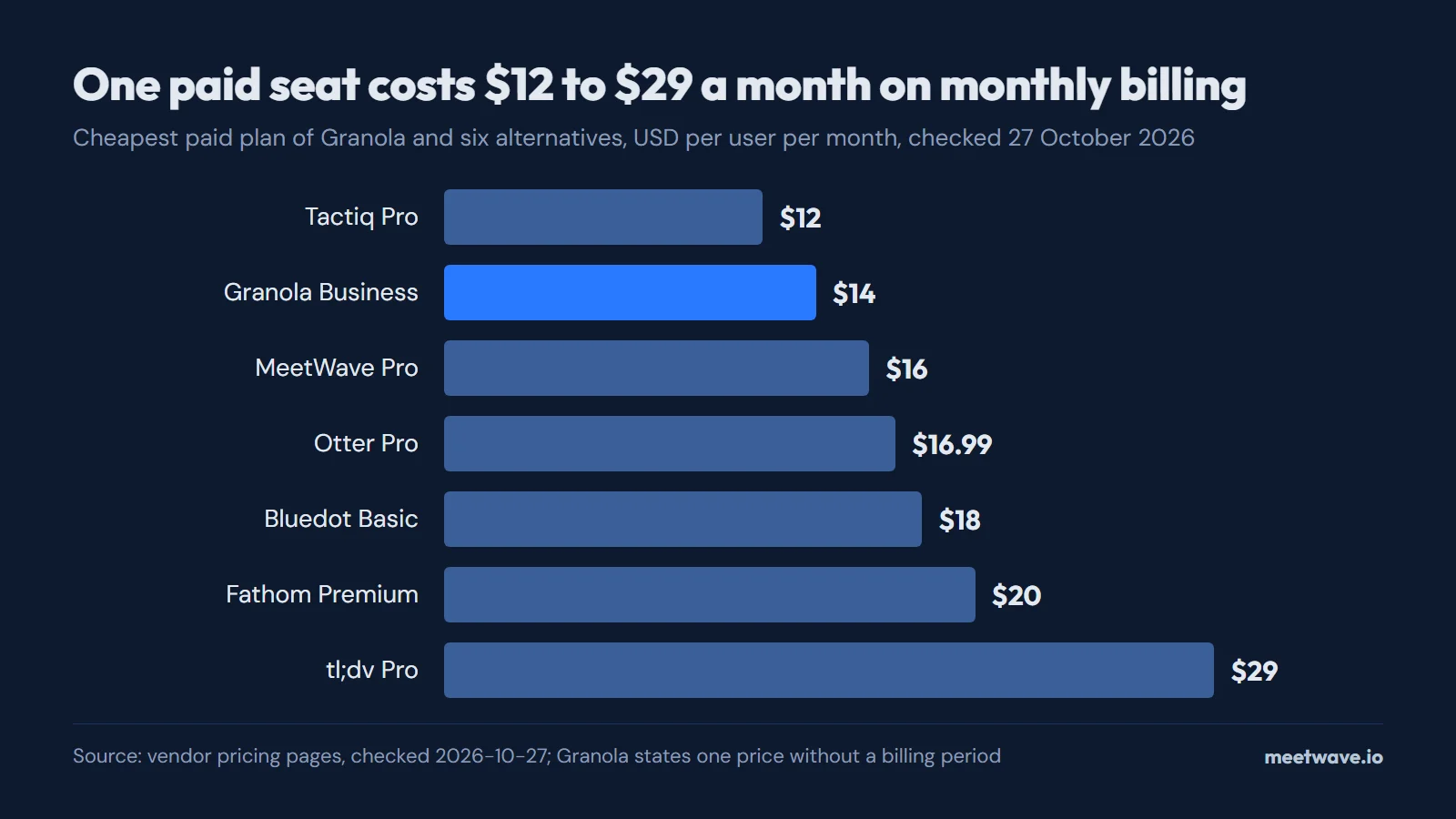 Figure 2. Cheapest paid plan of Granola and six alternatives, USD per user per month, monthly billing. Source: vendor pricing pages, checked 27 October 2026.
The plans are not equal in what they include. Bluedot Basic caps a recording at 1 hour and records audio only, and Otter Pro caps a meeting at 90 minutes, while tl;dv Pro adds unlimited uploads (Bluedot pricing, Otter pricing, tl;dv pricing). Compare on the meetings you run, not on the headline price.
Before you leave Granola
Export first. On Basic, Granola shows 30 days of meeting history, so notes older than that are out of reach once a paid plan lapses (Granola pricing). The Granola notes export guide walks through getting your notes out as files before you cancel.
Granola's Chrome extension does not replace the desktop app: it adds Google Meet speaker tags for the Granola desktop app on macOS and Windows, while the desktop app does the transcribing (Granola Docs, Speaker tags in Google Meet, checked 27 October 2026). If a browser-only tool is what you need, the extensions in this list record on their own.
Recording without a bot changes who sees the recorder in the participant list, not the rules on recording: tell people you are recording and check local law. The full list of 12 bot-free note takers, with the operating systems each one names, is in best bot-free AI note takers.
Key numbers
- Granola's free Basic plan keeps 30 days of meeting history, and its Business plan costs $14 per user a month, checked 27 October 2026 (Granola pricing).
- Granola transcribes only in its desktop app for macOS or Windows or its mobile app, and it does not record or save audio, checked 27 October 2026 (Granola Docs).
- On monthly billing, the cheapest paid seat among Granola and six alternatives runs from $12 (Tactiq Pro) to $29 (tl;dv Pro) a month in 2026 (Tactiq pricing, tl;dv pricing).
- tl;dv's free plan includes unlimited video recordings and AI notes on 10 meetings, checked 27 October 2026 (tl;dv pricing).
- Jamie's free plan includes 10 AI notes a month of up to 30 minutes each, checked 27 October 2026 (Jamie pricing).
FAQ
What is the best free Granola alternative?
tl;dv's free plan has unlimited video recordings with AI notes on 10 meetings, and Fathom's has unlimited recordings, bot-free only in a Mac beta (tl;dv pricing, Fathom pricing). MeetWave's free plan includes 10 hours of analysis and 25 summaries a month (MeetWave pricing).
Is there a Granola alternative for Windows?
Granola itself runs on Windows, so this is rarely the reason to switch (Granola). Other tools that record on Windows without a bot include tl;dv, Otter, Jamie, Bluedot and MeetWave's Windows app (tl;dv desktop app, Bluedot).
Is there a Granola alternative that works in Chrome only?
Yes: MeetWave, Tactiq and Bluedot record from a Chrome extension. Granola's own extension only adds Google Meet speaker tags to its desktop app (Granola Docs).
Can I move my Granola notes to another tool?
There is no standard import format between note takers, so export the notes as files and keep them in your own drive or wiki (Granola notes export guide).
Does Granola train AI on my meetings?
Its pricing page offers "Opt out of model training any time" on every plan, so training applies until you opt out (Granola pricing). Jamie and MeetWave say they never train on your meetings (Jamie, privacy policy).
Sources
- Granola — Pricing (2026). Accessed 2026-10-27.
- Granola — Home (2026). Accessed 2026-10-27.
- Granola Docs — How transcription works (2026). Accessed 2026-10-27.
- Granola Docs — Speaker tags in Google Meet (2026). Accessed 2026-10-27.
- Tactiq — Pricing and Home (2026). Accessed 2026-10-27.
- Bluedot — Pricing and Home (2026). Accessed 2026-10-27.
- tl;dv — Pricing and Desktop app (2026). Accessed 2026-10-27.
- Fathom — Pricing and What's new (2026). Accessed 2026-10-27.
- Otter.ai — Pricing and Desktop app (2026). Accessed 2026-10-27.
- Jamie — Pricing and Home (2026). Accessed 2026-10-27.
Still comparing tools?
See how MeetWave stacks up against the tools most teams evaluate alongside it.
- MeetWave vs GranolaSee how MeetWave compares to Granola for bot-free meeting notes
- MeetWave vs JamieSee how MeetWave compares to Jamie AI for bot-free meeting notes
- MeetWave vs tl;dvSee how MeetWave compares to tl;dv for meeting intelligence
More on this: Alternatives







