Notion AI Meeting Notes Free Limit: How Much You Get and What It Costs
Notion publishes no number for the free limit. On Free and Plus, AI Meeting Notes is a "Limited Trial" drawn from a limited number of complimentary AI responses, and when they run out Notion asks the workspace owner to upgrade. The feature itself belongs to Business and Enterprise: Business is listed at $20 per member a month, with a cap of 10 hours of meeting notes per user per day. Whatever tool you pick, record the call: a week after a conversation, both people recalled only 4.7% of its details.
What the free limit actually is
Notion states the limit in words, not numbers. Its pricing page marks Meeting notes as "Limited Trial" on Free and Plus, and its AI FAQ says those plans "get a limited number of complimentary AI responses" (Notion pricing, Notion AI FAQs, checked 5 November 2026).
The help page on complimentary responses adds the rules that exist. Each AI action that returns a response counts, a retry counts again, and at the end you "will see a message that an upgrade to the Business or Enterprise Plan is necessary to continue using AI features"; only a workspace owner can upgrade, on desktop (Notion, complimentary AI responses, checked 5 November 2026).
What the page does not say is what decides your count. It does not state a number, whether the allowance is per member or per workspace, whether it resets, or whether meeting notes draw on the same allowance as other AI answers (Notion, complimentary AI responses). So how many meetings you get on Free depends on how much AI your workspace has already used, in a way Notion does not spell out.
Counts of the free trial circulate on other sites. We publish a count only after testing it ourselves on a fresh Free workspace, and that test has not been run yet (How we checked).
Which plan includes it, and what it costs
AI Meeting Notes is a paid feature: "You must be on Notion's Business or Enterprise Plan to use AI Meeting Notes" (Notion help, AI Meeting Notes, checked 5 November 2026). Business is the cheapest plan that includes it.
| Plan | Price per member a month, as listed | AI Meeting Notes | Checked |
|---|---|---|---|
| Free | $0 | Limited Trial | 2026-11-05 |
| Plus | $10 | Limited Trial | 2026-11-05 |
| Business | $20 | Included, 10 hours per user per day | 2026-11-05 |
| Enterprise | Custom pricing | Included, plus zero data retention with AI providers | 2026-11-05 |
Source: Notion pricing and Notion help, AI Meeting Notes, checked 5 November 2026. The pricing page offers to "Save up to 20% with yearly".
Business is per member, so a team of 5 that upgrades only for meeting notes pays for 5 seats, $100 a month at the listed $20 (Notion pricing, How we checked). The seat also buys Notion Agent and the rest of the workspace. Figure 1 puts the Business seat next to the two other tools compared below.
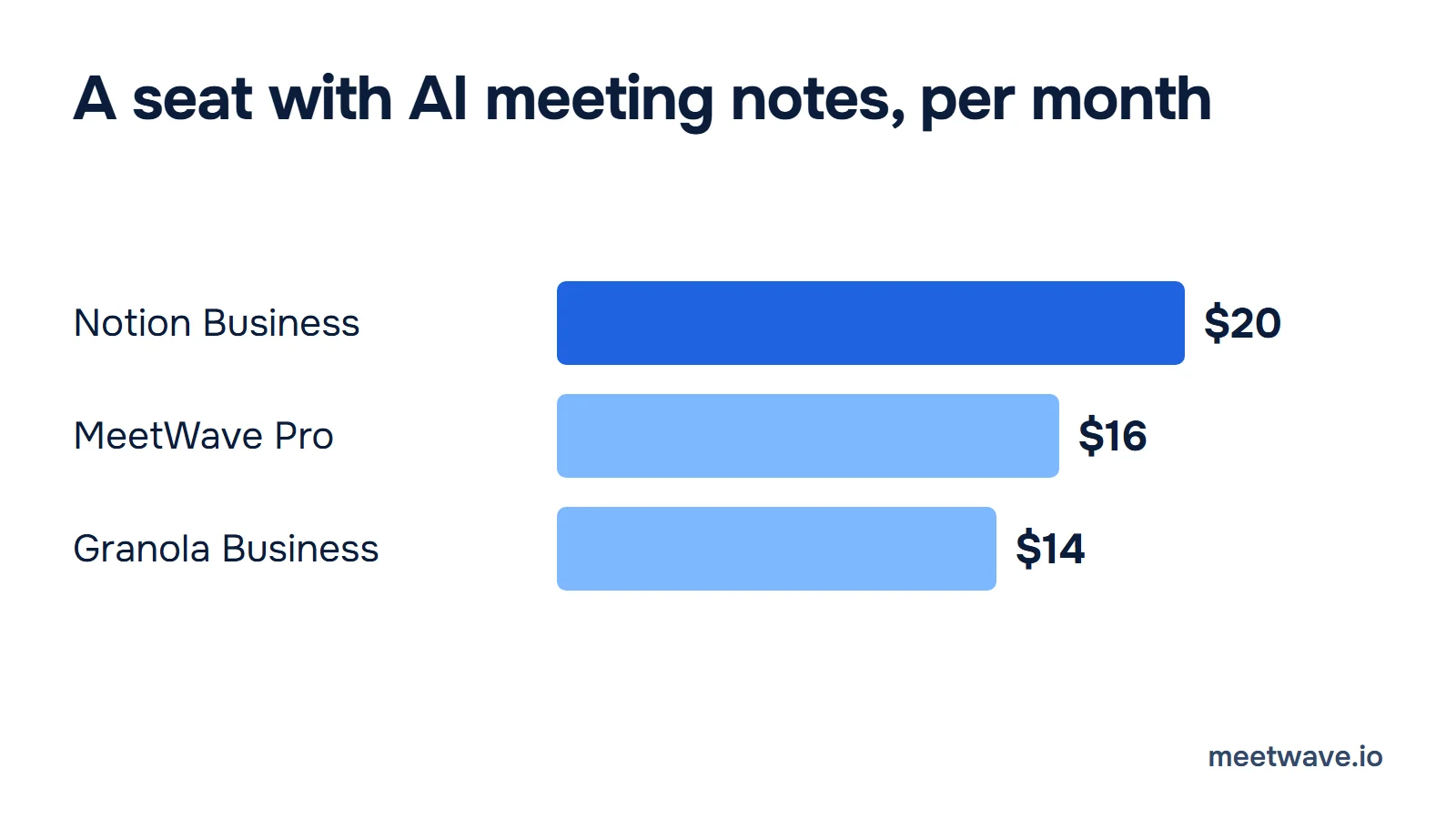
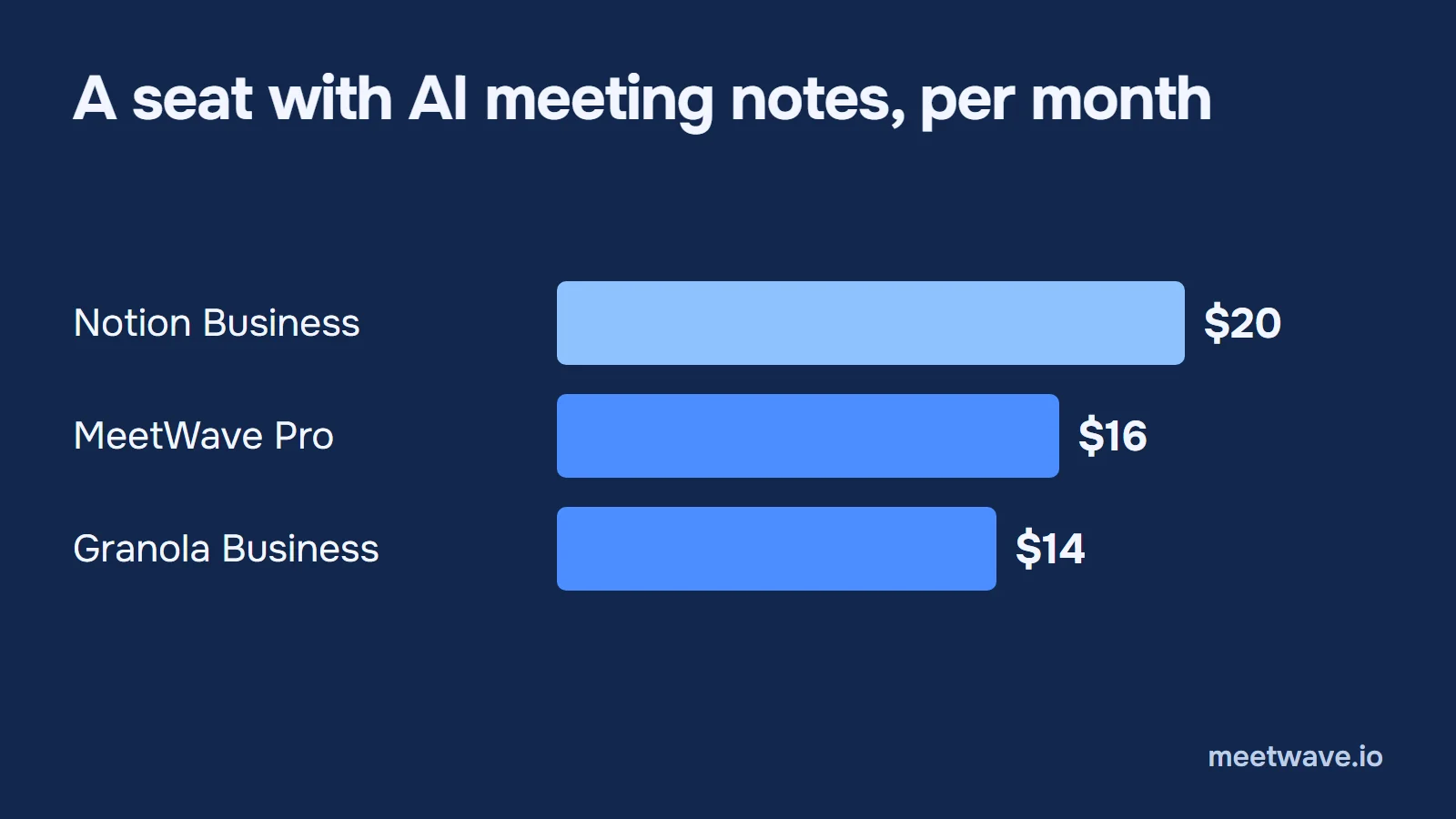 Figure 1. Notion Business costs more per seat than MeetWave Pro or Granola Business, and includes the whole workspace. Source: Notion, Granola and MeetWave pricing pages, checked 5 November 2026.
What it does and what it doesn't
Notion records video calls only from its desktop app. The desktop app, version 4.7.0 or later, captures the microphone and system audio on macOS 13 or later and on the latest Windows; in the browser only the microphone is transcribed, and the mobile app uses the phone's microphone, so both suit in-person meetings (Notion help, AI Meeting Notes, checked 5 November 2026).
- 16 languages, including English, Chinese, Spanish and Japanese, but "Speaker labeling is currently available in English only" (Notion help, AI Meeting Notes).
- Google Meet speaker names need the Notion Meetings Add-on, which works in Chrome 127 or later on a computer, posts and pins a message in the Meet chat, and shows a recording indicator over your camera (Notion help, Meetings Add-on).
- No bot. The pricing page describes Business meeting notes as "no bot needed" (Notion pricing).
- Notes land in a database. New meeting notes go to your default meetings database, or to a private "My meetings" database Notion creates (Notion help, AI Meeting Notes).
- Audio is not kept by default. Local audio copies are off on all plans; when on, the person recording keeps the 10 most recent recordings (Notion help, AI Meeting Notes).
- The daily cap is 10 hours per user (Notion help, AI Meeting Notes).
Notion AI vs Granola vs MeetWave
If your team lives in Notion, Notion's own recorder is the only one of the three that files every meeting into a Notion database without a click. Granola sends notes to Notion only on its Business plan, by hand and one note at a time; MeetWave's Notion integration is not out yet (Granola Docs, Notion, MeetWave integrations, checked 5 November 2026).
| Notion AI Meeting Notes | Granola | MeetWave | |
|---|---|---|---|
| Cheapest seat with meeting notes | Business $20 per member a month | Business $14 per user a month | Pro $16 a month |
| Free | Limited Trial on Free and Plus, no number published | Basic: 30 days of meeting history | 10 hours of recording analysis and 25 summaries a month |
| Records calls on | Desktop app, macOS 13+ and Windows | Desktop app, macOS and Windows | Windows app; Chrome extension on macOS, Windows, Linux, ChromeOS |
| Phone app | Yes, microphone only | iOS, Android | No |
| Bot in the call | No | No | No |
| Speaker names | English only; Google Meet needs the add-on | Google Meet, with its Chrome extension | Speaker identification in the transcript |
| Where notes live | Your Notion meetings database | Granola; a personal Notion database if you push them | Your MeetWave account, encrypted |
| Into Notion | Automatic | Business only, by hand, one note at a time | Download as Markdown and paste; integration coming |
Source: Notion pricing, Notion help, Granola pricing, Granola, Granola Docs, Notion and Granola Docs, speaker attribution, checked 5 November 2026 (speaker attribution 3 October 2026); MeetWave pricing and MeetWave integrations.
Figure 2 keeps the five rows that decide most choices.
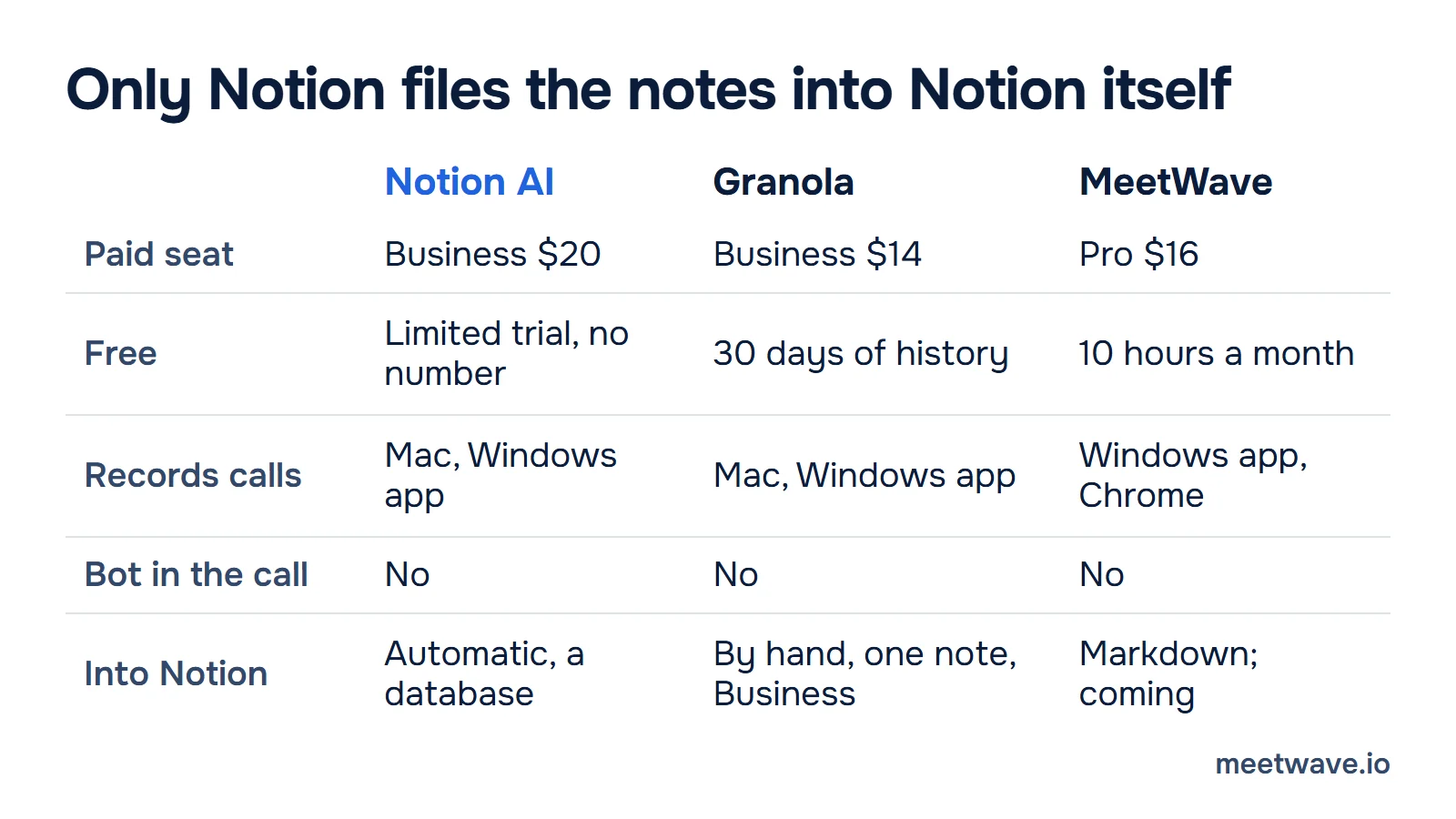
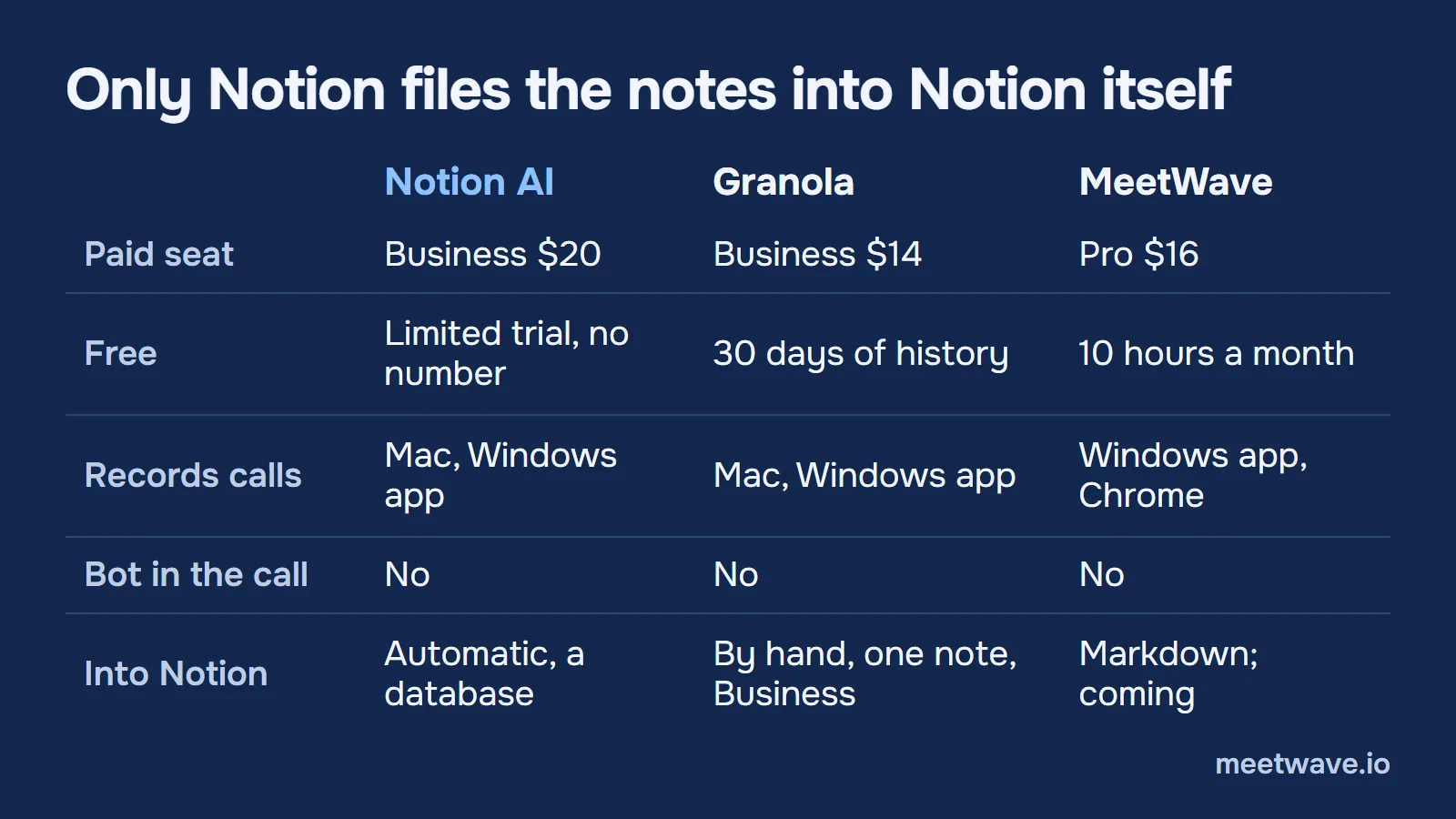 Figure 2. All three record without a bot; only Notion files the notes into Notion by itself. Source: Notion, Granola and MeetWave pricing and help pages, checked 5 November 2026.
Granola pushes a note only after it is enhanced, into a database Granola creates; you "can't pick a custom page or database", and there is "no way to sync or send many notes to Notion in one go" (Granola Docs, Notion, checked 5 November 2026). Its automatic path is a Zapier trigger on a Granola folder.
MeetWave records with a Windows app or a Chrome extension, with no bot in the call, and writes decisions, action items with owners and dates, and risks (MeetWave Chrome extension). Today you take the transcript out as a Markdown file and paste it into Notion; if you are moving notes out of Granola, the Granola notes export guide turns them into files first.
How to pick
Five rules cover most cases, based on the facts above (Notion pricing, Granola pricing, MeetWave pricing, checked 5 November 2026):
- You already pay for Notion Business. Use Notion's meeting notes: they cost nothing extra, and the notes are already in your workspace (Notion help).
- You are on Free or Plus and want a few meetings. Use the trial, and expect it to stop without warning of how many are left (Notion, complimentary AI responses).
- You are on Free or Plus and record calls every week. A separate recorder costs less than a Business seat for every member: Granola Business is $14, MeetWave Pro is $16, and both have free tiers (Granola pricing, MeetWave pricing).
- Your meetings are not in English. Notion transcribes 16 languages but labels speakers in English only (Notion help).
- You need every meeting in Notion with no clicks, and will not buy Business. No option here does that today: Granola needs Business and goes one note at a time, and MeetWave's Notion integration is coming (Granola Docs, MeetWave integrations).
Turn meeting notes into database rows
A row is useful when every action item has an owner and a date. In a 35-minute demo client call, the notes list 7 action items, and 2 of them have no date: Megan confirming the Westgate badge and Kwame's blog-post list (demo notes). Figure 3 shows the two blocks that map onto the template below: "What we agreed" becomes Decisions, "Who does what" becomes Action items.
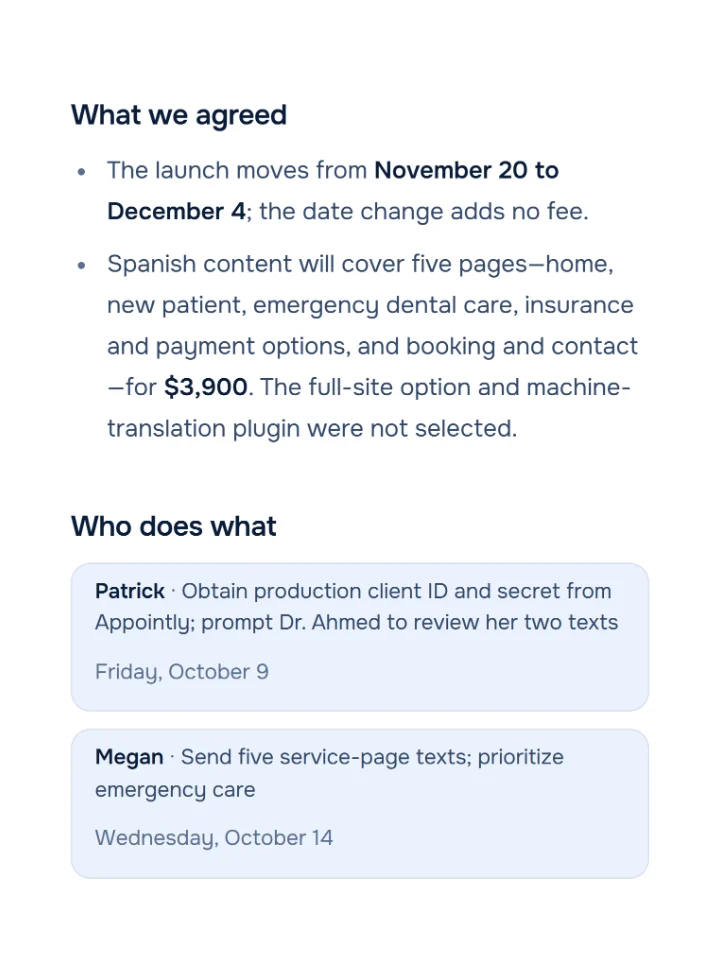
 Figure 3. Demo meeting, people are fictional. Two decisions and the first two action items, each with an owner and a date. Source: demo client call notes, October 2026.Analyzed with MeetWaveSee the full notesTry it on your next client call
The formula for your own notes: one row per meeting, one line per decision, and an action item goes in only with a name and a date. An item without a date is the question to ask before the call ends, as the 2 undated items in the demo show (demo notes).
A Notion meetings database you can paste
Copy both blocks and paste them into an empty Notion page; each arrives as a table. To filter and sort, open the table menu and choose Turn into database (Notion guide, simple tables and databases). The example rows come from the demo call in Figure 3.
| Meeting | Date | Type | Attendees | Decisions | Action items |
|---|---|---|---|---|---|
| Riverbend launch and Spanish pages | 2026-10-07 | Client call | Kwame, Laura, Megan, Patrick | Launch moves to Dec 4; Spanish content covers five pages | Patrick: Appointly credentials; Megan: five service-page texts |
| | | | | | || Action item | Owner | Due | Meeting | Done |
|---|---|---|---|---|
| Get production credentials from Appointly | Patrick | 2026-10-09 | Riverbend launch and Spanish pages | No |
| Send five service-page texts | Megan | 2026-10-14 | Riverbend launch and Spanish pages | No |
| Confirm the Westgate badge | Megan | ask on the call | Riverbend launch and Spanish pages | No |After converting, set Date and Due to the Date type, Type to Select, Done to Checkbox, and link Meeting in Action items to the Meetings database with a Relation property (Notion guide).
Key numbers
- Notion lists AI Meeting Notes as a "Limited Trial" on Free and Plus and publishes no number for it, checked 5 November 2026 (Notion pricing, Notion, complimentary AI responses).
- Notion Business, the cheapest plan with AI Meeting Notes, is listed at $20 per member a month, checked 5 November 2026 (Notion pricing).
- AI Meeting Notes has a daily limit of 10 hours per user on paid plans, 2026 (Notion help, AI Meeting Notes).
- Notion's meeting notes transcribe 16 languages and label speakers in English only, 2026 (Notion help, AI Meeting Notes).
- Granola Business, which adds the Notion integration, costs $14 per user a month, checked 5 November 2026 (Granola pricing).
- A week after a conversation, only 4.7% of its details were recalled by both partners, in 21 pairs of participants, 2023 (Brown-Schmidt et al., Cognitive Science).
How we checked
Every Notion and Granola fact was read on the vendor's own page on 5 November 2026, linked where it is used. Prices are as each pricing page lists them; Notion's page offers yearly billing at up to 20% off and does not say which period the $20 assumes (Notion pricing). The 5-seat cost is 5 × $20 = $100 a month.
The free-limit count is not tested. It needs a fresh Free Notion workspace recorded until the trial stops; until we run that, the article gives Notion's wording and no number (Notion, complimentary AI responses).
The demo meeting is fictional. The 7 action items and the 2 without a date are counted by hand from its notes (demo notes). The 4.7% is the study's figure for idea units recalled by both partners after a week (Vanderbilt University, 2023).
FAQ
Is Notion AI Meeting Notes free?
Only as a trial. Free and Plus get a "Limited Trial"; the full feature needs Business or Enterprise (Notion pricing, Notion help).
How many meeting notes can I make on the Free plan?
Notion does not say. Free and Plus get "a limited number of complimentary AI responses", with no number, and an upgrade message when they run out (Notion, complimentary AI responses).
Does Notion AI Meeting Notes work on Windows?
Yes, in the desktop app 4.7.0 or later on the latest Windows, which captures system audio and the microphone (Notion help, AI Meeting Notes).
Does Notion AI identify speakers?
In English only. In Google Meet, speaker names need the Notion Meetings Add-on in Chrome (Notion help, AI Meeting Notes, Notion help, Meetings Add-on).
Can Granola send notes to Notion automatically?
Not by itself. Its Notion push is on Business, manual and one note at a time; automation goes through Zapier (Granola Docs, Notion, Granola pricing).
What is a free alternative to Notion AI Meeting Notes?
Granola Basic keeps 30 days of meeting history, and MeetWave's free plan includes 10 hours of recording analysis a month; neither sends notes into Notion automatically (Granola pricing, MeetWave pricing).
Sources
- Notion — Pricing (2026). Accessed 2026-11-05.
- Notion Help Center — AI Meeting Notes (2026). Accessed 2026-11-05.
- Notion Help Center — Notion AI FAQs (2026). Accessed 2026-11-05.
- Notion Help Center — Complimentary AI responses (2026). Accessed 2026-11-05.
- Notion Help Center — Install the Notion Meetings Add-on (2026). Accessed 2026-11-05.
- Notion — Simple tables vs databases (2026). Accessed 2026-11-05.
- Granola — Pricing and Home (2026). Accessed 2026-11-05.
- Granola Docs — Share notes to Notion (2026). Accessed 2026-11-05.
- Brown-Schmidt, S., Jaeger, C. B., Evans, M. J., Benjamin, A. S. — MEMCONS: How contemporaneous note-taking shapes memory for conversation, Cognitive Science (2023); summary in Vanderbilt University news (2023). Accessed 2026-11-05.
Still comparing tools?
See how MeetWave stacks up against the tools most teams evaluate alongside it.
- MeetWave vs GranolaSee how MeetWave compares to Granola for bot-free meeting notes
- MeetWave vs JamieSee how MeetWave compares to Jamie AI for bot-free meeting notes
- MeetWave vs Otter AISee how MeetWave compares to Otter AI for meeting intelligence
More on this: Alternatives