Interview Transcription
Interview transcription differs from ordinary transcription in one specific way: you need to know who said what. A regular transcript that just runs the words together is nearly unusable for an interview, whether it's a hiring conversation or a recorded Q&A, because the value is in comparing what one person said against what another asked or answered — not just accurate words, but accurate attribution.
Why Interview Transcription Needs Speaker Labels
In a single-speaker recording, a plain transcript is enough. In an interview, at least two people are talking, usually taking turns asking and answering, and a transcript without speaker labels forces you to guess or re-listen to figure out who said which line.
This matters more the longer the interview runs and the more interviews you're comparing. A 45-minute candidate interview with three unlabeled paragraphs of text is far harder to review than one with the interviewer's questions and the candidate's answers clearly separated. The technical term for this separation is speaker diarization, and it's a distinct capability from transcription itself, not something every transcription method includes automatically.
Getting an Interview Transcript With Speaker Names
| Approach | Speaker labeling | Best fit |
|---|---|---|
| Manual note-taking during the interview | You label speakers yourself, in real time | Short interviews, or when you already need to be actively listening and reacting |
| General transcription tool on a recorded file | Often produces one continuous block without reliable speaker separation | Single-speaker recordings, or interviews where labeling isn't critical |
| Recording tool built for multi-speaker conversations | Labels each speaker automatically as part of transcription | Interviews of any length, especially when comparing multiple candidates or sources |
Steps for getting a usable interview transcript, regardless of which approach fits:
- Record the interview in a way that captures both sides of the conversation clearly. A recording where one voice is much quieter than the other produces worse results for that speaker specifically.
- Check whether your transcription method separates speakers before relying on the output. If it doesn't, expect to manually annotate who's speaking where — or transcribe the interview with speaker names from the recorded file.
- Review the transcript against the recording, particularly around cross-talk or interruptions, which are common in interviews and where automatic transcription is least reliable.
- Structure the reviewed transcript into notes, pulling out the actual answers and observations rather than keeping the full back-and-forth.
How to Format an Interview Transcript with Speaker Names (the Speaker: Colon Format)
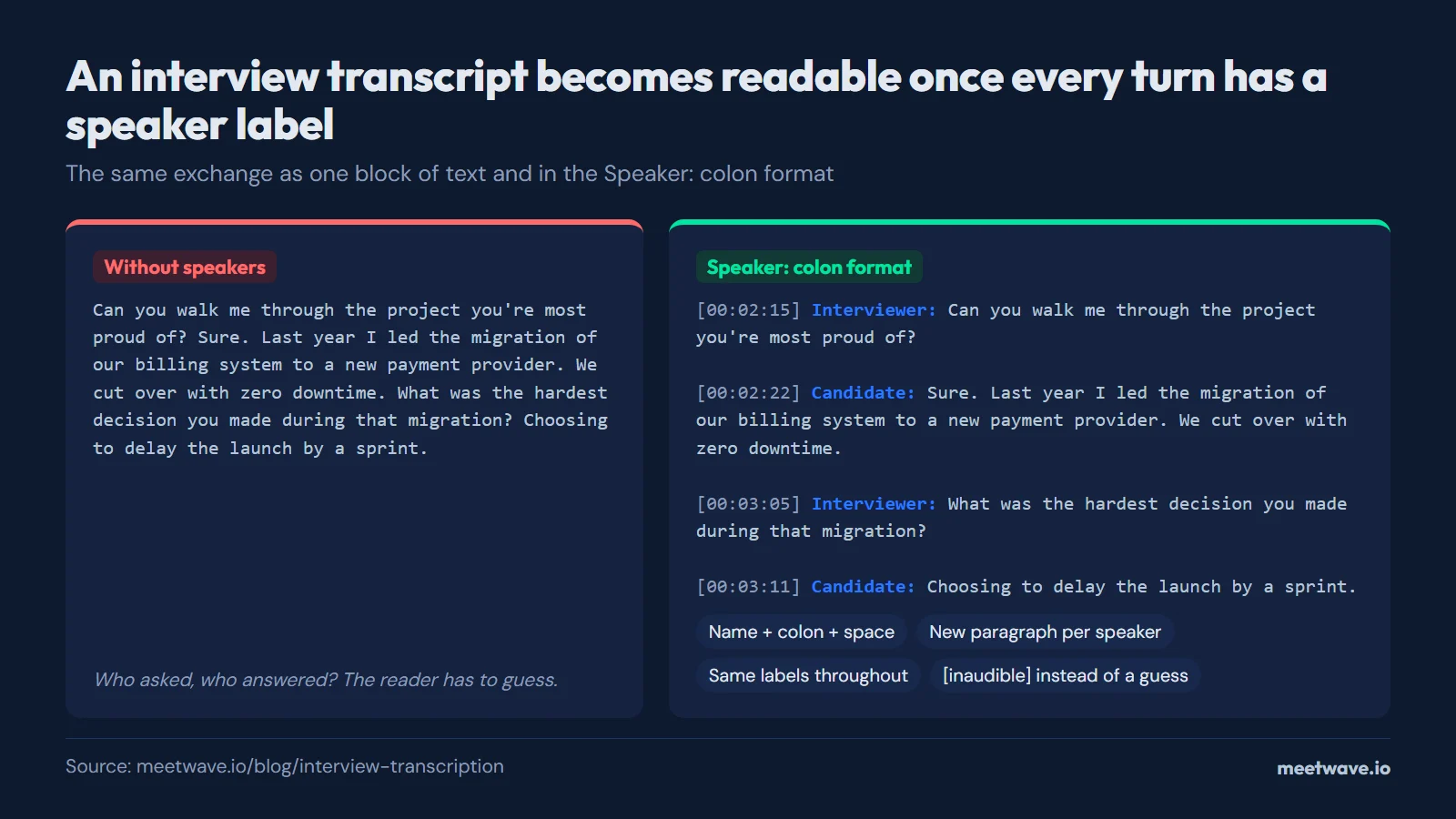
The standard format for an interview transcript is the speaker's name followed by a colon at the start of each turn, a new line for every change of speaker, and a blank line between turns. Use consistent labels throughout — either real names ("Dana Reyes:") or roles ("Interviewer:" / "Candidate:") — and never switch between the two mid-transcript.
Here is what that looks like in practice, with optional timestamps in square brackets before the speaker name:
[00:02:15] Interviewer: Can you walk me through the project you're most proud of?

[00:02:22] Candidate: Sure. Last year I led the migration of our billing system
to a new payment provider. The part I'm proud of is that we cut over with zero
downtime — we ran both providers in parallel for two weeks and reconciled every
transaction daily.

[00:03:05] Interviewer: What was the hardest decision you made during that
migration?

[00:03:11] Candidate: Choosing to delay the launch by a sprint. We found a
rounding discrepancy in refunds two days before cutover, and I made the call to
hold rather than patch it live.
The conventions that make this format work:
- Name, colon, space, then the words.
Interviewer: Can you...— nothing else before the text of the turn. - A new paragraph for every speaker change, even for a one-word answer. Merging turns is what makes transcripts unreadable.
- Consistent labels, decided once. In hiring, "Interviewer:" and "Candidate:" travel better than names when the transcript is shared across a hiring panel; in journalism, real names matter because quotes will be attributed.
- Timestamps only where they earn their place — every turn for a transcript someone will check against the recording, every few minutes or none at all for a transcript that will only be read.
- Mark uncertainty inline, not silently:
[inaudible 00:14:32]or[crosstalk]where the audio defeats you, rather than a guess presented as fact. - Multiple unknown speakers get numbered labels —
Speaker 1:,Speaker 2:— which you can find-and-replace with names once you identify the voices.
If you are transcribing for a hiring loop, the transcript in this format then feeds the interview notes template, which structures the labeled answers into a scorecard. Recruiters running many interviews a week can see how this fits a full workflow on the MeetWave for recruiters page; candidates recording their own practice or debrief sessions have the mirror-image workflow on the job seekers page.
From Transcript to Structured Interview Notes
A raw transcript, even a well-labeled one, is a record of what was said, not a decision-ready document. The next step is usually turning it into something structured: a scorecard for a hiring interview, or a set of quotes and takeaways for a journalistic one.
For hiring interviews specifically, that structuring usually means pulling the candidate's answers into a format organized by the question or the skill being assessed, so several interviews from the same hiring loop can sit side by side and get compared fairly. The meeting notes template on this site provides a fill-in-the-fields structure that works for this: attendees, discussion points per topic, and a place to record the assessment, rather than a page of undifferentiated transcript text.
Hiring Interviews vs Journalistic Interviews
The two most common reasons people search for interview transcription point at different follow-up needs, even though the transcription step itself is the same.
A hiring interview transcript gets used to compare one candidate's answers against another's, usually against a fixed set of questions, and often needs to be shared with other people on the hiring team who weren't in the room. Consistency across interviews matters more than any single quote. A journalistic interview transcript gets mined for specific quotable lines and context, where the exact wording of one sentence can matter more than the overall structure, and speaker labels matter mainly to attribute a quote correctly rather than to compare responses.
Both need the same starting point, an accurate transcript with speakers separated, but what happens after transcription looks different: structured comparison for hiring, selective quoting for journalism.
For recruiting teams running interviews as live meetings rather than working from pre-recorded audio, MeetWave records the conversation and produces a transcript with speakers separated automatically, without needing to record on one device and transcribe on another afterward. It records without a bot joining the call — through the MeetWave Chrome extension for interviews conducted in the browser, which works on any OS with Chrome, or through the Windows desktop app. It's built for live meetings rather than for transcribing interview recordings someone else already made.
FAQ
How do you transcribe an interview with two speakers?
Record the conversation with both voices captured clearly, then use a transcription method that labels speakers rather than producing one continuous block of text. If your transcription tool doesn't separate speakers automatically, you'll need to review the recording and manually mark who said what, which takes considerably longer for a long interview.
What's the difference between interview transcription and regular transcription?
Regular transcription just needs accurate words. Interview transcription additionally needs to know which speaker said which line, since interviews are structured as a back-and-forth between at least two people and the value of the transcript depends on being able to tell the interviewer's questions apart from the answers.
Can I get a free transcript of a job interview?
Yes, using a free transcription tool on the recorded audio, though most free tools don't reliably separate speakers, so you may end up manually labeling who said what in a hiring interview where that distinction matters.
How do you compare multiple candidate interviews using transcripts?
Structure each transcript around the same set of questions or skills being assessed, rather than leaving them as raw back-and-forth text, so the answers line up side by side across candidates. A consistent structure applied to every interview in a hiring loop makes the comparison far faster than reading full transcripts one at a time.
Do interview transcripts need speaker diarization?
Yes, for any interview with more than one speaker, speaker diarization, meaning automatic labeling of who's talking, is what makes the transcript usable without re-listening to the recording. Without it, a transcript is just text with no indication of who said what.
What is the standard format for speaker names in an interview transcript?
The speaker's name or role followed by a colon at the start of each turn — Interviewer: ... or Dana Reyes: ... — with a new paragraph for every change of speaker and a blank line between turns. Pick either names or roles and keep it consistent through the whole transcript; timestamps in square brackets before the label are optional.
Should I use real names or "Interviewer/Candidate" labels?
Use roles for hiring transcripts that will be shared across a panel — "Candidate:" keeps the comparison focused on answers rather than identities, and makes anonymized review possible. Use real names for journalistic transcripts, where quotes must be attributable to a specific person. Whichever you choose, decide before you start labeling, because switching midway forces a full re-pass.
How do I label speakers when I can't tell who is talking?
Use numbered placeholders — Speaker 1:, Speaker 2: — and mark truly undecipherable passages as [inaudible] with a timestamp rather than guessing. Once a voice becomes identifiable later in the recording, find-and-replace the placeholder with the name. Guessed attribution is worse than a placeholder: in a hiring loop it can credit one candidate's answer to another.
Still comparing tools?
See how MeetWave stacks up against the tools most teams evaluate alongside it.
- MeetWave vs KrispSee how MeetWave compares to Krisp for meeting notes
- MeetWave vs JamieSee how MeetWave compares to Jamie AI for bot-free meeting notes
- MeetWave vs Otter AISee how MeetWave compares to Otter AI for meeting intelligence
More on this: Audio to text







