How to Transcribe a Voice Recording
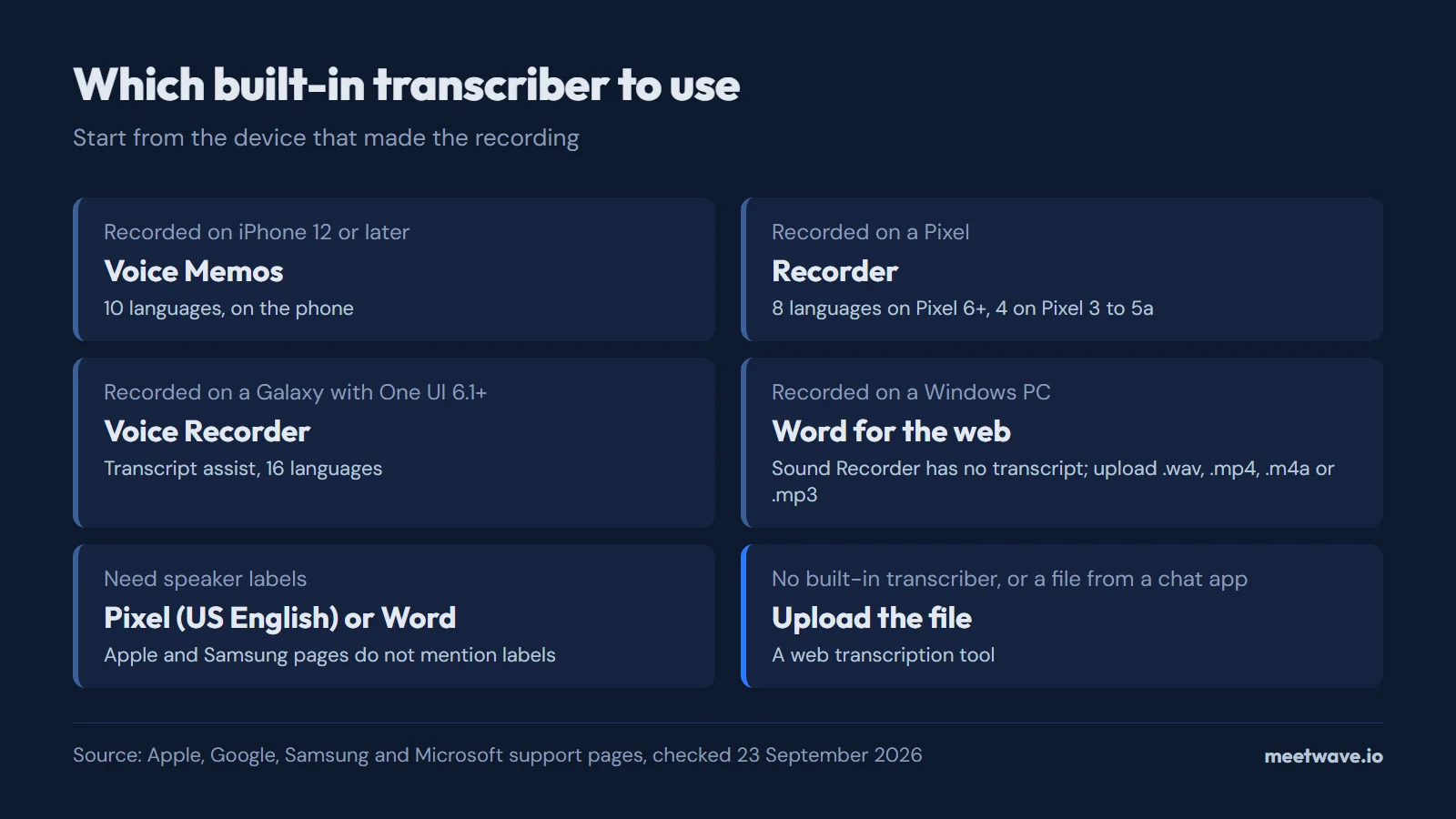
To transcribe a voice recording, use the transcriber built into the app that made it: Voice Memos on iPhone 12 or later, Recorder on a Pixel, Voice Recorder on a Galaxy with One UI 6.1 or later. On Windows, Sound Recorder has no transcript, so upload the file to Word for the web, which takes .wav, .mp4, .m4a and .mp3. When you need to know who said what, check the speaker-label limits first: Pixel labels speakers only in US English.
Key numbers
- iPhone Voice Memos transcribes on iPhone 12 or later in 10 languages, and not in every country or region (Apple, iPhone User Guide for iOS 27, 2026).
- Pixel Recorder labels speakers only in US English, on Pixel 6 and later (Google, Pixel Phone Help, checked September 2026).
- Samsung Voice Recorder transcribes 16 languages with Transcript assist on Galaxy devices running Android 14 and One UI 6.1 or later (Samsung US Support, checked September 2026).
- Word for the web transcribes 300 minutes of uploaded audio a month with a Microsoft 365 subscription, from .wav, .mp4, .m4a and .mp3 files (Microsoft Support, checked September 2026).
- A widely used open-source speech model got 17.4% of words wrong on AMI meeting recordings made with headset microphones and 39.9% on the same meetings from one distant microphone (Radford et al., 2022, Table 9).
Which way fits your recording
The app does not decide the method; three things do: the device that made the recording, how many people speak on it, and whether you need the text as a file. The table gives the route to a transcript of voice recording files in each common case (Apple, Google, Samsung, Microsoft).
| Recording | Way to transcribe | Limit to check |
|---|---|---|
| Voice memo on iPhone | Voice Memos, on the phone | iPhone 12 or later; 10 languages; not in all countries |
| Memo on a Pixel | Recorder, on the phone | Pixel 6 and later: 8 languages; Pixel 3 to 5a: 4 |
| Memo on a Galaxy | Voice Recorder with Transcript assist | Android 14 and One UI 6.1 or later; 16 languages |
| Recording on a Windows laptop | Upload to Word for the web | Microsoft 365; 300 minutes a month; Edge or Chrome |
| Two or more speakers | Pixel Recorder or Word | Pixel labels speakers in US English only |
| Other Android phone, or a file from a chat app | Upload the file to a transcription tool | File format and length |
Source: Apple, Google Pixel Help, Samsung, Microsoft, checked 2026-09-23.
Figure 1. Which built-in transcriber to use, by the device that made the recording. Source: Apple, Google, Samsung and Microsoft support pages, checked September 2026.
Transcribe a voice memo on iPhone
Voice Memos transcribes on the phone itself, on iPhone 12 or later, in English (all variants), Spanish, Portuguese, Italian, French, German, Japanese, Korean, Simplified Chinese and Traditional Chinese. Apple notes that the feature is not available in all countries or regions (Apple).
- Open Voice Memos (in the Utilities folder) and tap the recording.
- Tap the More button (three dots).
- Choose Copy Transcript to copy all of it, or View Transcript to select a passage.
- Paste the text into Mail, Notes or a text file.
A memo recorded in iOS 17 or earlier is transcribed automatically the first time you open it, if it contains speech (Apple). You can also watch the transcript appear live: swipe up on the waveform while recording.
Transcribe a recording on Android
Pixel and Galaxy phones have a transcriber in the recorder app; other Android phones may not. On a Pixel 6 or later, Recorder transcribes in real time in 8 languages: Chinese (Mandarin), English, French, German, Hindi, Italian, Japanese and Spanish, several with regional variants. Pixel 3 to 5a handle 4: English, French, German and Japanese (Google Pixel Help).
To get the text out of Recorder, touch and hold a recording, tap Share, then Transcript (.txt). The same menu sends the transcript to Google Docs (Google Pixel Help).
On a Galaxy phone or tablet, Voice Recorder transcribes with Galaxy AI on Android 14 with One UI 6.1 or later (Samsung):
- Open Voice Recorder and select the recording.
- Tap the Transcript assist icon (four stars) at the top, then Transcribe.
- To export, tap More options (three dots) → Share → Text file, or add it to Samsung Notes.
Transcript assist covers 16 languages, among them English, Spanish, Hindi, Arabic, Russian, Thai and Vietnamese (Samsung). On any other Android phone, share the audio file from the recorder app and upload it, as in the last section.
Transcribe a voice recording on Windows
Sound Recorder, the recorder built into Windows 11, records audio and changes playback speed, and it does not transcribe. Windows voice typing (Win + H) is a separate feature that types what you say live, not what you recorded earlier (Microsoft Windows Learning Center, 2023).
For a saved file on Windows, Word for the web is the built-in route with a Microsoft 365 subscription (Microsoft Support):
- Open a document in Word for the web, in the new Microsoft Edge or in Chrome.
- Go to Home → Dictate drop-down → Transcribe.
- Choose Upload audio and pick a .wav, .mp4, .m4a or .mp3 file.
Word allows 300 minutes of uploaded audio a month with a Microsoft 365 subscription and 30,000 minutes with a Microsoft Copilot license. It saves the audio to a Transcribed Files folder in OneDrive and labels voices as Speaker 1, Speaker 2 (Microsoft Support). For format and length problems with any file, see audio file formats and long files.
How accurate is built-in transcription
No vendor states a number: the Apple, Google, Samsung and Microsoft pages linked above list devices and languages, and none gives an error rate for its recorder app. The closest published yardstick is the paper behind a widely used open-source speech model, which measured one model on many kinds of English speech. That model got 2.5% of words wrong on clean read audiobook speech (LibriSpeech test-clean) and 17.4% on real meetings recorded with headset microphones (Radford et al., 2022, Table 9).
The gap between those two numbers is the gap between a voice memo read into a phone and a meeting. A single speaker close to the microphone is the easy case for any transcriber; several people talking in a room is the hard one.
What changes the error rate most
Distance to the microphone changed the error rate more than anything else in that paper's measurements. The AMI corpus holds 100 hours of meetings recorded with both close-talking and far-field microphones (AMI Corpus). On it, the same model got 17.4% of words wrong from headset microphones and 39.9% from one distant microphone (Radford et al., 2022, Table 9). Figure 2 puts the three conditions side by side.
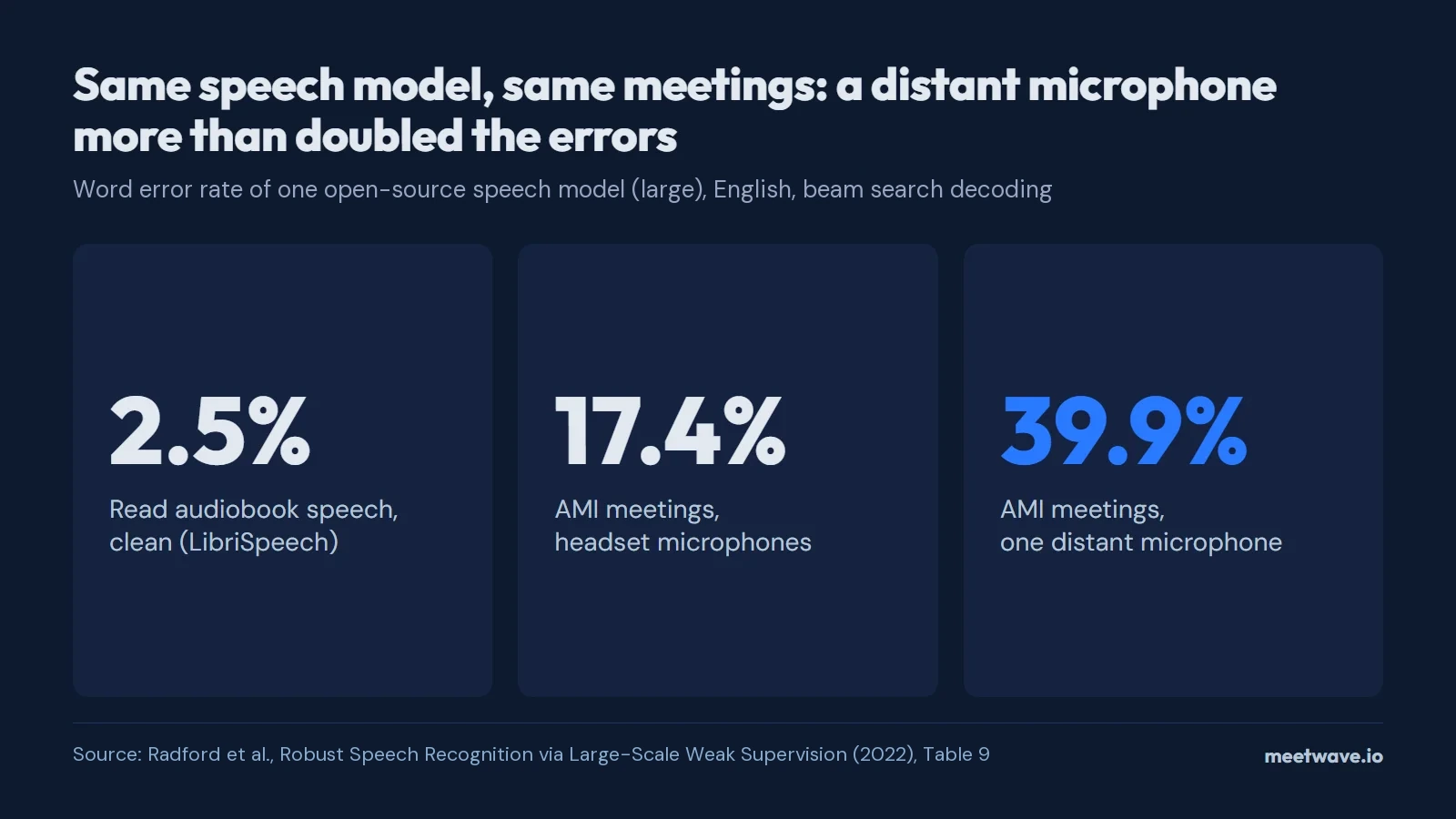 Figure 2. Word error rate of one speech model in three recording conditions. Source: Radford et al. (2022), Table 9.
Background noise is the second factor. In the same paper, all models lost accuracy as added pub noise grew louder, and models trained only on read audiobooks fell behind it once the noise came within 10 dB of the speech (Radford et al., 2022, section 3.7). For a phone recording this means two things: put the phone near the person speaking, and record away from a TV, traffic or a busy cafe.
Voice recording transcription with more than one speaker
Speaker labels exist in two of the four built-in routes, and both have limits. Pixel Recorder labels speakers as Speaker 1, Speaker 2 and so on only in US English and only on Pixel 6 and later; you turn it on under Recorder settings → Speaker labels (Google Pixel Help). Word for the web separates speakers in uploaded files, and you can rename the labels (Microsoft Support).
The Apple and Samsung pages for Voice Memos and Voice Recorder do not mention speaker labels (Apple, Samsung). How to lay out a two-person transcript once you have one is covered in speaker labels in an interview transcript. For work calls recorded on a computer, MeetWave records the meeting's audio and separates the speakers in the transcript.
Transcribe a saved voice recording online
When the phone has no transcriber, the language is not supported, or the file came from a chat app, upload it instead. To turn a voice recording to transcript text without installing anything, transcribe a voice recording online: the tool takes the audio file and returns the text. If you transcribe every week, compare transcription software before paying for one.
How we checked
Every limit in this article comes from the vendor's own support page, opened on 23 September 2026: the Apple iPhone User Guide for iOS 27, Google Pixel Phone Help, Samsung US Support and Microsoft Support. We counted languages as the vendors list them, with regional variants of one language counted once, so Pixel's 15 listed variants on Pixel 6 and later are 8 languages (Google Pixel Help). Error rates come from Table 9 of that paper, which uses beam search decoding (Radford et al., 2022); we did not measure the phone apps ourselves.
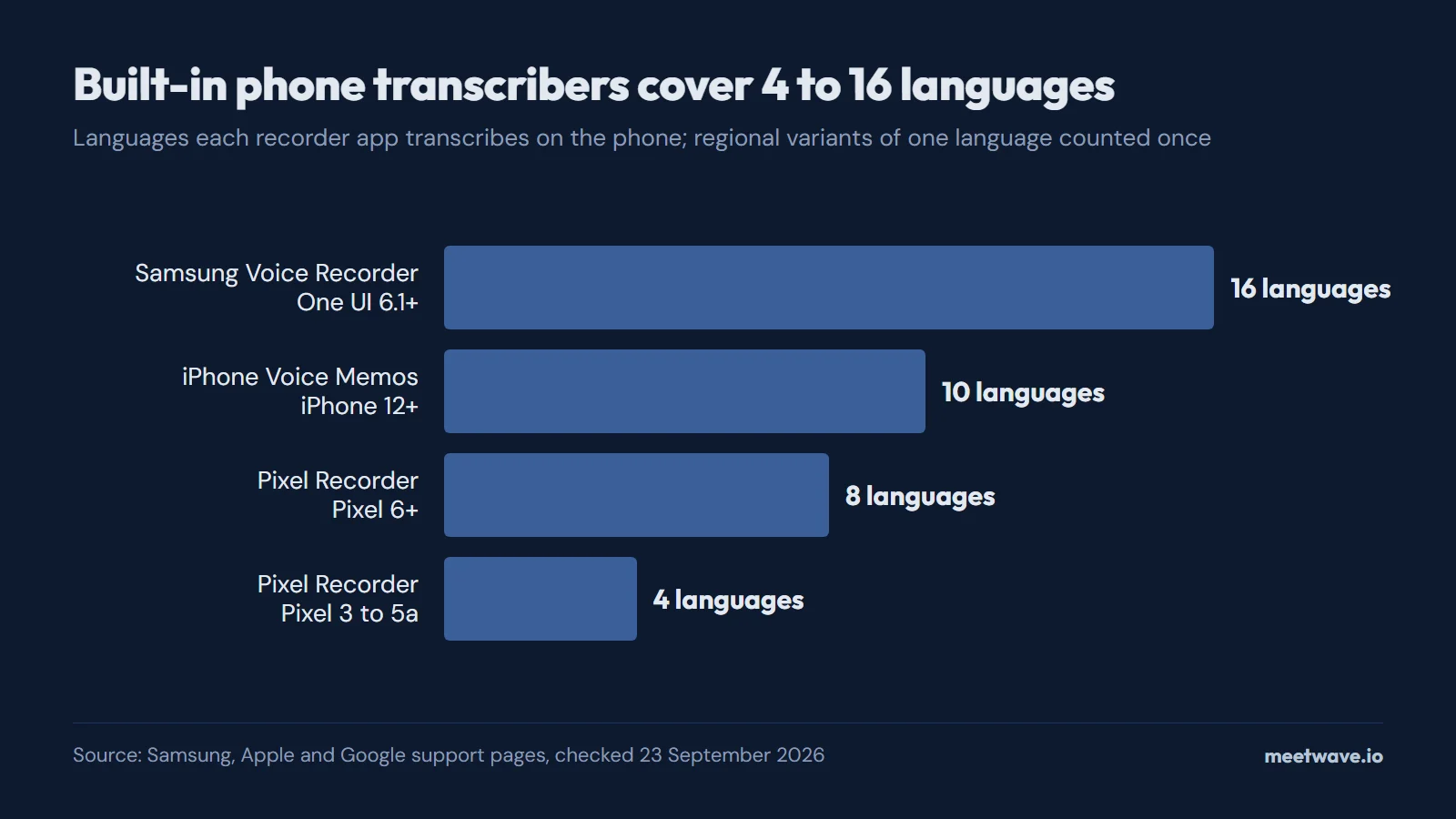 Figure 3. Languages each built-in phone transcriber supports. Source: Samsung, Apple and Google support pages, checked September 2026.
FAQ
Can a voice recorder app transcribe?
Yes on recent iPhones, Pixels and Galaxy phones: Voice Memos, Recorder and Voice Recorder all turn speech into text on the device (Apple, Google, Samsung). Sound Recorder on Windows 11 does not (Microsoft).
Can I transcribe a voice memo recorded before iOS 18?
Yes. When you open a recording made in iOS 17 or earlier on an iPhone 12 or later, Voice Memos transcribes it automatically if it contains speech (Apple).
Does Pixel Recorder label who is speaking?
Yes, in US English only, on Pixel 6 and later. Turn it on in Recorder settings → Speaker labels (Google Pixel Help).
How far should the phone be from the speaker?
As close as practical. In the model authors' measurements on the same meetings, one distant microphone produced 39.9% wrong words against 17.4% from headset microphones (Radford et al., 2022).
What is voice transcription?
Voice transcription turns recorded speech into written text. For the file side of it, formats and length limits, see how to transcribe audio.
Sources
- Apple — View a Voice Memos transcription on iPhone, iPhone User Guide for iOS 27 (2026). Accessed 2026-09-23.
- Google — Use speaker labels in a recording, Pixel Phone Help (undated). Accessed 2026-09-23.
- Google — Create, edit & manage transcriptions, Pixel Phone Help (undated). Accessed 2026-09-23.
- Google — Save & share recordings & transcripts, Pixel Phone Help (undated). Accessed 2026-09-23.
- Samsung — Use Voice Recorder with Galaxy AI on Galaxy phones or tablets (undated). Accessed 2026-09-23.
- Microsoft — Transcribe your recordings (undated). Accessed 2026-09-23.
- Microsoft — Using a Voice Recorder for Your PC, Windows Learning Center (2023). Accessed 2026-09-23.
- Radford et al. — Robust Speech Recognition via Large-Scale Weak Supervision, arXiv:2212.04356 (2022). Accessed 2026-09-23.
- AMI project — AMI Meeting Corpus (undated). Accessed 2026-09-23.
Still comparing tools?
See how MeetWave stacks up against the tools most teams evaluate alongside it.
- MeetWave vs FathomFree AI meeting assistant and note taker focused on sales teams
- MeetWave vs FellowSee how MeetWave compares to Fellow for meeting notes and AI summaries
- MeetWave vs GranolaSee how MeetWave compares to Granola for bot-free meeting notes
More on this: Audio to text







