How to Record a Zoom Meeting: Computer, Cloud, Free Plan, Not the Host
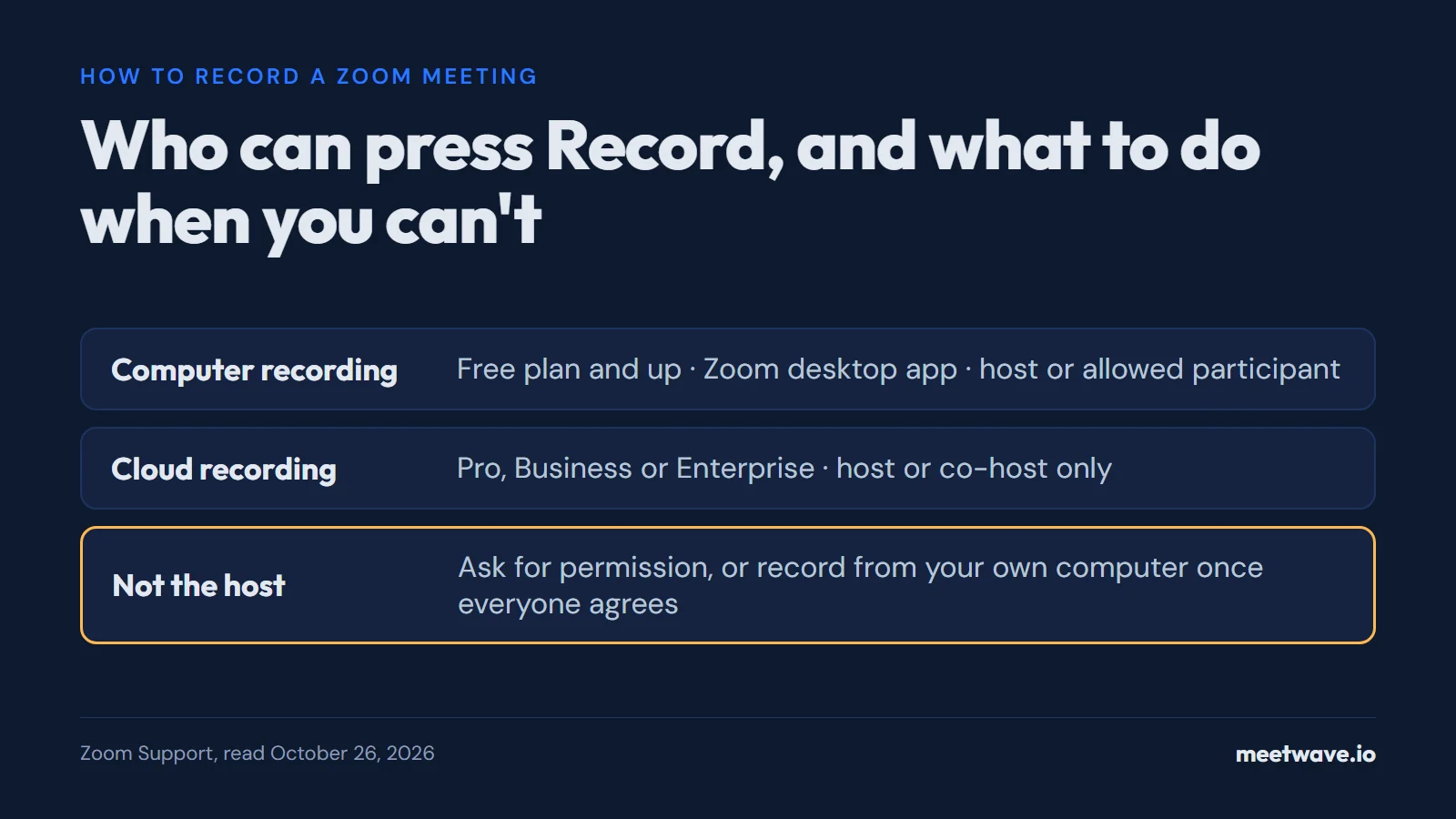
Zoom has two built-in recorders. Computer recording works on the free Basic plan, but only in the Zoom desktop app for Windows, macOS or Linux; cloud recording needs a Pro, Business or Enterprise license. The host records, or a participant the host allows, and only hosts and co-hosts can start a cloud recording (Zoom Support, checked 2026-10-26). If you cannot press Record, ask the host, or record from your own computer after everyone agrees. Do record: five minutes after a conversation, people in a lab study recalled about 10% of its ideas.
Computer recording or cloud recording
Pick by plan and app: computer recording is the one every account has, cloud recording is the one that works on a phone and in a browser. The table puts Zoom's two recorders side by side, from Zoom's own support pages, read on 2026-10-26.
| Computer recording | Cloud recording | |
|---|---|---|
| Plans | Basic (free) and above | Pro, Business, Education, Enterprise |
| Apps | Zoom desktop app for Windows, macOS, Linux | Desktop app, mobile app for iOS and Android, Zoom Web App |
| Phone or tablet | Not supported on iOS, iPad or Android | Yes |
| Who can start it | The host, or a participant the host allows | Hosts and co-hosts only |
| Where the file goes | A zoom folder in Documents on your computer | Your Zoom account: Recordings & Transcripts in the web portal, and Zoom Hub |
| Audio transcript | None from Zoom | A VTT file, if audio transcription is turned on |
| Files | MP4 video, M4A audio, chat text | MP4 video, M4A audio, chat text |
Source: Zoom Support, computer recording, cloud recording, getting started, audio transcription (2026).
A computer recording appears only after Zoom converts it when the meeting ends; the folder opens when conversion finishes (Zoom Support). A cloud recording has to process first, which Zoom says takes about twice the recorded duration (Zoom Support). Exact folder paths, file sizes and what to do when a file never converted are in where Zoom saves recordings.
How to start a recording
Sign in to the Zoom desktop app first. A host who joins without signing in is not recognised as the host, and Zoom asks them to request permission like any participant (Zoom Community, 2022).
- Turn it on once. In the Zoom web portal, open Settings → Recording and switch on Record to computer files (Zoom Support).
- To your computer. In the meeting toolbar, click Record, then Record on this Computer (Zoom Support).
- To the cloud. In the toolbar, click More → Record → Record to the cloud. On a phone: More → Record → Start recording, as host or co-host (Zoom Support).
Everyone sees a recording indicator in the top-left corner while it runs, and people who dialled in by phone hear a message unless the host turned it off (Zoom Support).
What the free Basic plan records
Basic records to your computer and nothing else. Zoom's pricing table lists Basic recording as "Local", meetings of 40 minutes, and up to 100 participants; Pro adds 10 GB of cloud storage per license and recording transcripts, at $16.99 per user a month billed monthly or $14.16 billed annually (Zoom pricing, read 2026-10-26).
What that means in practice, by Zoom's own pages:
- No cloud copy and no Zoom transcript. Audio transcripts are made only for cloud recordings, on Pro, Business, Education or Enterprise (Zoom Support).
- No recording from a phone. "Computer recording is only supported in the desktop app", and the mobile app supports cloud recording only (Zoom Support FAQ). A free account on a phone has no Record button, as people keep finding out: "I have the free version of Zoom ... but I cannot find the record button" (Zoom Community, 2024).
- No recording from the browser. Zoom lists only the desktop app for computer recording and lists the Zoom Web App under cloud recording (computer recording; cloud recording). On a Chromebook that leaves a free account without a Zoom recorder; recording Zoom on a Chromebook covers the way around it.
When you are not the host
Click Record, and Zoom offers to ask the host; the host gets a pop-up and approves or denies it (Zoom Community, 2023). The host can also grant it unasked: Participants → More → Allow Record, after which a recording icon shows next to your name (Zoom Support). An account admin can let internal, external or chosen-domain participants start a computer recording by themselves, or approve their requests automatically (Zoom Support).
A cloud recording is different: only hosts and co-hosts can start one, so the host has to make you co-host (Zoom Support). The full walk-through, with the cases where the request never reaches the host, is in record Zoom or Teams without host permission.
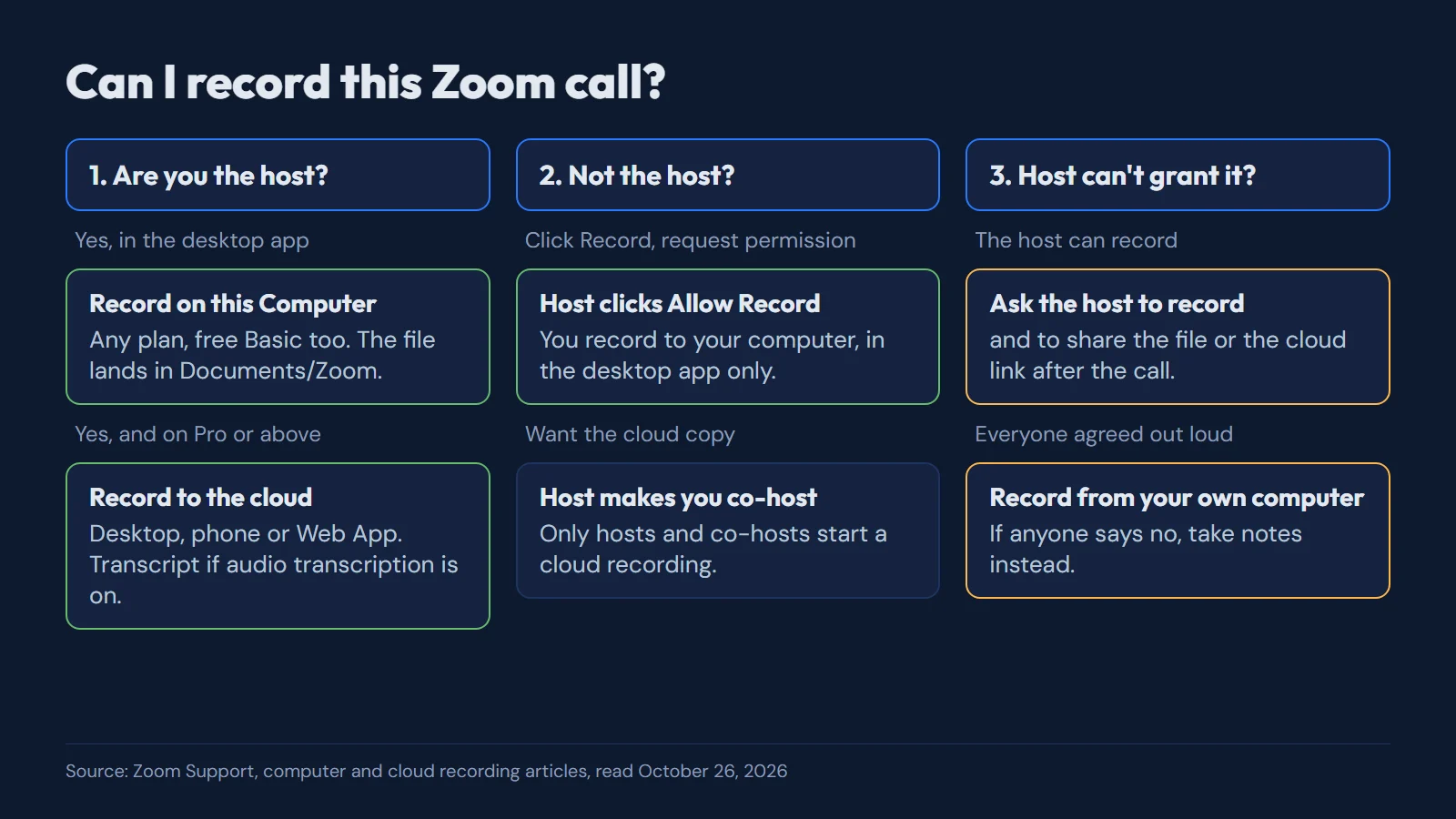 Figure 1. Can I record this Zoom call? Three questions, in the order you meet them. Source: Zoom Support, computer and cloud recording articles, read 2026-10-26.
The same chart as a list, for a phone screen (Zoom Support):
- You are the host. Record on this Computer on any plan, in the desktop app; record to the cloud on Pro or above, from the desktop, the phone or the Web App.
- You are not the host. Click Record and request permission; the host clicks Allow Record. For a cloud copy, the host makes you co-host.
- The host can't grant it (recording is switched off for the account, or the host is away). Ask the host to record and share the file or the cloud link. If everyone has agreed out loud, record from your own computer; if anyone says no, take notes instead.
Recording from your own computer
When Zoom's recorder is out of reach, a recorder on your own computer captures what the computer plays and your microphone, so it needs no permission from the meeting. MeetWave does this without a bot: on Windows, the desktop app captures system audio from any app, the Zoom desktop app included; on a Mac, Linux or ChromeOS, open the meeting link in Chrome, join from the browser, and the Chrome extension records the tab. It does not record the Zoom desktop app on a Mac or Linux. Nothing joins the participant list, so telling people is on you; the extension can post a recording notice in the meeting chat, one switch in its settings (how no-bot recording works).
What a recording keeps that memory drops
A demo job interview shows why the file is worth the trouble: the interviewer hosts the call, the candidate cannot press Record, and the best fact of the hour is said in passing. At 02:48, asked what "faster" meant, the candidate said: "It was, um, noticeably faster." Ten minutes later, at 12:30, answering a different question: "One point eight, I think. Anyway" (demo interview notes).
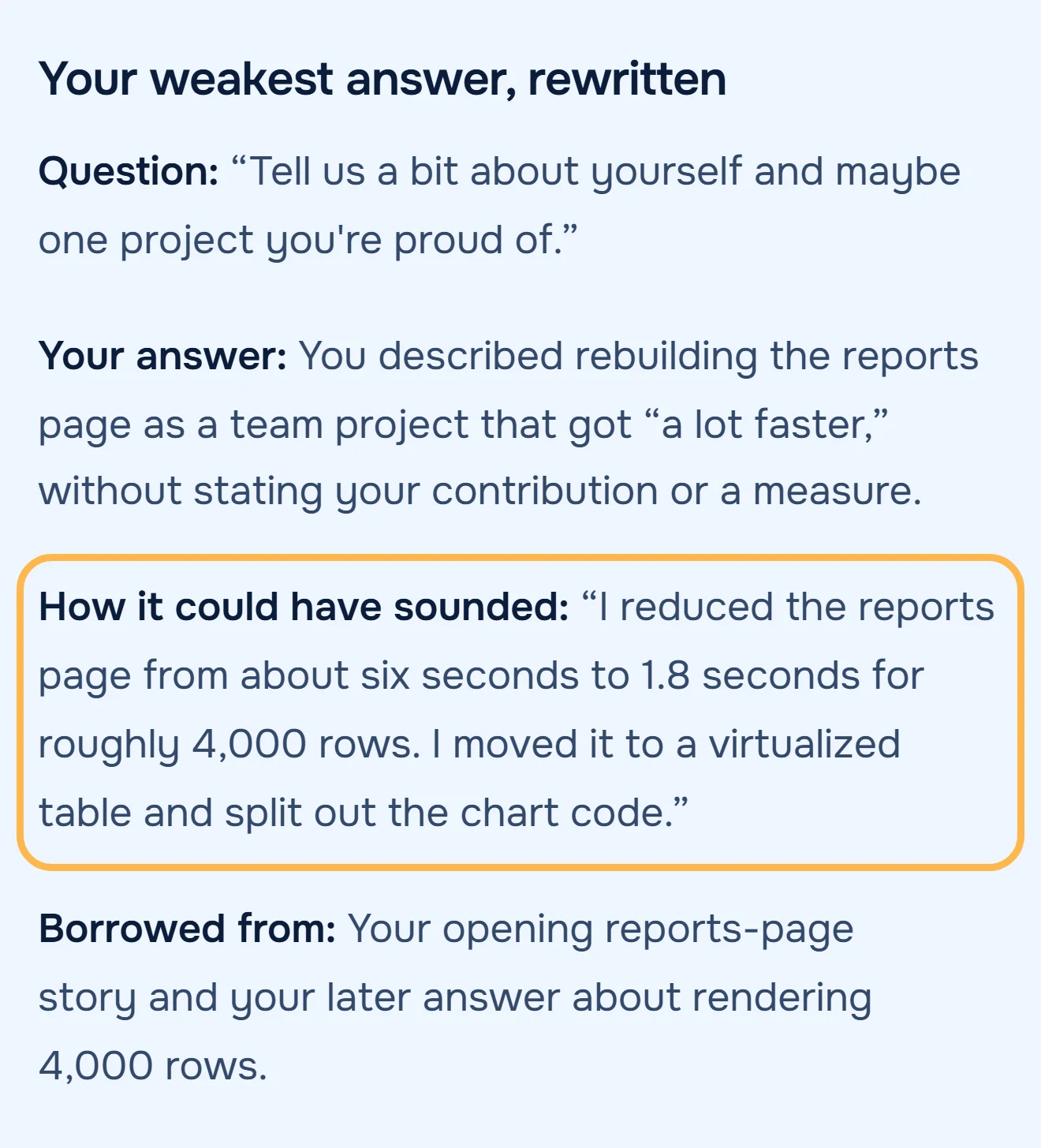 Figure 2. Demo meeting, people are fictional. The 1.8 seconds said in passing at 12:30 becomes the first sentence of the project answer. Source: demo technical screen, Interview Performance Review notes, October 2026.Analyzed with MeetWaveSee the full notesTry it on your next interview
The formula works for any call you record: find the number you said in passing, and move it to where you were asked for it. Memory will not find it for you. In a lab study of 128 people, recall five minutes after a 7-minute conversation was 10% of its idea units, and the best participant recalled 40% (Brown-Schmidt & Benjamin, 2018, reporting Stafford & Daly, 1984).
Tell people you're recording
Record only when everyone on the call agrees, and say it at the start. Zoom itself shows the indicator and can show a recording consent dialogue, and its reports mark who accepted it (Zoom Support FAQ). US federal law lets a party to a conversation record it (18 U.S.C. § 2511(2)(d)), but some states require the consent of everyone: Washington makes it unlawful to record a private conversation over a device "without first obtaining the consent of all the participants" (RCW 9.73.030). Other countries have their own rules. This is not legal advice.
If someone says no, the method still works: write down the numbers and promises within the hour, with the minute you remember them at.
Before the call: a checklist
Copy it into the meeting invite or your notes, and go through it five minutes before the start.
Plan: Basic records to my computer only; Pro or above can record to the cloud.
Role: am I the host? If not, ask now for Allow Record, or to be made co-host for the cloud.
App: join from the Zoom desktop app and sign in; a phone or the Web App records to the cloud only.
Where it lands: Documents > zoom on my computer, or Recordings & Transcripts in the Zoom web portal.
Who to tell: say at the start that the call is recorded and why; if anyone objects, stop and take notes.
After the call, a transcript turns into notes in the free meeting transcript summarizer, no account needed. What Zoom's own transcript contains on each plan is in Zoom meeting transcripts. Recording Google Meet or Teams instead: see Google Meet and Microsoft Teams in the guide to recording online meetings, which puts all platforms side by side.
Key numbers
- Zoom computer recording works on the Basic (free) plan, in the desktop app for 3 systems: Windows, macOS and Linux (Zoom Support, read 2026-10-26).
- Zoom cloud recording needs a licensed user on a Pro, Business or Enterprise account, and only hosts and co-hosts can start it (Zoom Support, read 2026-10-26).
- Zoom Basic meetings run 40 minutes with recording listed as "Local"; Pro costs $16.99 per user a month billed monthly and includes 10 GB of cloud storage per license (Zoom pricing, read 2026-10-26).
- A cloud recording takes about twice the recorded duration to process (Zoom Support, read 2026-10-26).
- Five minutes after a 7-minute conversation, 128 people in a 1984 lab study recalled 10% of its idea units on average (Brown-Schmidt & Benjamin, 2018).
How we calculated
- Zoom facts are what Zoom's support and pricing pages state on 2026-10-26; nothing is estimated. Plans and menus change, so each line carries the date it was read (Zoom Support).
- The demo interview is a fictional 15-minute technical screen written for MeetWave's test set before it was analyzed. MeetWave's Interview Performance Review read it once; the frame and the linked notes are that run, unedited, and both quotes were checked against its transcript word for word.
- The 10% is Stafford & Daly's 1984 result as reported in the 2018 review; we read the review, not the 1984 paper (Brown-Schmidt & Benjamin, 2018).
FAQ
What is Zoom cloud recording?
A recording that Zoom stores in your account instead of on your computer. It needs a Pro, Business or Enterprise license, only hosts and co-hosts can start it, and it works from the desktop app, the mobile app and the Zoom Web App (Zoom Support). You find it under Recordings & Transcripts in the Zoom web portal.
How do I record a Zoom meeting as a participant?
Ask the host for permission first: click Record and request permission, and the host clicks Allow Record (Zoom Support). If the host cannot grant it, record from your own computer after everyone on the call agrees; record Zoom or Teams without host permission has the steps.
Where do Zoom recordings go?
A computer recording goes to a folder named zoom in Documents, and a cloud recording to your Zoom account (Zoom Support). Paths for each system are in where Zoom saves recordings.
Can I record a Zoom meeting on the free plan?
Yes, to your computer, in the Zoom desktop app for Windows, macOS or Linux (Zoom Support). The free plan has no cloud recording and no Zoom transcript.
Can I record a Zoom meeting on my phone?
Only to the cloud, which needs a paid plan and the host or co-host role. Computer recording is not supported on iOS, iPad or Android (Zoom Support).
Sources
- Zoom Support — Enabling or disabling computer recording (2026). Accessed 2026-10-26.
- Zoom Support — Starting a computer recording (2026). Accessed 2026-10-26.
- Zoom Support — Starting a cloud recording (2026). Accessed 2026-10-26.
- Zoom Support — Getting started with computer and cloud recording (2026). Accessed 2026-10-26.
- Zoom Support — Using audio transcription for cloud recordings (2026). Accessed 2026-10-26.
- Zoom Support — Frequently asked questions about Zoom recording (2026). Accessed 2026-10-26.
- Zoom — Zoom Workplace pricing (2026). Accessed 2026-10-26.
- Brown-Schmidt, S., & Benjamin, A. S. — How we remember conversation: implications in legal settings, Policy Insights from the Behavioral and Brain Sciences 5(2), 187–194 (2018). Accessed 2026-10-26.
- United States Code — 18 U.S.C. § 2511 (2026). Accessed 2026-10-26.
- Revised Code of Washington — RCW 9.73.030 (2026). Accessed 2026-10-26.
- Zoom Community — recording a meeting (2023) and Zoom record button is missing (2024). Accessed 2026-10-26.
Still comparing tools?
See how MeetWave stacks up against the tools most teams evaluate alongside it.
- MeetWave vs Otter AISee how MeetWave compares to Otter AI for meeting intelligence
- MeetWave vs Fireflies.aiSee how MeetWave compares to Fireflies.ai for meeting intelligence
- MeetWave vs tl;dvSee how MeetWave compares to tl;dv for meeting intelligence
More on this: Meeting transcripts by platform







