Zoom vs Teams vs Google Meet in 2026: Which One Fits Your Team?
Pick the one your company already pays for: Teams comes with Microsoft 365, Meet with Google Workspace. On the free plans, Zoom Basic lists 40 minutes per meeting, Teams and Meet end group calls at 60 minutes, and only Zoom records for free. The cheapest paid seat is Teams Essentials at $4 a month, paid yearly; AI meeting notes start at $14 on the Workspace annual plan, $14.16 on Zoom Pro billed annually and $23.50 on Microsoft 365 with Copilot, paid yearly. Record the call either way: a week after a conversation, only 4.7% of its details were recalled by both people.
Every cell below was read on the platform's own pricing or help page on 3 November 2026, in US dollars, per user a month. Where a platform does not publish a fact, the cell says so. Video and audio quality are not compared: we did not measure them.
The comparison table
Each of the three splits the same features across different plans, under different names. The table puts them on one row each (Zoom pricing, Teams plans, Workspace prices).
| Zoom | Microsoft Teams | Google Meet | |
|---|---|---|---|
| Free: meeting length | 40 minutes per meeting | Group: 60 minutes. One-to-one: 60 minutes in Microsoft's support table, 30 hours on its Teams page | 3 or more people: 60 minutes. One-on-one: 24 hours |
| Free: participants | 100 | 100 | 100 |
| Free: recording | To your computer, desktop app only | No | Not in Google's list of plans that record |
| Cheapest paid seat | Pro, $14.16 billed annually ($16.99 monthly) | Teams Essentials, $4.00 paid yearly | Business Starter, $7 on the Annual Plan ($8.40 flexible) |
| Paid: length and participants | 30 hours, 100 | 30 hours, 300 | 24 hours, 100 on Starter |
| Recording on the cheapest paid seat | Computer, plus 10 GB cloud per license | Recordings with transcripts | No. From Business Standard, $14 |
| Who may start a recording | Host, or a participant the host allows. Cloud: host and co-hosts | Organizer and people in the same organization, not guests | Host, co-hosts (an outside co-host too), or anyone in the host's organization if host management is off |
| Transcript | Cloud recordings, Pro and up, as a VTT file | With recordings on Teams Essentials | Business Standard and up, 8 languages |
| AI notes | Meeting summaries: 3 hosted meetings a month on Basic, unlimited on Pro | Intelligent recap: Teams Premium or a Copilot license | Gemini in Meet, "Take notes for me": Business Standard and up |
| Where recordings live | Your computer (Documents, "zoom"), or Zoom cloud | Organizer's OneDrive, or SharePoint for channel meetings; an admin sets expiry | Organizer's Google Drive, "Google Meet" folder |
Source: Zoom pricing, Zoom recording types, Teams free plan, Teams business plans, Teams recording, Meet limits, Workspace plan features, Meet recording, all read 3 November 2026.
Free plan time limits
Zoom Basic lists "40 minutes per meeting" and 100 participants, with no separate rule for two people (Zoom pricing); Teams and Meet cut group calls at 60 minutes. Figure 1 shows the three group limits side by side.
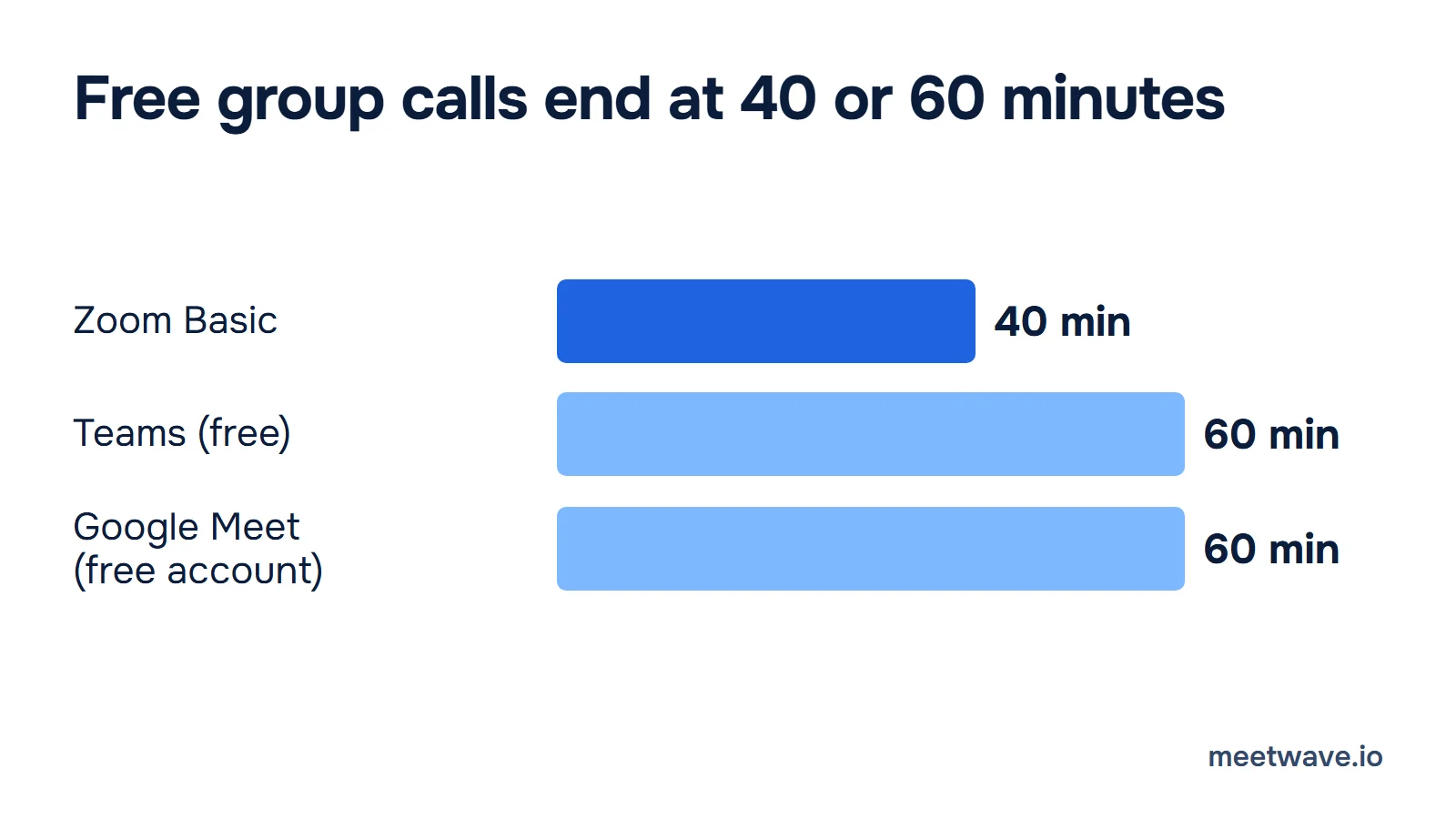
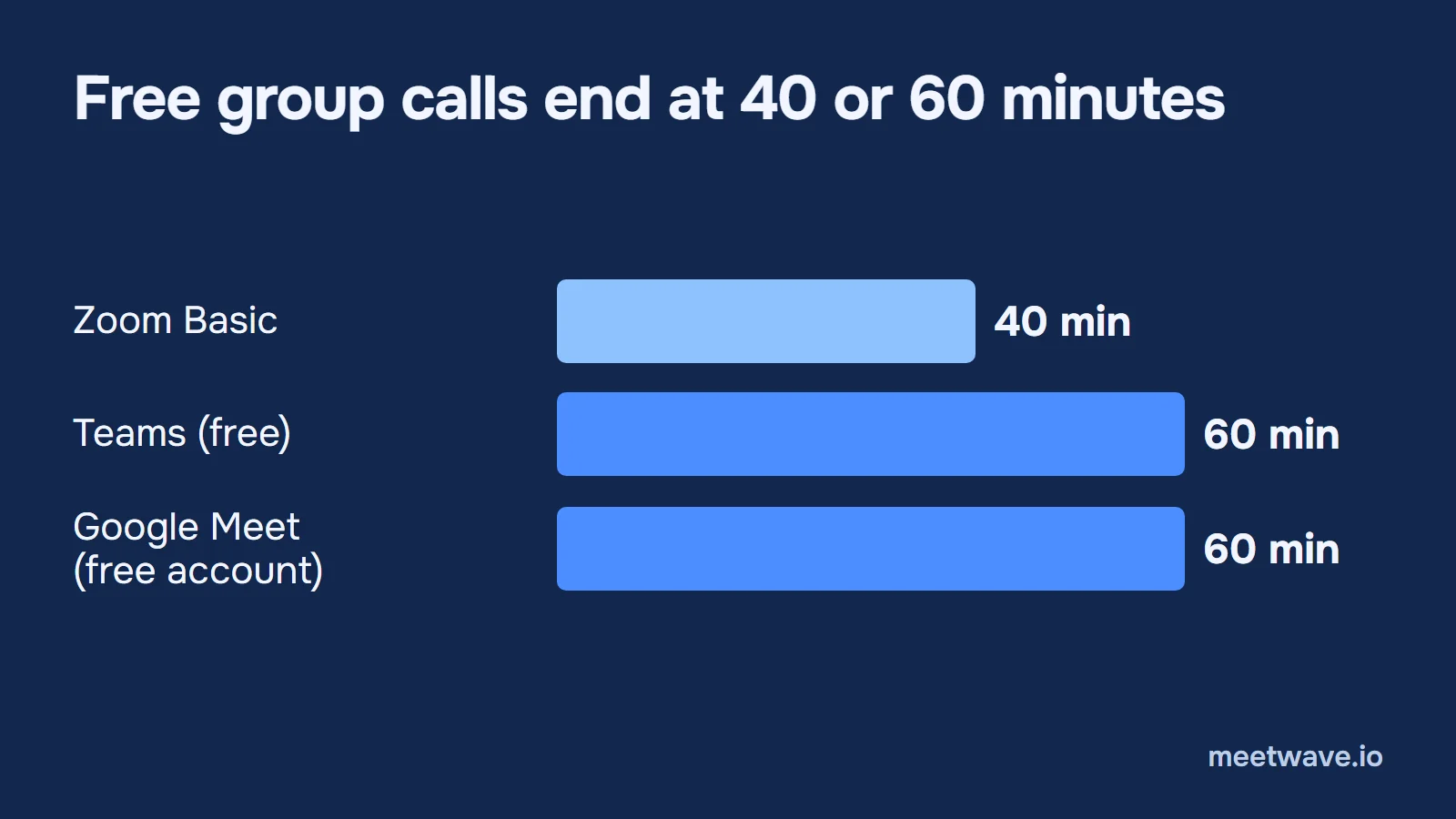 Figure 1. How long a free group meeting runs on each platform. One-to-one calls run 24 hours on Meet; for Teams, Microsoft's pages disagree (see below). Source: zoom.us/pricing, microsoft.com Teams free plan, Google Meet Help, read 3 November 2026.
Teams free states "Unlimited group meetings for up to 60 minutes" and "Unlimited one-to-one meetings for up to 30 hours", for up to 100 participants (Microsoft). Microsoft's own support table for Teams for personal use lists a 60-minute maximum and does not mention the one-to-one exception, so we do not state 30 hours as settled (Microsoft Support).
Google Meet without a subscription allows one-on-one meetings "for up to 24 hours" and meetings of 3 or more "for up to 60 minutes" on a computer. At 50 minutes everyone hears a chime and sees that the meeting is about to end (Google Meet Help). The limit counts people in the call, so a third person turns a 24-hour call into a 60-minute one.
Recording and transcripts
Only Zoom records on the free plan, and only from the desktop app. Zoom's computer recording works on "Basic (free) account or above" in the app for Windows, macOS or Linux, not on phones; cloud recording and the transcript need Pro or above (Zoom Support). The steps are in how to record a Zoom meeting.
Teams free lists "Meeting recordings: No"; Teams Essentials includes "Team meeting recordings with transcripts" for $4.00 a seat (Microsoft). Only the organizer and people from the same organization can start one, and it lands in the organizer's OneDrive (Microsoft Support). More in recording on Teams and Teams transcripts.
Google Meet records on Business Standard and up, not on Business Starter or a free account; files go to the organizer's Drive (Meet Help, Workspace plans). Transcripts follow the same editions and support 8 languages (Meet Help). More in recording on Meet and Meet transcripts; what each platform's transcript file contains is in meeting platform transcripts.
Price per seat
The cheapest paid seat costs $4 on Teams (paid yearly), $7 on Workspace (the Annual Plan, priced per month; prices vary by region) and $14.16 on Zoom (billed annually, up front). Paying monthly, Workspace Business Starter is $8.40 and Zoom Pro $16.99 (Workspace prices, Zoom pricing). Figure 2 compares the annual-plan prices.
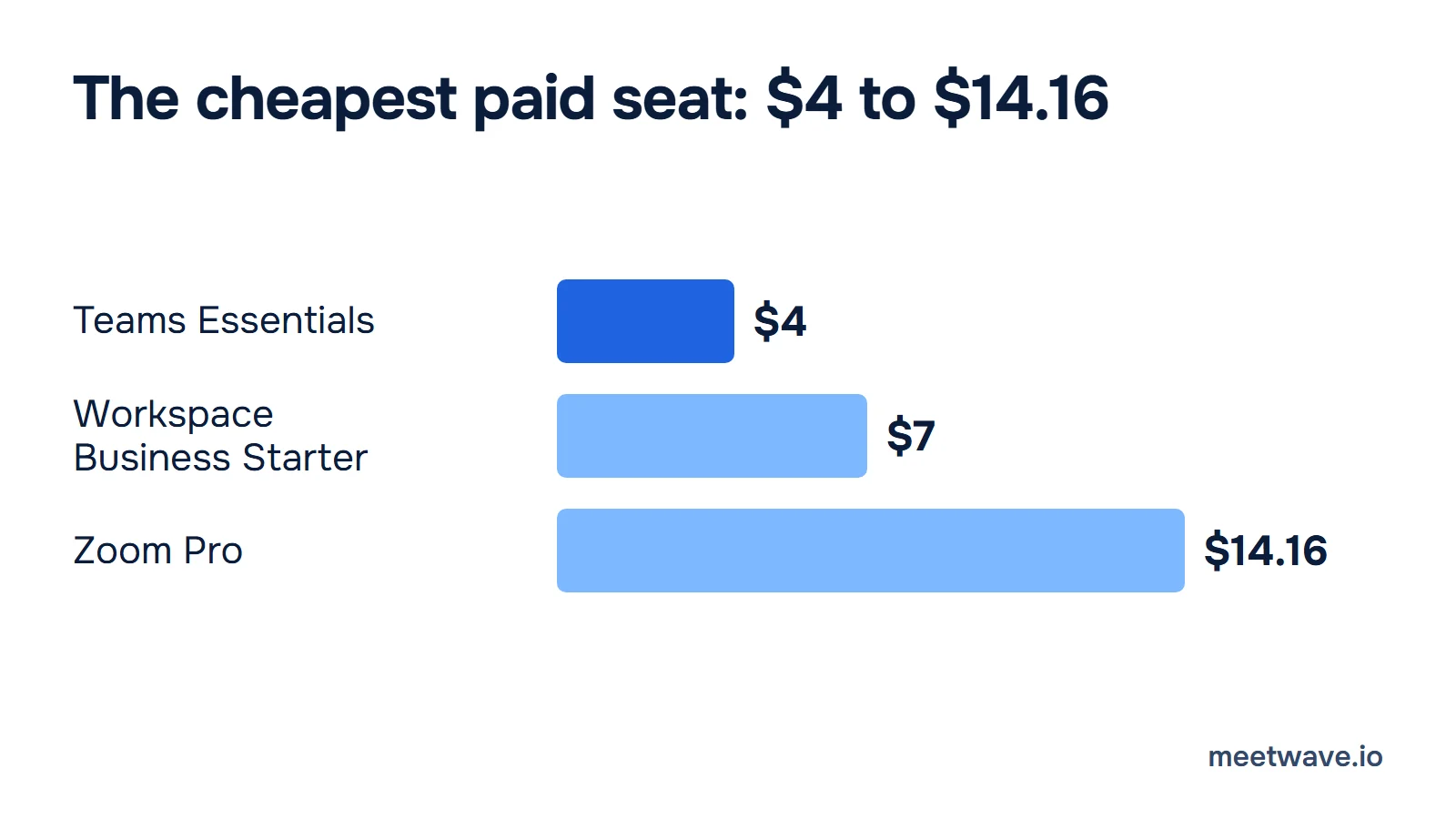
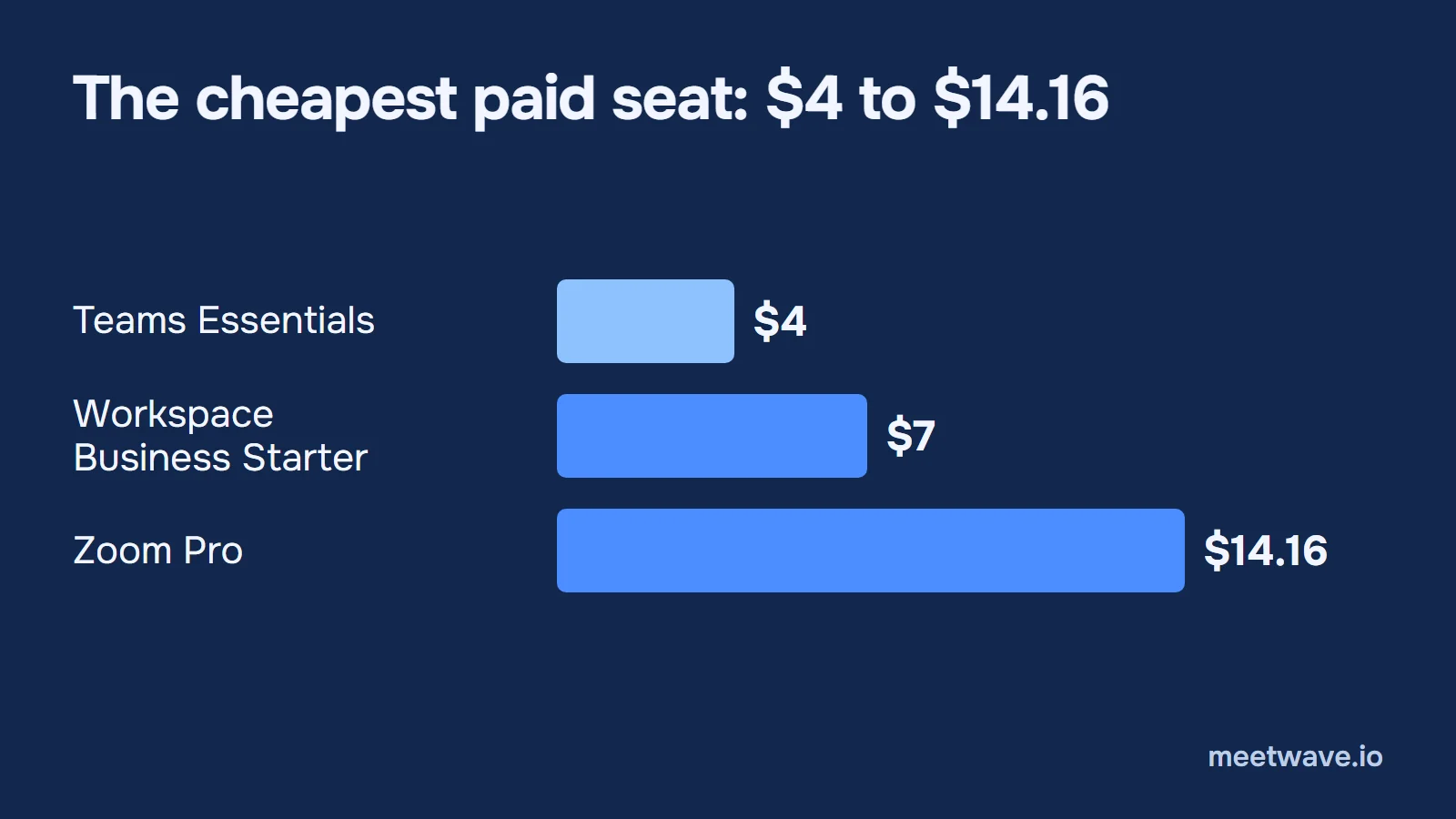 Figure 2. The cheapest paid plan of each, per user a month on an annual plan. Workspace Business Starter does not record meetings. Source: Microsoft, Google Workspace Admin Help, zoom.us/pricing, read 3 November 2026.
The cheap seats are not equal. Business Starter at $7 has no Meet recording and no Gemini in Meet; both start at Business Standard, $14 (Workspace plans, Workspace prices). Teams Essentials at $4.00 records with transcripts (Microsoft).
AI notes and what they cost
Zoom includes AI meeting summaries in Pro; Google includes Gemini in Meet from Business Standard; Microsoft charges for Copilot on top. Figure 3 shows the cheapest seat that includes the platform's own AI notes (Zoom pricing, Workspace plans, Microsoft).
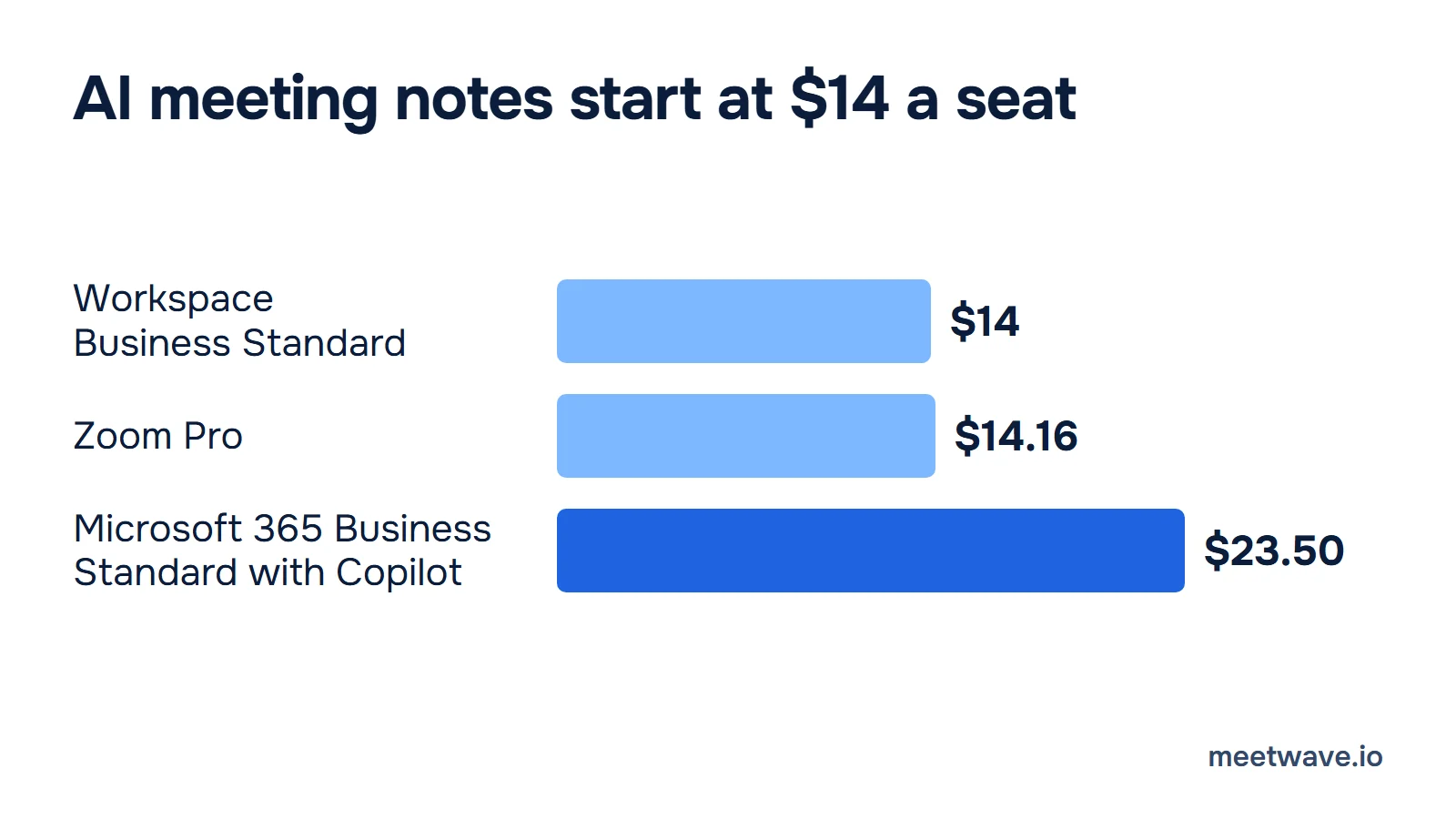
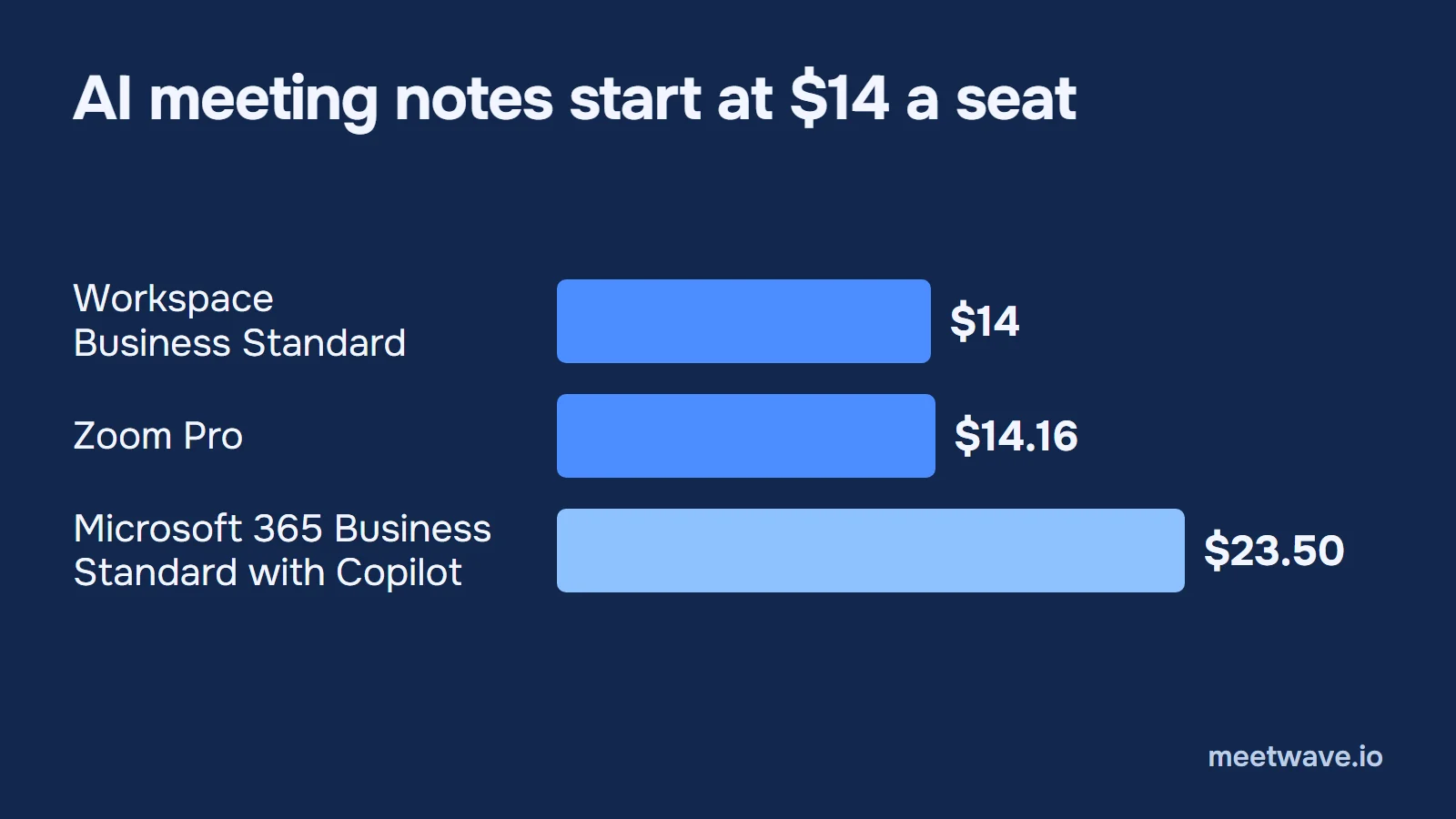 Figure 3. The cheapest plan of each that includes its own AI meeting notes, per user a month on an annual plan (Microsoft: paid yearly). Source: Google Workspace Admin Help and plan table, zoom.us/pricing, Microsoft Teams plans, read 3 November 2026. Method: see How we calculated.
Zoom. Basic gives meeting summaries for 3 hosted meetings a month and 3 uses of AI note-taking; Pro gives "Unlimited meeting summaries" at $14.16 billed annually (Zoom pricing). Zoom's AI page calls the assistant ZoomMate and sells more advanced AI as a separate license, without a price we could read (Zoom).
Microsoft Teams. AI notes come from intelligent recap, which needs "a Teams Premium license or Microsoft Copilot license" and transcription turned on (Microsoft Learn). Teams Premium is $10.00, paid yearly, but needs a Teams Enterprise license. Microsoft 365 Business Standard with Copilot is $23.50, paid yearly. The Copilot Business add-on is $21.00 a month on an annual commitment, and $18.00 for the first year as a promotional price until 31 December 2026 (Microsoft). Microsoft's page requires an "eligible Microsoft 365 subscription"; we could not confirm that Teams Essentials is one, so we price no Essentials-plus-Copilot route (how we calculated).
Google Meet. "Take notes for me" writes the notes into a Google Doc in the organizer's Drive and tells everyone in the meeting that notes are being taken. It needs "an eligible Google Workspace edition or Google AI plan" (Meet Help); on Workspace that starts at Business Standard, $14 (Workspace prices).
Pick by situation
There is no winner across all rows; the row that matches your situation decides. Each line points back to a row of the comparison table.
| Your situation | Fits | The row that decides |
|---|---|---|
| Already on Microsoft 365 | Teams | Cheapest paid seat: Teams comes with Microsoft 365 Business plans |
| Already on Google Workspace | Meet | Recording and AI notes come with Business Standard and up |
| Free plan only, groups | Teams or Meet | Free: meeting length, 60 minutes against 40 |
| Free plan only, you must record | Zoom | Free: recording, the only one of the three |
| Outside guests who must record | Zoom | Who may start a recording: Zoom's settings can allow external participants; Teams cannot; Meet only as co-host |
| One-on-one calls on a free plan | Meet | Free: one-to-one runs 24 hours on Meet; Microsoft's Teams pages give 30 hours and 60 minutes |
Source: the rows above, from Zoom, Microsoft and Google help pages, read 3 November 2026.
Notes on any of the three
Whichever you pick, recording and AI notes depend on the plan and the host. If you are a guest, on a free plan, or the host's settings keep Record grey, notes can come from your own computer instead. MeetWave records Google Meet, Zoom and Teams in Chrome on any computer, or any call app with its Windows app, and no bot joins the call (how it shows up in a meeting). Record only with everyone's consent.
Already have a transcript from any of the three? The free meeting transcript summarizer turns a Zoom .vtt, a Teams transcript or a Meet doc into a summary, decisions and action items in your browser.
Copy the comparison
The block below is the table in plain text, for a doc or a chat with whoever signs off on the plan. The prices and limits were read on 3 November 2026; check them again before you buy.
Zoom vs Teams vs Google Meet, read 3 November 2026 (USD, per user a month, annual plans)

FREE PLAN
- Zoom Basic: 40 min per meeting, 100 people, records to your computer
- Teams (free): group 60 min, one-to-one 60 min (support table) or 30 h (Teams page), 100 people, no recording
- Google Meet (free account): 3+ people 60 min, one-on-one 24 h, 100 people, no recording

CHEAPEST PAID SEAT
- Zoom Pro: $14.16 billed annually (monthly $16.99), 30 h, 100 people, computer + 10 GB cloud recording, transcripts, AI summaries
- Teams Essentials: $4.00 paid yearly, 30 h, 300 people, recordings with transcripts
- Workspace Business Starter: $7 Annual Plan (flexible $8.40), 24 h, 100 people, no recording, no Gemini in Meet

AI MEETING NOTES, CHEAPEST SEAT
- Workspace Business Standard: $14 Annual Plan (Gemini in Meet, recording, transcripts)
- Zoom Pro: $14.16 billed annually (unlimited meeting summaries)
- Microsoft 365 Business Standard with Copilot: $23.50, paid yearly (intelligent recap)

WHO MAY RECORD
- Zoom: host, or a participant the host allows; cloud: host and co-hosts
- Teams: organizer and people in the same organization, not guests
- Meet: host, co-hosts, or the host's organization if host management is off
FAQ
Is Zoom better than Teams?
Neither wins every row. Zoom records on its free plan, and its settings can let outside participants record; Teams costs less per seat, $4.00 for Teams Essentials against $14.16 for Zoom Pro (Zoom pricing, Microsoft). A team already on Microsoft 365 has Teams included.
What is the Google Meet time limit?
Without a subscription, a meeting of 3 or more people ends at 60 minutes, and a one-on-one runs up to 24 hours on a computer. A chime sounds at 50 minutes (Google Meet Help). Workspace plans allow 24 hours for any meeting (Workspace plans).
Which is free: Zoom, Teams or Meet?
All three have a free plan for 100 participants. Zoom Basic ends meetings at 40 minutes but records to your computer; Teams and Meet allow 60 minutes for groups and do not record (Zoom pricing, Microsoft Support, Google Meet Help).
Key numbers
- Zoom Basic, the free plan, allows "40 minutes per meeting" for up to 100 participants in 2026 (Zoom pricing).
- Teams free and Google Meet without a subscription end group meetings at 60 minutes, per their own pages in 2026 (Microsoft, Google Meet Help).
- Teams Essentials costs $4.00 per user a month, paid yearly, in November 2026 (Microsoft).
- The cheapest seats with built-in AI meeting notes cost $14 (Workspace Business Standard), $14.16 (Zoom Pro) and $23.50 (Microsoft 365 Business Standard with Copilot) a month on annual plans, in November 2026 (how we calculated).
- Only 4.7% of a conversation's details were recalled by both partners a week later, in a 2023 study (Brown-Schmidt et al., Cognitive Science, 2023).
How we calculated
Every price is the platform's own US price per user a month on an annual plan, read on 3 November 2026: Zoom on zoom.us/pricing (billed annually, up front), Microsoft on its Teams plans page (paid yearly), Google on its billing help page (the Annual Plan, priced per month; payment options vary by region). "Cheapest seat with AI meeting notes" is the lowest-priced plan whose own page lists the platform's AI meeting notes: Zoom Pro ("Unlimited meeting summaries"), Workspace Business Standard ("Gemini in Meet") and Microsoft 365 Business Standard with Copilot. Microsoft 365 Business Standard with Copilot ("paid yearly") is the Microsoft plan that lists Copilot in Teams. Figure 3 shows single plans only; we price no Teams Essentials plus Copilot route, because we could not confirm Essentials is an eligible base for the add-on. Taxes, promotions and trials are left out.
Sources
- Zoom — Plans & Pricing (2026). Accessed 2026-11-03.
- Zoom Support — Recording a meeting: local and cloud (2026). Accessed 2026-11-03.
- Zoom Support — Enabling and starting computer recordings (2026). Accessed 2026-11-03.
- Zoom — ZoomMate, your AI teammate (2026). Accessed 2026-11-03.
- Microsoft — Free video conferencing with Microsoft Teams (2026). Accessed 2026-11-03.
- Microsoft Support — Learn more about subscriptions for Microsoft Teams Free (2026). Accessed 2026-11-03.
- Microsoft — Compare Microsoft Teams business options (2026). Accessed 2026-11-03.
- Microsoft Support — Record a meeting in Microsoft Teams (2026). Accessed 2026-11-03.
- Microsoft Learn — Manage Teams recording policies for meetings and events (2026). Accessed 2026-11-03.
- Microsoft Learn — Intelligent recap for Teams calls, meetings, and events (2026). Accessed 2026-11-03.
- Google Meet Help — Learn what requirements you need to use Google Meet (2026). Accessed 2026-11-03.
- Google Workspace — Compare pricing plans (2026). Accessed 2026-11-03.
- Google Workspace Admin Help — Compare Flexible and Annual/Fixed-Term payment plans (2026). Accessed 2026-11-03.
- Google Meet Help — Record a video meeting (2026). Accessed 2026-11-03.
- Google Meet Help — Use transcripts with Google Meet (2026). Accessed 2026-11-03.
- Google Meet Help — Take notes for me in Google Meet (2026). Accessed 2026-11-03.
- Brown-Schmidt S, Jaeger CB, Evans MJ, Benjamin AS — MEMCONS: How contemporaneous note-taking shapes memory for conversation, Cognitive Science 47(4):e13271 (2023). Accessed 2026-11-03.
Still comparing tools?
See how MeetWave stacks up against the tools most teams evaluate alongside it.
- MeetWave vs TactiqSee how MeetWave compares to Tactiq for meeting transcripts
- MeetWave vs NottaSee how MeetWave compares to Notta for meeting transcription
- MeetWave vs KrispSee how MeetWave compares to Krisp for meeting notes
More on this: Meeting transcripts by platform