How to Write Meeting Notes: A Practical Guide
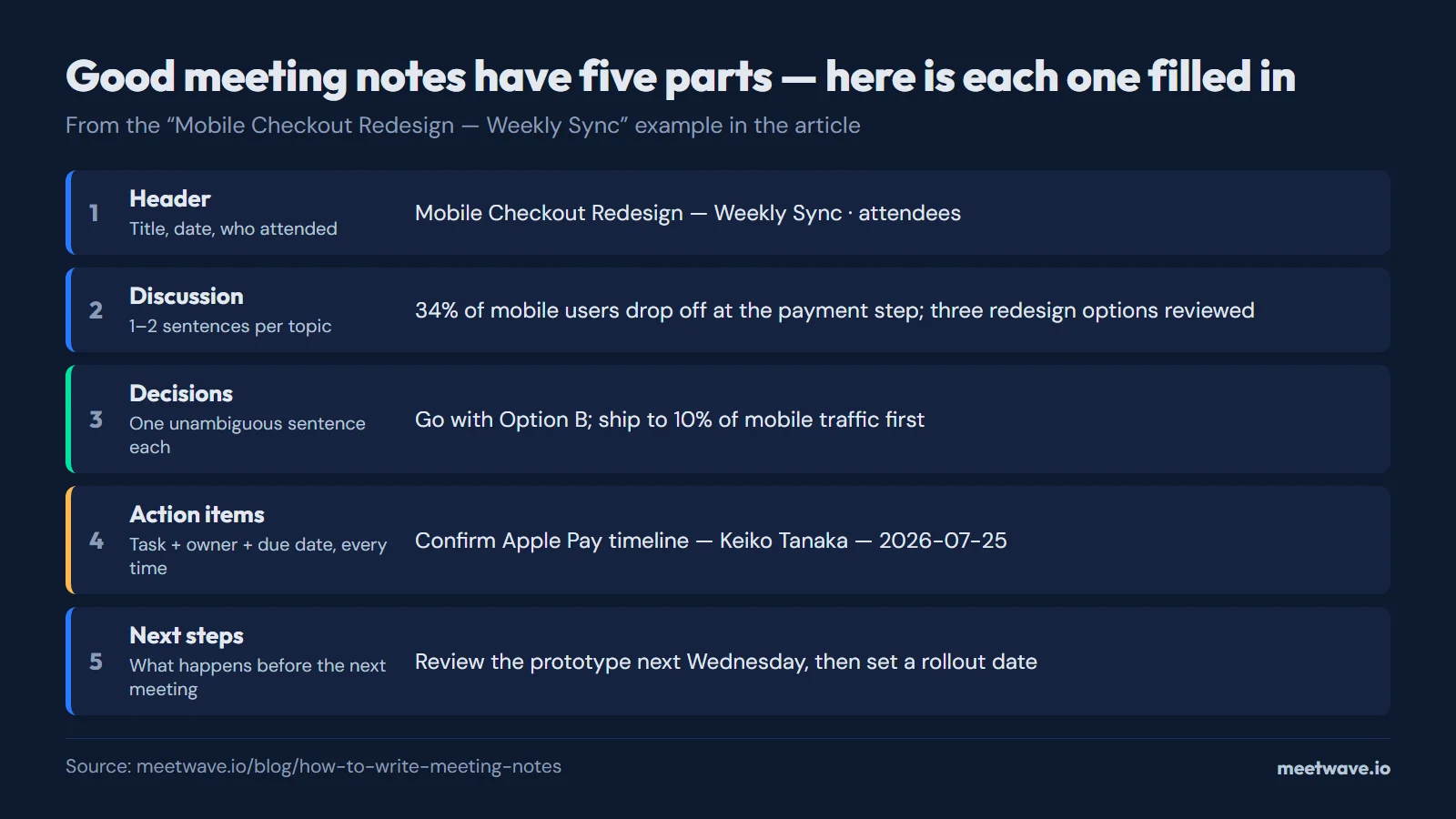
Good meeting notes need four things: who was there, what was decided, who owes what by when, and what stays open. A short header covers attendance; one or two sentences per topic cover discussion; each decision gets one clear sentence; each action item gets a task, an owner, and a due date. Everything else is optional.
How to Write Meeting Notes
- Set up the structure before the meeting starts. Open a template with the four sections already in place — attendees, discussion, decisions, action items, next steps — so you are filling in fields, not building a document from a blank page.
- Fill in attendees as people join, not at the end when you are trying to remember who was there.
- Write the discussion point for a topic right after it wraps up, not at the end of the meeting. Memory of specifics fades fast once the conversation moves on.
- Capture the decision the moment it is stated, in one sentence. If the room seems unsure what was decided, ask out loud — that clarity is worth the ten seconds of awkwardness.
- Record the action item the moment someone commits to it, with their name and a date, not "soon" or "this week."
- Review within the hour. Clean up shorthand and confirm you did not miss an action item while the meeting is still fresh.
Most meeting notes fail for one of two reasons. Either they try to capture everything said, which turns into a wall of text nobody reads, or they capture nothing beyond a vague summary that leaves everyone unsure what actually happened. The fix is not writing more — it is writing the right four things, every time, in the same place.
What Meeting Notes Actually Need
A working set of meeting notes has a short header, then four sections: discussion, decisions, action items, and next steps.
- Header — meeting title, date, and who attended. This is context, not content, and it takes ten seconds to fill in.
- Discussion points — one or two sentences per topic. Not a transcript, not a summary of every sentence spoken, just enough for someone who missed the meeting to understand what was covered and why.
- Decisions — each decision written as a single, unambiguous sentence. "The team agreed to delay launch by one week" is a decision. "There was general agreement to move forward" is not — it does not say what was actually agreed.
- Action items — a task, an owner, and a due date. All three, every time. A task with no owner or no date is a wish, not an action item.
- Next steps — what happens before the group meets again, so momentum carries over instead of resetting.
A Filled Example
Here is what that structure looks like filled in for a real product sync:
Mobile Checkout Redesign — Weekly Sync Date: 2026-07-22. Attendees: Priya Nair, Tom Wallace, Keiko Tanaka, Diego Alvarez.
Discussion points: Reviewed drop-off data showing 34% mobile abandonment at the payment step. Diego presented three redesign options; the team leaned toward Option B, a single-page checkout with saved payment methods. Keiko flagged that Apple Pay integration timing needs confirmation from the payments vendor before a launch date can be set.
Decisions: Move forward with Option B. Hold the launch date until the Apple Pay integration timeline is confirmed. Ship to 10% of mobile traffic first, not a full rollout.
Action items:
| Task | Owner | Due Date |
|---|---|---|
| Confirm Apple Pay integration timeline with vendor | Keiko Tanaka | 2026-07-25 |
| Build Option B checkout prototype for review | Diego Alvarez | 2026-07-31 |
| Set up 10% A/B test cohort | Tom Wallace | 2026-08-01 |
Next steps: Reconvene next Wednesday to review the prototype and confirm the Apple Pay timeline before setting a rollout date.
Notice what is missing: no motions, no vote counts, no formal resolutions. That structure belongs to meeting minutes, not everyday meeting notes — see the comparison below.
What to Record vs What to Skip
| Record this | Skip this |
|---|---|
| The decision that was reached | Every argument made on the way to it |
| The owner and due date of each action item | Vague commitments with no name attached |
| A one-sentence summary of each discussion topic | A blow-by-blow account of who said what |
| Open questions that still need an answer | Side conversations that went nowhere |
| Numbers, dates, and figures exactly as stated | Personal opinions of the person taking notes |
The test for whether something belongs in the notes is simple: will anyone need to look this up later? If yes, write it down precisely. If it was context for a discussion that ended in a clear decision, the decision is what gets recorded — not the path to it.
How Meeting Notes Differ From Meeting Minutes
The two terms get used interchangeably, but they are not the same document. Meeting notes are a working record for the team's own use — flexible, informal, built around discussion, decisions, and action items. Meeting minutes are a more formal record, sometimes approved by attendees afterward, and for boards and governance meetings they typically include quorum, formal motions, and vote counts.
Most team meetings only need notes. Boards and formal committees need minutes. If you are not sure which your meeting needs, the simplest rule is: if nobody is voting on anything, you need notes, not minutes. For the fuller comparison and a generator with the formal fields, see the meeting minutes template.
Use a Template Instead of Starting From Scratch
The structure in this guide matches the meeting notes template generator on this site: fill in the fields live during the meeting, watch the formatted preview update as you type, and download the result as Markdown when you are done. No motions or vote counts to skip past — just the fields a working meeting actually needs.
FAQ
What should be included in meeting notes?
Meeting notes should include the meeting title and date, who attended, a short summary of each discussion point, the decisions made, and action items with a named owner and due date for each. Anything beyond that — a verbatim transcript, every side comment, personal opinions — makes the notes harder to read without adding value.
What is the difference between meeting notes and meeting minutes?
Meeting notes are an informal, flexible working record for the team's own use. Meeting minutes are a more formal record, often following a fixed structure, and for board or governance meetings they include quorum, motions, and vote counts. Most team meetings only need notes.
How do you write meeting notes quickly?
Set up the structure before the meeting starts so you are filling in fields, not building a document live. Write each discussion point right after that topic wraps up, capture decisions in one clear sentence the moment they are stated, and record the owner and due date for every action item as soon as someone commits to it.
Is there a free meeting notes template?
Yes. The meeting notes template generator on this site is free: fill in the fields, watch the formatted preview update, and download the result as Markdown. No account and no sign-up.
What format should meeting notes be in?
A short header with title, date, and attendees, followed by discussion points, decisions, an action items table with owner and due date, and next steps. Markdown works well for this because it stays readable as plain text while rendering cleanly in Notion, Slack, and most notes apps.
Can I record a meeting instead of writing notes manually?
Yes. Recording the audio and generating a transcript solves the problem of missing details, but a transcript is not the same as notes — it still needs to be turned into a structured summary. Tools like MeetWave record a meeting on your own device — the MeetWave Chrome extension for browser calls on any OS, or the Windows desktop app — and generate structured notes automatically, which removes the real-time writing burden while still producing something scannable rather than a wall of transcript text.
Still comparing tools?
See how MeetWave stacks up against the tools most teams evaluate alongside it.
- MeetWave vs FellowSee how MeetWave compares to Fellow for meeting notes and AI summaries
- MeetWave vs GranolaSee how MeetWave compares to Granola for bot-free meeting notes
- MeetWave vs TactiqSee how MeetWave compares to Tactiq for meeting transcripts
More on this: Meeting minutes template







