
Why Is There No Transcript on This YouTube Video?
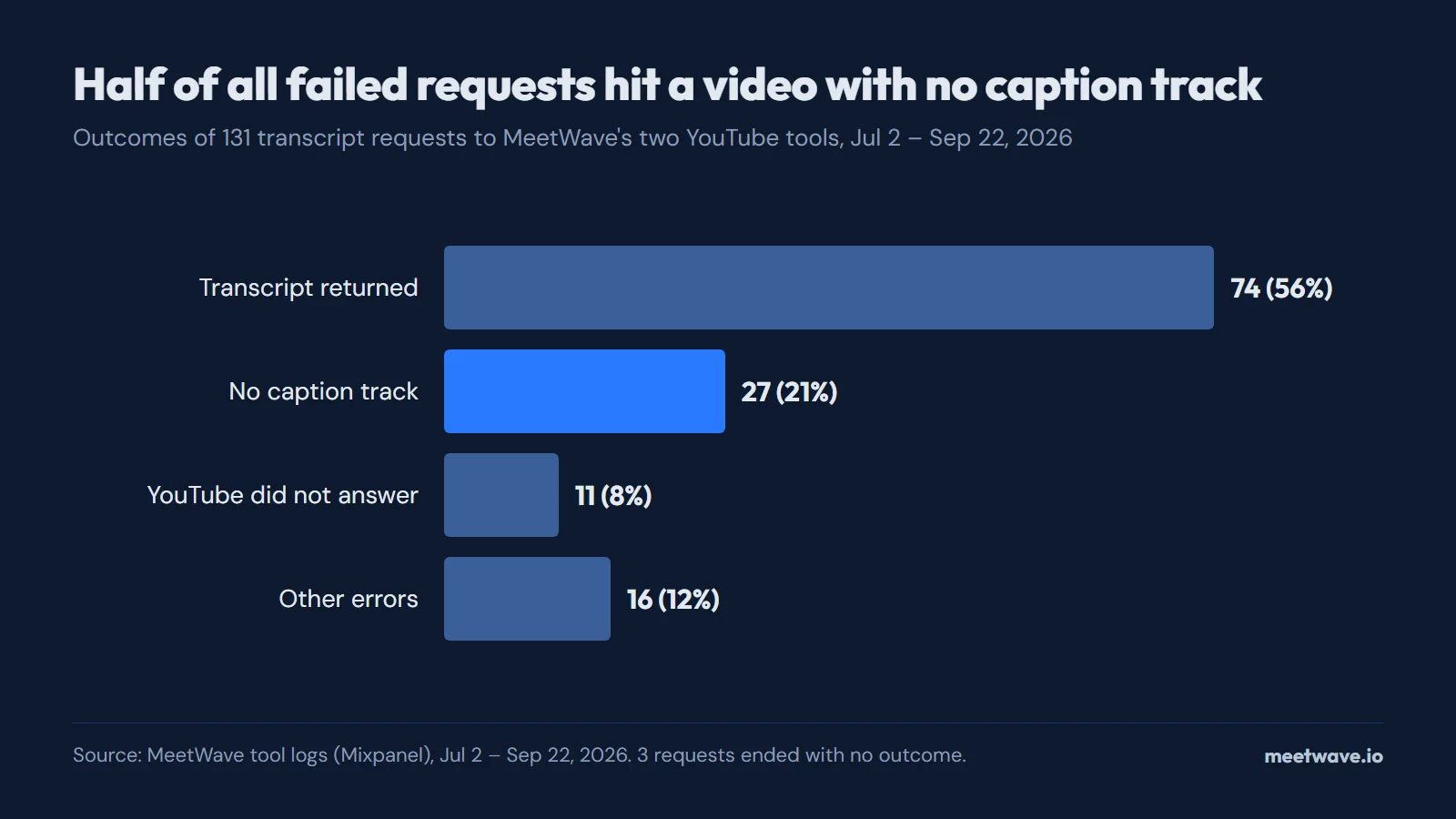
A YouTube video has no transcript when it has no caption track: the Show transcript panel is built only from captions. YouTube lists six reasons automatic captions fail: audio still processing, a language outside the 67 it supports, a video that is too long, poor or unrecognized speech, a long silence at the start, and overlapping speakers or languages. In our YouTube transcript tools, 27 of 131 requests (21%) between July 2 and September 22, 2026 hit a video with no caption track at all.
Key numbers
- YouTube generates automatic captions in 67 languages, per its help page checked on September 23, 2026 (YouTube Help).
- YouTube's help lists 6 reasons a video may get no automatic captions, from unfinished audio processing to overlapping speakers (2026, YouTube Help).
- Live automatic captions work in English only and are not kept after the stream ends; the replay gets new captions from regular processing (2026, YouTube Help).
- 27 of 131 transcript requests (21%) to our YouTube tools between July 2 and September 22, 2026 found no caption track at all (how we calculated).
- In February 2017 YouTube reported more than 1 billion videos with automatic captions, in 10 languages at the time (YouTube Official Blog).
No captions, no transcript
YouTube's transcript is its caption track shown as a list of lines. The help page says so directly: "You can see the full transcript of any video that has captions", and the Show transcript button sits in the video description (YouTube Help, View video transcripts). A video with neither a creator-uploaded track nor an automatic one has no transcript to show (YouTube Help).
The same holds for every tool that reads captions, ours included: it fetches the track YouTube already holds and cannot fetch one that does not exist. Where the button is and how to download a track that does exist is covered in how to open and download a YouTube transcript.
The six reasons YouTube gives
Only one of the six reasons fixes itself with time. YouTube's troubleshooting list for automatic captions names these causes, word for word (YouTube Help, Use automatic captioning):
| Reason, as YouTube words it | What the viewer sees | Will waiting help? |
|---|---|---|
| The captions aren't available yet due to processing complex audio in the video | No transcript on a fresh upload | Yes |
| Automatic captions don't support the language in the video | No automatic track | No |
| The video is too long | No automatic track | No |
| The video has poor sound quality or YouTube doesn't recognize the speech | No automatic track | No |
| There's a long period of silence at the beginning of the video | No automatic track | No |
| There are multiple speakers whose speech overlaps or multiple languages at the same time | No automatic track | No |
Source: YouTube Help — Use automatic captioning, checked 2026-09-23.
Three details on the same page narrow it down. The language has to be one of the 67 on YouTube's list; when a video carries several audio tracks, automatic captions are made for the default language only (YouTube Help). YouTube does not say how long "too long" is, and neither do we. Figure 1 shows the list as it appears on the help page.
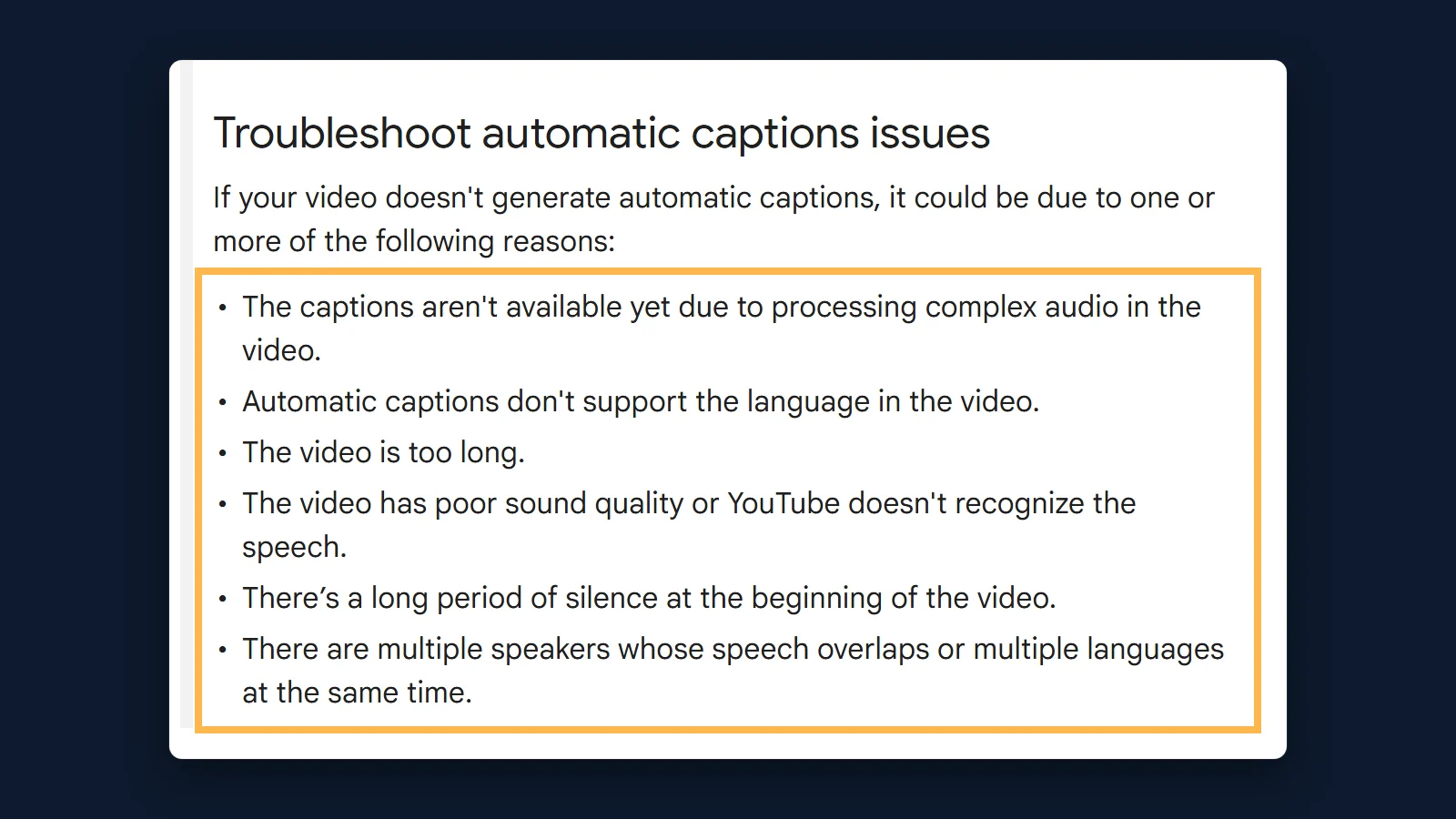 Figure 1. YouTube's own list of six reasons a video gets no automatic captions. Source: support.google.com/youtube/answer/6373554, September 2026.
Live streams
A live stream can end with no transcript at all and get one later. Automatic captions for live streams are English only, are turned on per stream, and need a stream at "normal latency"; YouTube is rolling them out to channels with more than 1,000 subscribers (YouTube Help).
After the stream, the live captions are not kept: "New automatic captions will be generated based on the VOD process" (YouTube Help). Until that processing finishes, the replay has no caption track and so no transcript.
How long automatic captions take after upload
YouTube gives no number. Its help page says only that captions "may not be ready at the time that you upload a video" and that "processing time depends on the complexity of the video's audio" (YouTube Help). The "12–24 hours" figure repeated by transcript-tool blogs has no source behind it on YouTube's pages, so we do not repeat it as a rule.
What transcript tools see
Half of the failed requests to our YouTube tools were videos with no caption track. Between July 2 and September 22, 2026, the YouTube transcript generator and the YouTube subtitles downloader received 131 requests: 74 returned a transcript and 27 found no caption track at all, 27 of the 54 failures (how we calculated). Figure 2 shows the full split.
Figure 2. Outcomes of 131 transcript requests to MeetWave's two YouTube tools. Source: MeetWave tool logs, Jul 2 – Sep 22, 2026.
From the outside, "the creator removed the captions" and "YouTube never made them" look the same. The page YouTube serves to a player lists the caption tracks, and in both cases that list is empty; the open-source library our tools use raises the same "disabled" error for both (youtube-transcript-plus on npm). A tool that tells you "the author disabled captions" is guessing, and ours no longer says it.
What you can do
The next step depends on why the track is missing and whose video it is (YouTube Help):
- Fresh upload or a finished live stream. Wait and check again: the track may still be processing, and YouTube gives no deadline (YouTube Help).
- Your own video, or you have the recording. Transcribe the audio file itself — MeetWave can transcribe the audio file — and upload the result to YouTube Studio as a caption file (YouTube Help, Add subtitles & captions).
- Someone else's video. Ask the creator to add captions. YouTube Studio lets them upload a file, paste a transcript for automatic syncing, or type captions while watching (YouTube Help).
- Don't rip the audio from someone else's video. YouTube's terms forbid downloading content without YouTube's or the rights holder's permission (YouTube Terms of Service).
If the video does have captions and you need a file, export the caption track as TXT or SRT; the SRT layout itself is explained in the SRT file format guide.
How we calculated
The tool figure comes from our own analytics. We exported the tool_transcript_requested, tool_transcript_succeeded and tool_transcript_failed events of the YouTube transcript generator and the YouTube subtitles downloader from Mixpanel for July 2 to September 22, 2026, removed duplicate deliveries of the same event (587 raw rows, 259 after deduplication by insert ID), and counted outcomes by error code (YouTube transcript generator).
- Requests: 131 (91 on the transcript generator, 40 on the subtitles downloader), from 62 distinct visitors.
- Transcript returned: 74 (56.5%). No caption track (
NO_CAPTIONS): 27, or 20.6% of requests, 95% Wilson interval 14.6–28.3%. YouTube did not return the page or player (TRANSCRIPT_UNAVAILABLE): 11 (8.4%). Other errors, from invalid links to rate limits: 16 (12.2%). No outcome recorded: 3 (how we calculated). NO_CAPTIONSis returned only after one retry 500 ms later, because a single malformed YouTube response can look like a missing track (how we calculated).
Limits: internal test traffic is not separated, video IDs are not stored with failures, and the visitors who reach a transcript tool are not a random sample of YouTube videos. The 21% describes our tools, not YouTube as a whole (how we calculated). YouTube publishes no share of videos without captions; its last published count is more than 1 billion videos with automatic captions, from February 2017 (YouTube Official Blog).
FAQ
Why do some YouTube videos not have transcripts?
They have no caption track: the creator uploaded none, and automatic captions were not made for one of the six reasons on YouTube's help page, such as an unsupported language or overlapping speech.
Do all YouTube videos have transcripts?
No. In our tools, 27 of 131 requests between July 2 and September 22, 2026 hit a video with no caption track at all (how we calculated).
The video has captions but no Show transcript button — why?
YouTube puts the button in the video description: expand the description and click Show transcript (YouTube Help).
How long does YouTube take to add automatic captions?
YouTube does not say; processing time "depends on the complexity of the video's audio" (YouTube Help).
Can I get a transcript of a YouTube video without captions?
Only by transcribing the audio, and only from a recording you have the right to use; for someone else's video, ask the creator to add captions (YouTube Help).
Why are automatic captions not available for my live stream?
Live automatic captions are English only, need normal-latency streaming and are rolling out to channels with more than 1,000 subscribers (YouTube Help).
Sources
- Google — YouTube Help: Use automatic captioning (2026). Accessed 2026-09-23.
- Google — YouTube Help: View video transcripts (2026). Accessed 2026-09-23.
- Google — YouTube Help: Add subtitles & captions (2026). Accessed 2026-09-23.
- YouTube — Terms of Service (2023). Accessed 2026-09-23.
- Liat Kaver, YouTube Official Blog — One billion captioned videos (2017). Accessed 2026-09-23.
- npm — youtube-transcript-plus (2026). Accessed 2026-09-23.
Ready to try AI meeting summaries?
Try MeetWave free — no credit card required.
Still comparing tools?
See how MeetWave stacks up against the tools most teams evaluate alongside it.
- MeetWave vs Otter AISee how MeetWave compares to Otter AI for meeting intelligence
- MeetWave vs Fireflies.aiSee how MeetWave compares to Fireflies.ai for meeting intelligence
- MeetWave vs tl;dvSee how MeetWave compares to tl;dv for meeting intelligence