Speech to Text API in Python: Transcribe a File with Speaker Names
To transcribe a file in Python, send it to a speech-to-text API with requests: upload it, start a transcription, poll until it completes and print the segments. With the MeetWave API that is a 76-line script; it costs $0.12 per audio hour for text and $0.20 with speaker names, so a 100-second clip with names cost $0.005556 in our 2026-10-21 run. Files up to 350 MB or 3 hours long are accepted.
Key numbers
- The MeetWave API charges $0.12 per audio hour for text, $0.15 with speaker labels and $0.20 with speaker names, billed per second with no minimum, as of 2026-10-21 (MeetWave API pricing).
- One request takes a file up to 350 MB or 3 hours long, and the result is kept for 72 hours after it is ready, as of 2026-10-21 (MeetWave API limits).
- A 100-second clip of a public earnings call, transcribed with speaker names by the script below on 2026-10-21, was billed $0.005556 (how we ran it).
- A new API key comes with one free hour of audio at the speaker-names price, valid for 60 days, as of 2026-10-21 (MeetWave API pricing).
What you need
Python 3.9 or newer, the requests package and an API key. Install requests with pip install requests==2.32.3, and set the key as an environment variable so it never lands in your code (authentication):
pip install requests==2.32.3
export MEETWAVE_API_KEY=mwk_...
On Windows PowerShell the second line is $env:MEETWAVE_API_KEY = "mwk_...". The first hour of audio on a new key is free (MeetWave API pricing).
The three calls
A batch transcription is three HTTP calls, shown in Figure 1. First POST /v1/uploads returns a one-time upload address, and you PUT the file's bytes to it; a file already on a public https link skips this step and goes in as audio_url. Then POST /v1/transcriptions creates the job, and GET /v1/transcriptions/{id} returns its status until it is completed (transcriptions reference).
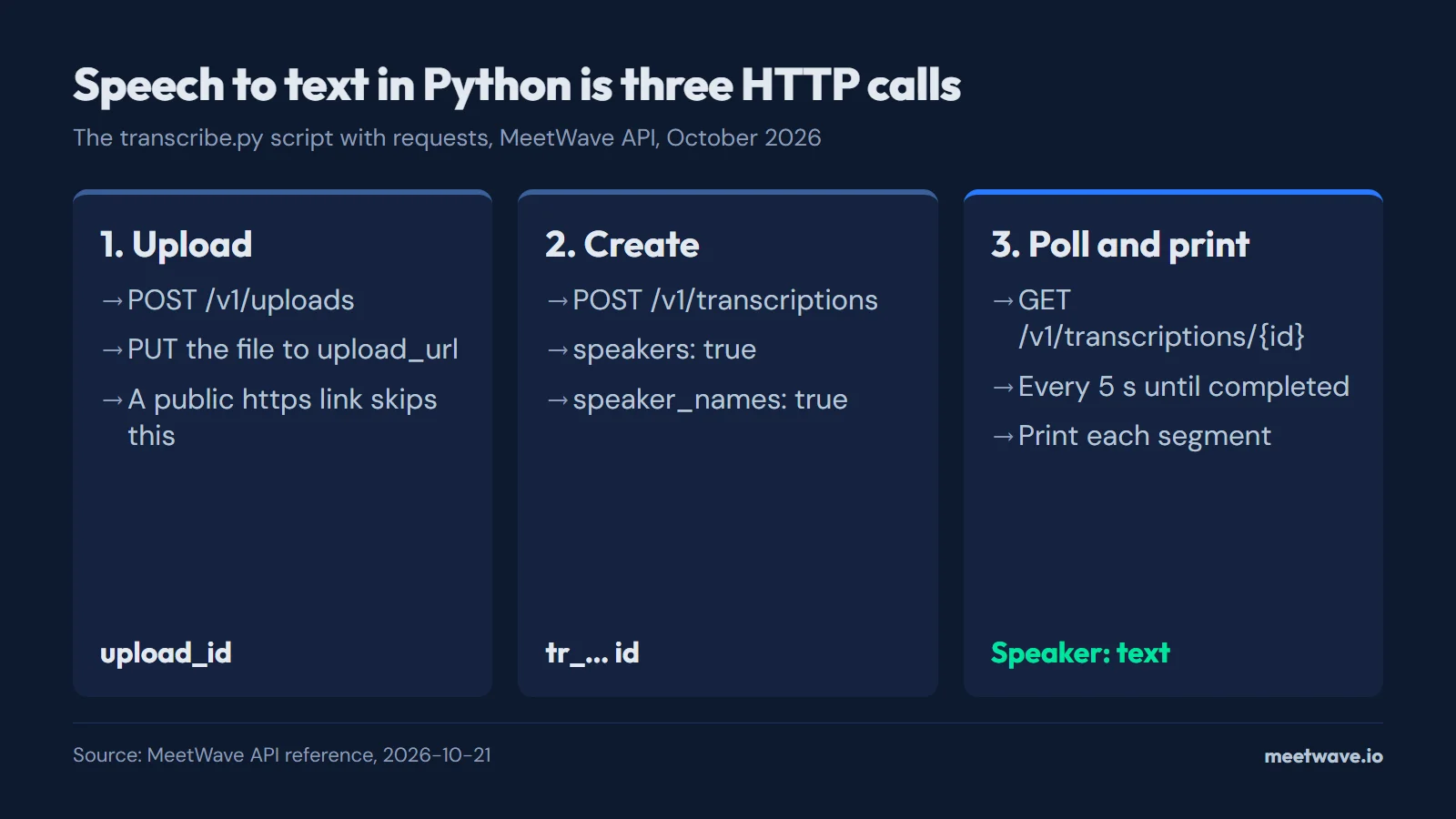 Figure 1. Upload, create, poll: the whole script is these three calls. Source: MeetWave API reference, 2026-10-21.
The whole script
Save it as transcribe.py; it is 76 lines. It reads the key from MEETWAVE_API_KEY, takes a file path or an https link, and prints one line per speaker turn, then the job id and the cost (transcriptions reference).
"""Transcribe an audio or video file with the MeetWave API and print it with speaker names.

    export MEETWAVE_API_KEY=mwk_...
    python transcribe.py meeting.m4a          # a file on this computer
    python transcribe.py https://example.com/call.mp3   # or a public link

Needs Python 3.9+ and requests (pip install -r requirements.txt).
"""

import os
import sys
import time

import requests

API_BASE = os.environ.get("MEETWAVE_API_BASE", "https://api.meetwave.io").rstrip("/")
API_KEY = os.environ.get("MEETWAVE_API_KEY")
USER_AGENT = "meetwave-examples/python"
# What to do when the API refuses the key or the balance is empty.
HINTS = {
    401: "Check MEETWAVE_API_KEY, or get a key: https://meetwave.io/speech-to-text-api?utm_source=github&utm_medium=integration&utm_campaign=api",
    402: "Top up your balance: https://app.meetwave.io/developers?utm_source=github&utm_medium=integration&utm_campaign=api",
}


def answer(response):
    """The answer's JSON; an error answer stops the run and is printed."""
    if not response.ok:
        hint = HINTS.get(response.status_code, "") if response.url.startswith(API_BASE) else ""
        sys.exit(f"{response.status_code} {response.text}\n{hint}".rstrip())
    return response.json()


def transcribe(source):
    headers = {"Authorization": f"Bearer {API_KEY}", "User-Agent": USER_AGENT}
    request = {"speakers": True, "speaker_names": True}

    if source.startswith(("http://", "https://")):
        request["audio_url"] = source
    else:
        # 1. Upload the file: get a one-time address, then PUT the bytes to it
        upload = answer(requests.post(f"{API_BASE}/v1/uploads", headers=headers))
        with open(source, "rb") as audio:
            requests.put(upload["upload_url"], data=audio).raise_for_status()
        request["upload_id"] = upload["id"]

    # 2. Create the transcription, with speakers and their names
    created = answer(requests.post(f"{API_BASE}/v1/transcriptions", headers=headers, json=request))

    # 3. Wait while it is queued or processing
    url = f"{API_BASE}/v1/transcriptions/{created['id']}"
    transcription = created
    while transcription["status"] in ("queued", "processing"):
        time.sleep(5)
        transcription = answer(requests.get(url, headers=headers))
    if transcription["status"] != "completed":
        sys.exit(f"Transcription failed: {transcription['error']}")
    return transcription


def print_transcript(transcription):
    for segment in transcription["transcript"]["segments"]:
        minutes, seconds = divmod(int(segment["start"]), 60)
        speaker = segment["speaker"] or "Speaker"
        print(f"[{minutes:02d}:{seconds:02d}] {speaker}: {segment['text']}")
    billing = transcription["billing"]
    print(f"\n{transcription['id']}: {billing['audio_seconds']} s of audio, ${billing['cost_usd']}")


if __name__ == "__main__":
    if not API_KEY:
        sys.exit("Set MEETWAVE_API_KEY first. Get a key with one free hour: "
                 "https://meetwave.io/speech-to-text-api?utm_source=github&utm_medium=integration&utm_campaign=api")
    if len(sys.argv) != 2:
        sys.exit("Usage: python transcribe.py <audio file or https link>")
    print_transcript(transcribe(sys.argv[1]))
Run it with python transcribe.py meeting.m4a. speakers labels who spoke when, and speaker_names replaces a label with the name when people say it in the recording; turn both off for text only at $0.12 per hour (MeetWave API pricing).
What it prints
Each segment carries a start time in seconds, a speaker and the text; the script turns them into lines (transcript format). On a 100-second clip of a public earnings call the run on 2026-10-21 printed 21 lines; four of them:
[00:11] Glenn: Thanks, Steve.
[00:13] Glenn: As you're aware, we've got generation capacity at our three largest mills in South Africa.
[00:19] Glenn: So we are able to manage this with ESCOM.
[00:22] Glenn: We haven't had a significant impact.

tr_gu4igx7kg8ljj572sjobe97gn8: 100 s of audio, $0.005556
The names come from the call itself: Steve and Glenn introduce each other, so the speaker labels became their names. A speaker nobody names keeps a letter label (transcript format).
What a file costs
The cost is the audio length in seconds times the price per hour, divided by 3,600, so it grows in a straight line with the file (MeetWave API pricing). Figure 2 shows it for four common lengths at the speaker-names price.
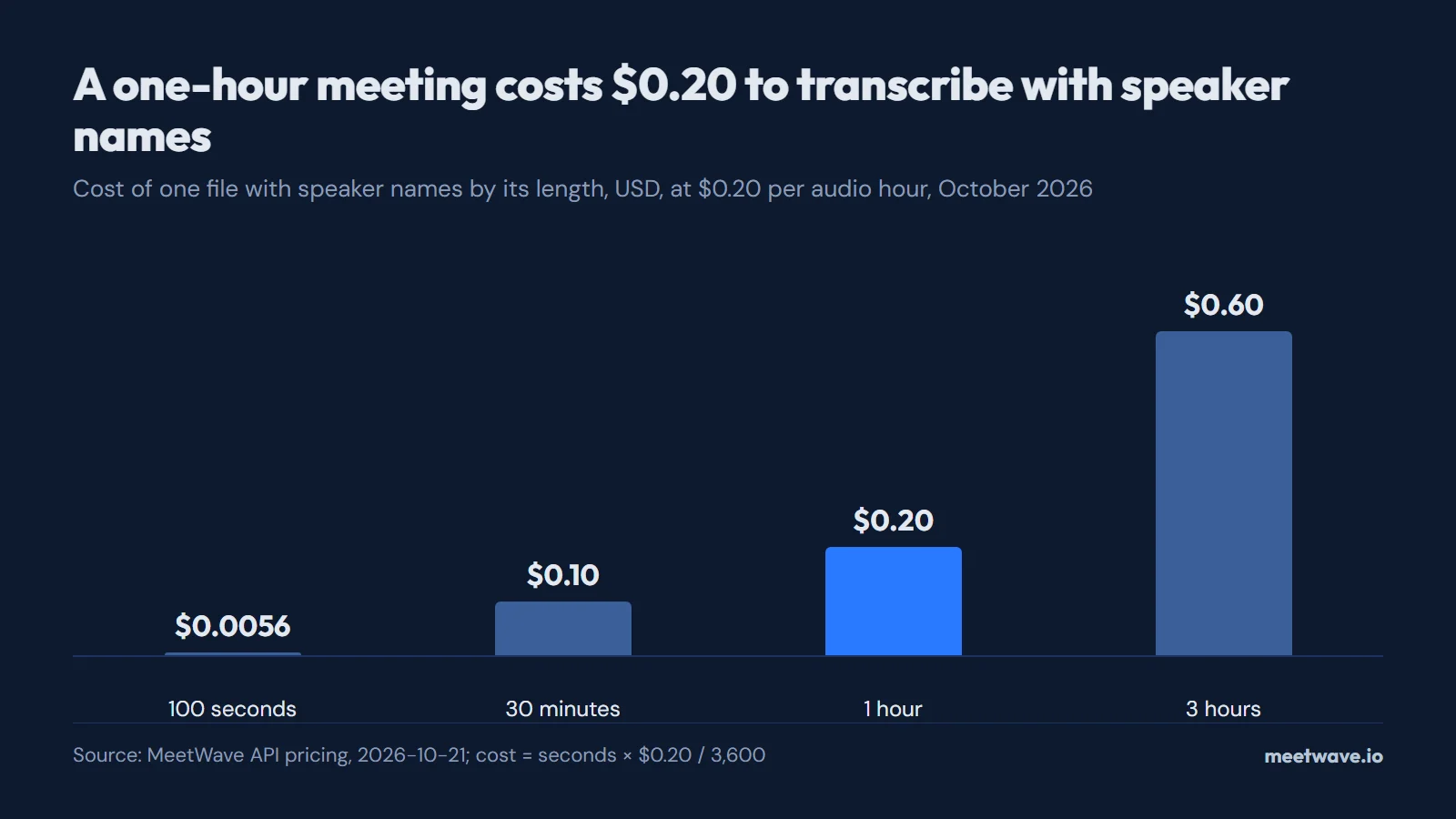 Figure 2. Cost of one file with speaker names by its length, at $0.20 per audio hour. Source: MeetWave API pricing, 2026-10-21.
How long it waits
The loop waits for the whole file, not for real time. In our test of 26 recordings through the MeetWave API on 2026-10-22, with speaker labels on, files of 15 to 45 minutes came back in a median 130 seconds and files over 45 minutes in a median 214 seconds (cheapest speech-to-text API research). The 100-second clip above took 50 seconds (how we ran it). For a one-hour meeting, plan on three to four minutes of polling.
When it fails
An error comes back as JSON with a code and a message, and the script prints it and stops (errors reference). The common ones: 401 for a missing or wrong key, 402 when the balance is empty, 413 when the file is over 350 MB, and 429 above 120 requests a minute on one key (errors reference). Polling every 5 seconds, as the script does, stays far below that limit.
Instead of polling
For many files, pass a webhook_url when you create the transcription and the API calls it when the job ends, so your code does not wait in a loop (webhooks). The same script works for a Zoom cloud recording once you download its audio file (Zoom transcript API guide).
How we ran it
On 2026-10-21 we ran the script above through the public API on its staging copy, which runs the same code and prices, on a 100-second clip cut from call 4469088 of the Earnings-22 benchmark, a public set of earnings-call recordings licensed CC BY-SA 4.0 (Earnings-22 on GitHub). The job was created at 16:09:48 UTC and completed at 16:10:38, 50 seconds later, and reported 100 seconds of audio and $0.005556: 100 × $0.20 / 3,600 (MeetWave API pricing). The costs in Figure 2 use the same formula.
FAQ
Is there a free speech-to-text API for Python?
Most paid APIs start with free credit. A new MeetWave API key gets one free hour of audio, enough to run this script on a one-hour meeting (MeetWave API pricing).
Do I need an SDK?
No. The script uses only requests; the API is plain HTTPS with JSON (transcriptions reference).
Which audio formats work?
Common audio and video files such as MP3, M4A, WAV and MP4, up to 350 MB or 3 hours (transcriptions reference). To try a file without code, use the audio to text tool.
Can it transcribe languages other than English?
Yes. Leave language out and it is detected, or set a code from the list of 100 languages (transcriptions reference).
Sources
- MeetWave — Speech-to-text API pricing (2026). Accessed 2026-10-21.
- MeetWave — Transcriptions API reference (2026). Accessed 2026-10-21.
- MeetWave — Errors and limits (2026). Accessed 2026-10-21.
- Rev — Earnings-22 in speech-datasets (2022). Accessed 2026-10-21.
More on this: API docs







