
How to Record a Teams Meeting on Linux (and Zoom or Google Meet)
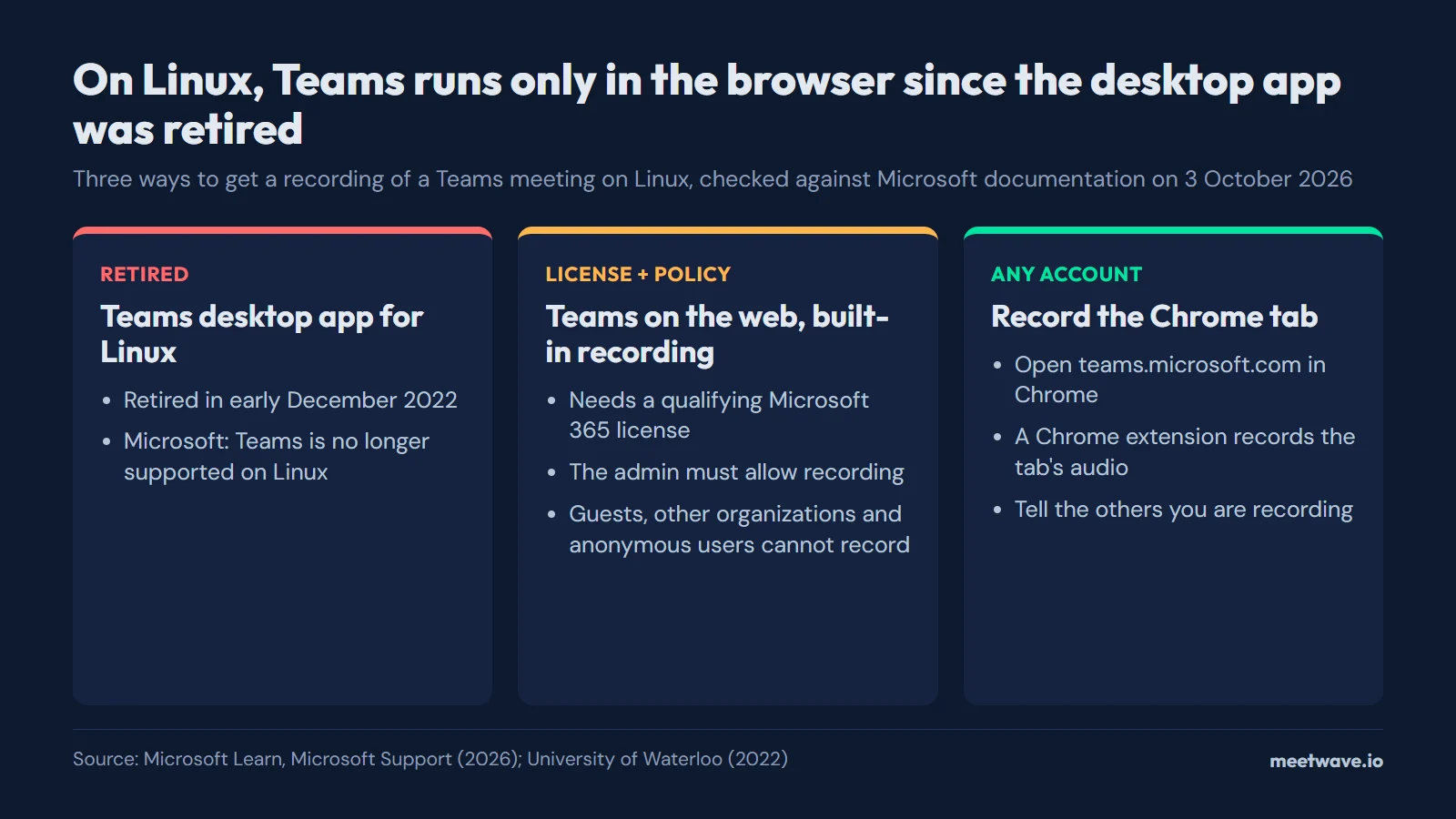
On Linux, a Teams meeting runs in the browser: Microsoft retired the Teams desktop app for Linux in early December 2022, and its client page now marks Linux as not supported (checked 2026-10-03). Teams' built-in recording needs a qualifying Microsoft 365 license and an admin policy that allows it, and guests cannot record. Without that, open the meeting at teams.microsoft.com in Chrome and record the tab with a Chrome extension, after telling the others. Zoom's Linux app can record to the computer, and Google Meet runs in the browser too.
Key numbers
- Microsoft retired the Teams desktop client for Linux in early December 2022 and moved Linux users to the web version and a progressive web app (University of Waterloo, 1 November 2022; Office 365 for IT Pros, 19 September 2022).
- Of 5 platforms in Microsoft's Teams client table, Linux is the only one marked unavailable: "Teams is no longer supported on Linux" (Microsoft Learn, updated July 2026, checked 2026-10-03).
- Microsoft lists 10 license types that can record a Teams meeting, from Office 365 Enterprise E1 to Business Essentials, and the admin must also allow recording (Microsoft Support, checked 2026-10-03).
- Of 5 participant types in Microsoft's table, 3 cannot start a Teams recording: people from another organization, guests and anonymous users (Microsoft Support, 2026).
- Zoom's feature comparison, updated 25 September 2026, marks local recording as available in its Linux app and not in the Zoom Web App (Zoom Support, KB0065520).
- Of the 12 bot-free note takers in our census of 25 September 2026, 2 name Linux for recording without a meeting bot (AI notetaker bots census).
Why Teams on Linux means Teams in a browser
There has been no Teams desktop app for Linux since early December 2022, when Microsoft retired it and pointed Linux users to the web version and a progressive web app (University of Waterloo, 2022). Microsoft's notice, MC412007, said the client would be retired in 90 days, and the web and PWA versions are "where we will continue to invest our development resources" (Office 365 for IT Pros, 2022).
Figure 1 shows Microsoft's current client table. Linux carries a cross and the note "Teams is no longer supported on Linux"; the web row says Teams is supported in Microsoft Edge, Chrome, Firefox and Safari (Microsoft Learn, updated July 2026).
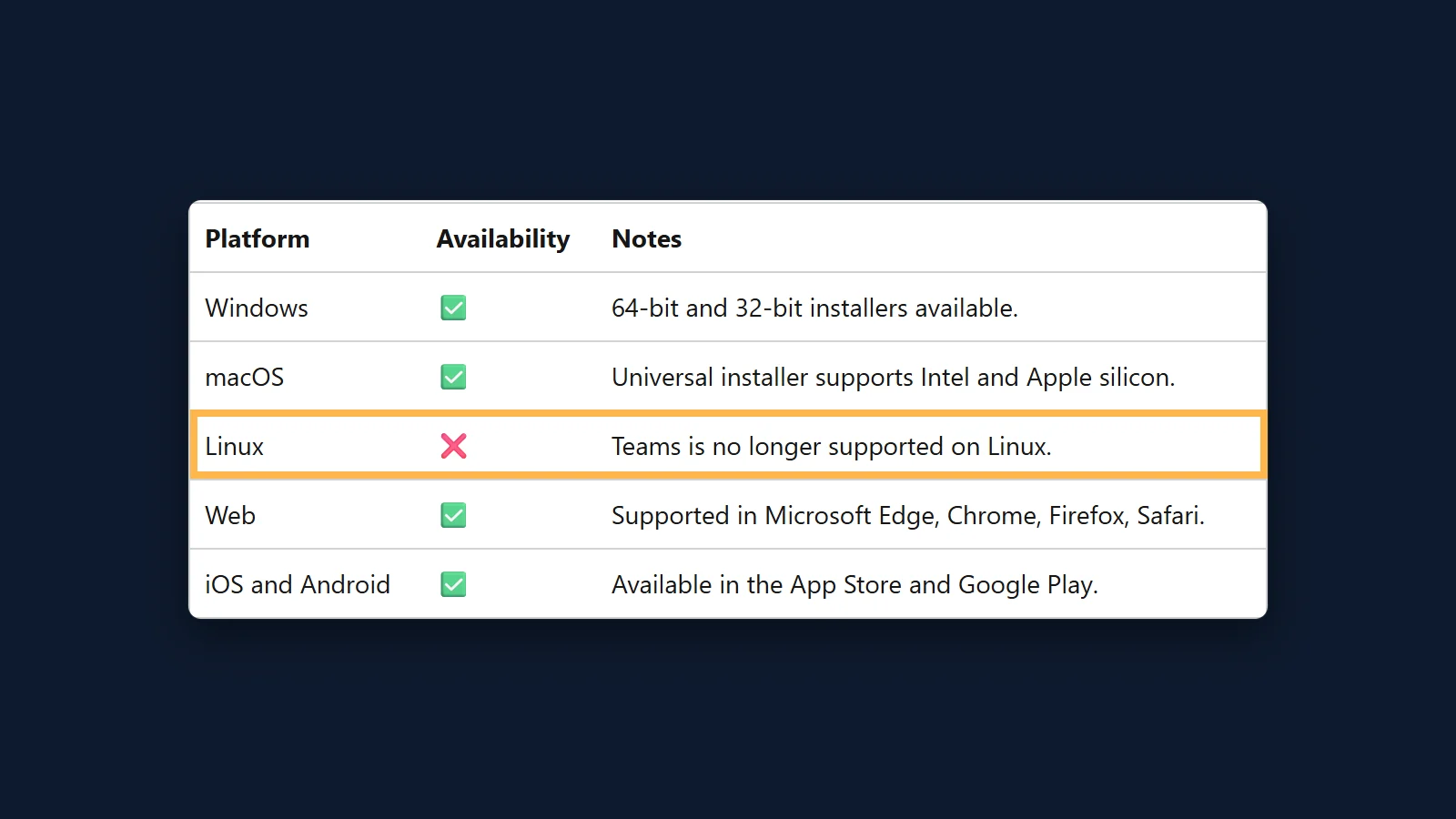 Figure 1. Microsoft's Teams client table marks Linux as not supported. Source: screenshot of Microsoft Learn, Overview of the Microsoft Teams client, 3 October 2026.
Recording a Teams meeting on Linux with Teams' own recorder
Teams' recorder works in the browser when you have the rights it asks for. Microsoft documents the path as More actions > Record and transcribe > Start recording, then Confirm, and everyone in the meeting gets a notification that recording has started (Microsoft Support, checked 2026-10-03). The recording is saved to the organizer's OneDrive.
The rights come in three layers. The person recording needs one of these licenses: Office 365 Enterprise E1, E3, E5, F3, A1, A3, A5, Microsoft 365 Business, Business Premium or Business Essentials (Microsoft Support). The admin turns the Meeting recording policy on, and both the organizer and the person recording need that permission (Microsoft Learn, recording policies, updated 2026). Guests, people from another organization and anonymous users cannot start a recording at all.
What the Teams transcript file contains and who can download it is in our Teams transcript guide.
Recording a Teams meeting on Linux without recording rights
Without those rights, the path is a Chrome tab. A tab recorder captures what plays in the tab and your microphone, so it does not depend on the Teams license or policy. Figure 2 compares the three paths.
- Open the meeting link in Chrome on your Linux computer and choose to continue in the browser. Work accounts use teams.microsoft.com (Microsoft Learn); Teams for personal accounts runs at teams.live.com.
- Allow the microphone when Chrome asks.
- Tell the others you are recording, then start the extension.
MeetWave works this way. No bot joins your calls: the Chrome extension records web calls on macOS, Windows, Linux and ChromeOS. It detects a Teams meeting by itself on teams.microsoft.com and teams.live.com, and on any other tab you start it from the extension's toolbar button. Recordings are uploaded to your MeetWave account and transcribed on our servers; the audio, transcript and summary are stored encrypted in your account, so you can reopen them on any computer at app.meetwave.io. If you already have a Teams transcript, the meeting transcript summarizer turns it into notes without installing anything.
Figure 2. Three ways to record Teams on Linux. Source: Microsoft Learn and Microsoft Support (2026); University of Waterloo (2022).
Use a regular Chrome tab rather than a Teams app window. A tab recorder hears Chrome tabs, and Microsoft's retirement notice moved Linux users to the web version and a progressive web app (Office 365 for IT Pros, 2022).
Zoom on Linux
Of the three platforms here, Zoom is the only one with a Linux desktop app, and that app records to the computer. Zoom's comparison table marks "Start local recording" as available for Linux, as Figure 3 shows, and local recording works from a free Basic account: in the meeting controls toolbar, click Record, then Record on this Computer (Zoom Support, KB0076922). The host must record or grant the ability to record to a participant.
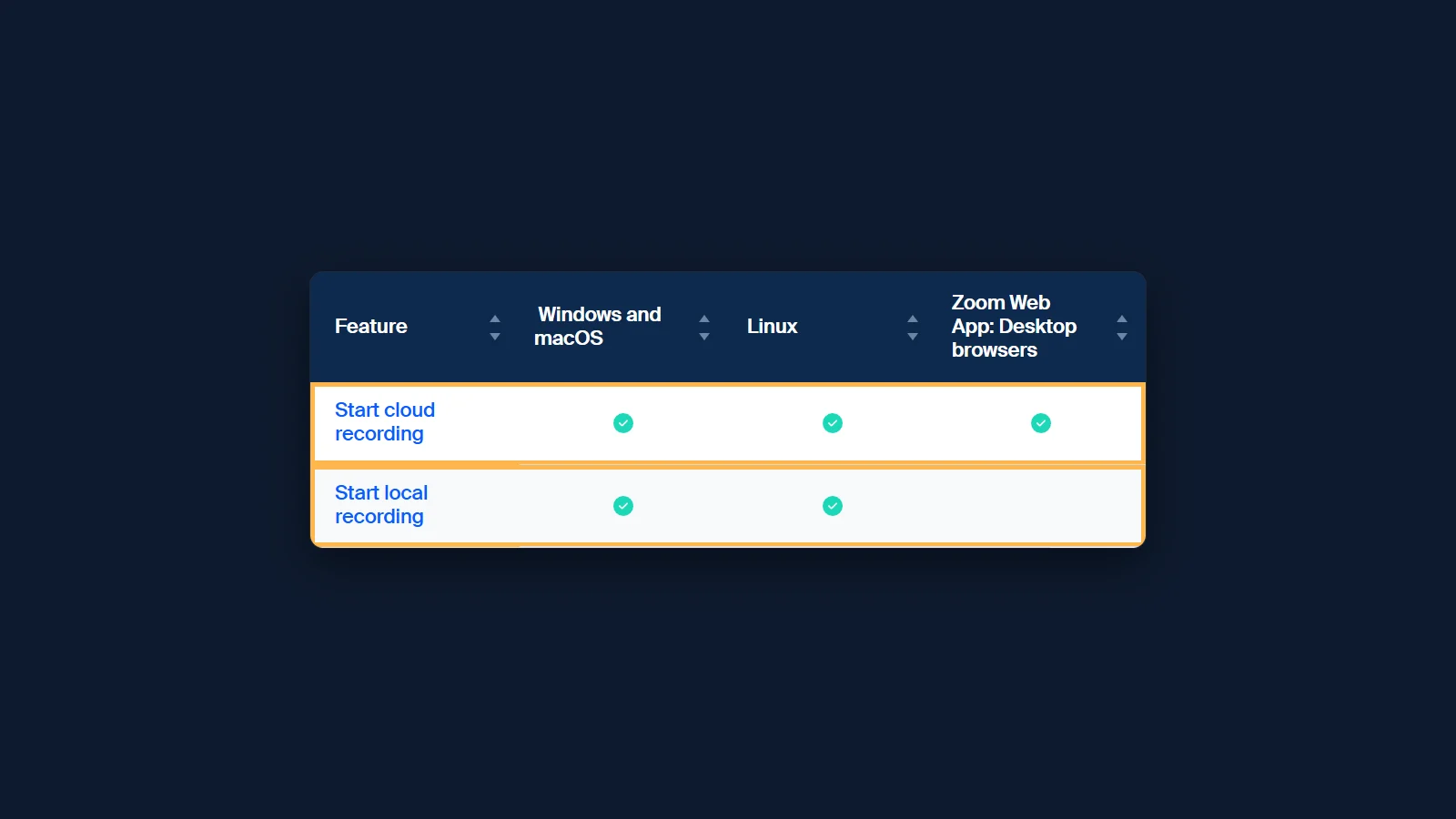 Figure 3. Zoom's Linux app has local recording, the Web App does not. Rows between the header and these two are hidden, and so are the VDI and mobile browser columns. Source: screenshot of Zoom Support KB0065520, 3 October 2026.
A transcript is a different matter. Zoom's audio transcript comes only with cloud recordings on a Pro, Business, Education or Enterprise account (Zoom Support, KB0064927, updated 22 August 2026), so a local recording on a free plan is a video file without text. A tab recorder does not reach the Zoom Linux app: to use one, open the meeting in Chrome with Join from your browser (Zoom Support, KB0060732), and the Web App meeting runs at a zoom.us/wc/ address, which the extension detects by itself (Zoom Support, KB0064261). More on what Zoom saves is in our guide to Zoom transcripts.
Google Meet on Linux
On a computer, Google Meet runs in the browser on every system, Linux included. Meet's own recorder needs an eligible Google Workspace edition, such as Business Standard, Business Plus or Education Plus, or a Google One plan with 2 TB or more of storage; the path is Meeting tools, then Recording, then Start recording (Google Meet Help, checked 2026-10-03). Without those, a tab recorder captures the Meet tab, and the extension detects meet.google.com by itself. The same steps on a Chromebook are in how to record a Zoom meeting on a Chromebook (Google Meet Help).
Which bot-free note takers name Linux
Linux is rare in vendors' own documentation. In our census of 25 September 2026, 2 of the 12 bot-free note takers name Linux for recording without a bot, and 1 names ChromeOS (AI notetaker bots census). Figure 4 shows the count by system, and the table below lists all 12 tools. A Chrome extension may run on Linux without the vendor saying so; the count includes only what vendors write.
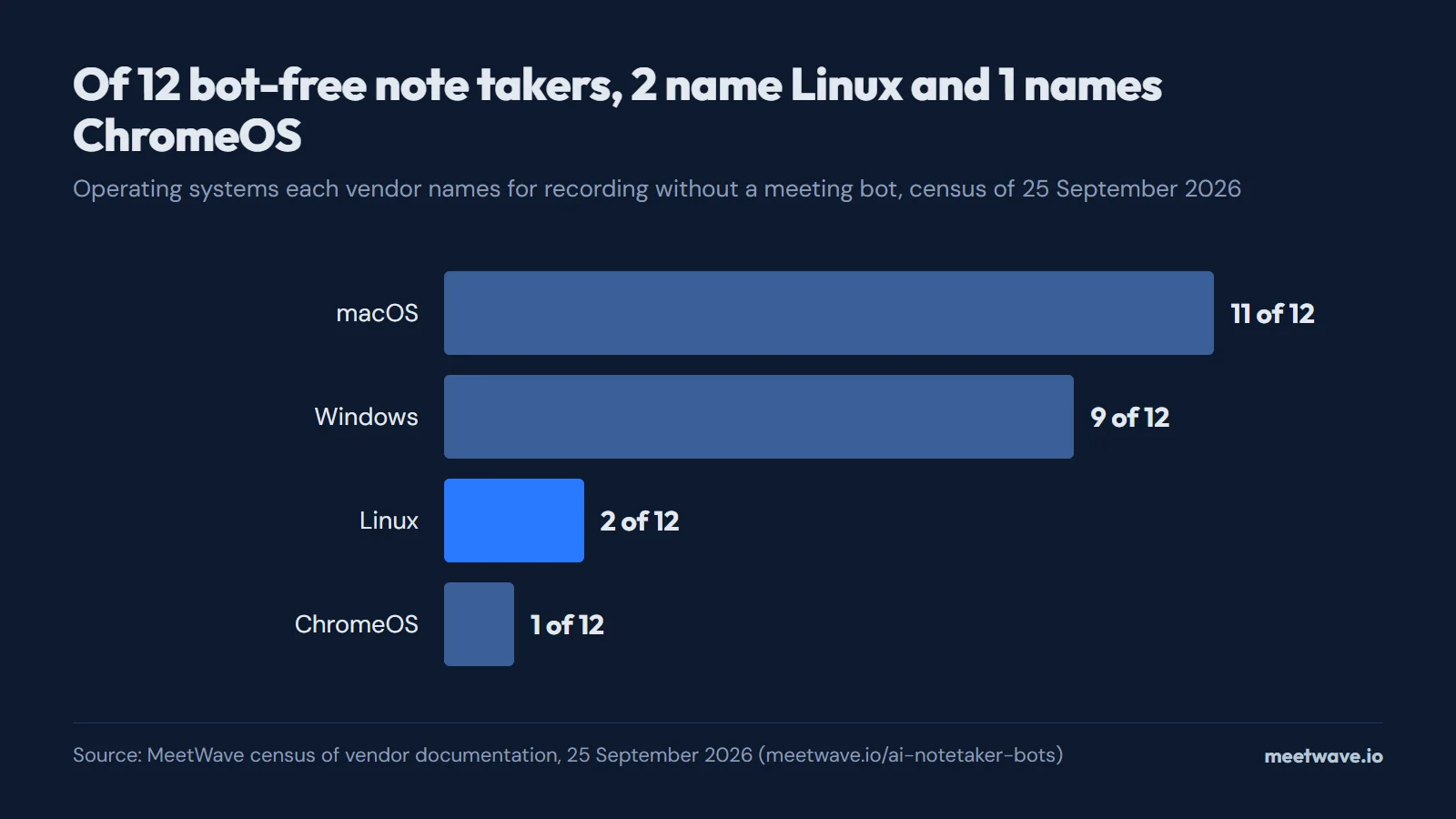 Figure 4. Operating systems vendors name for bot-free recording. Source: MeetWave census of vendor documentation, 25 September 2026.
| Tool | How it records without a bot | OS named for the bot-free mode | Free plan | Cheapest paid plan |
|---|---|---|---|---|
| Bluedot | Chrome extension or desktop app: "Record every meeting without bots using the Bluedot desktop app"checked 25 Sep 2026 | macOS, Windows (macOS 12.3+ on Apple Silicon, Windows 10+)checked 25 Sep 2026 | 5 meetings, lifetimechecked 25 Sep 2026 | Basic $14/user/mo billed annually, audio onlychecked 25 Sep 2026 |
| Fathomvs MeetWave | Bot-free capture is Mac-only and in beta; on Windows, Fathom records through its bot todaychecked 3 Oct 2026 | macOS (beta)checked 25 Sep 2026 | Unlimited recordings and basic AI summarieschecked 24 Sep 2026 | Premium $20/mo, or $16/mo billed annuallychecked 24 Sep 2026 |
| Fellowvs MeetWave | Bot for Zoom, Teams and Google Meet, or bot-free desktop app (Mac, Windows) and iOS app that capture audio from your devicechecked 25 Sep 2026 | macOS, Windowschecked 25 Sep 2026 | 5 AI notes (lifetime), 5 AI recordings (lifetime)checked 24 Sep 2026 | Team $7/user/mo billed annually ($11/user/mo billed monthly); Business $15/user/mo billed annually ($23/user/mo billed monthly)checked 24 Sep 2026 |
| Fireflies (Chrome extension)vs MeetWave | Bot for Zoom and Teams; bot-free Chrome extension for Google Meet in Chrome onlychecked 25 Sep 2026 | None named (names Chrome, not an operating system)checked 25 Sep 2026 | Not shown: its pricing page returned no plan limits on this checkchecked 25 Sep 2026 | Not shown: its pricing page returned no prices on this checkchecked 25 Sep 2026 |
| Granolavs MeetWave | Bot-free desktop app for Mac and Windows, using your computer audio; the Chrome extension "Granola Companion" works with the desktop appchecked 25 Sep 2026 | macOS, Windows, iOS, Androidchecked 25 Sep 2026 | Basic (free): 30 days of meeting historychecked 25 Sep 2026 | Business $14/user/mo; Enterprise $35/user/mochecked 25 Sep 2026 |
| Jamievs MeetWave | Bot-free: runs on your device, no meeting bot joins the callchecked 25 Sep 2026 | macOS, Windows, iOS (iPhone)checked 25 Sep 2026 | Free: 10 notes/month, 30 min per meetingchecked 24 Sep 2026 | Plus €21/mo billed annually, 20 meetings/month, up to 2h per meeting; Pro €39/mo, unlimited meetings, up to 5h per meetingchecked 25 Sep 2026 |
| Krispvs MeetWave | Works at the audio level on your device, so no bot joins the meetingchecked 25 Sep 2026 | macOS, Windowschecked 25 Sep 2026 | Meeting AI: 7-day free trial, no ongoing free tierchecked 24 Sep 2026 | Core $8/mo billed annually ($16/mo billed monthly); Advanced $15/mo billed annually ($30/mo billed monthly)checked 24 Sep 2026 |
| Meetily | Desktop app that captures audio from your device; open source under the MIT licensechecked 25 Sep 2026 | macOS, Windows, Linux (Linux: build from source)checked 25 Sep 2026 | Community Edition: free and open sourcechecked 25 Sep 2026 | Pro $10/user/mo billed annuallychecked 25 Sep 2026 |
| MeetWave | No bot joins your calls: the Chrome extension records web calls on macOS, Windows, Linux and ChromeOS, and the Windows desktop app also captures system audio from any app. | macOS, Windows, Linux, ChromeOS (Chrome extension); Windows (desktop app) | 10h of recording analysis/month, 25 AI summaries/month | Pro $16.00/mo, or $11.00/mo billed annually (up to 5 prior meetings in memory; 20 on Pro+) |
| Nottavs MeetWave | Notta Bot for Zoom, Google Meet, Teams and Webex, or bot-free Notta Desktop on Windows 10 (1903+) and macOS 13+checked 25 Sep 2026 | macOS, Windows (macOS 13+, Windows 10 (1903+) and 11)checked 25 Sep 2026 | 120 min/month, 3 min per recordingchecked 24 Sep 2026 | Pro $8.17/mo billed annually (1,800 min/month, 5h per recording); Business $16.67/mo billed annually, unlimited (annual price only — its page did not show a verified monthly figure)checked 24 Sep 2026 |
| Tactiqvs MeetWave | Live capture via Chrome/Edge browser extension, no bot; native macOS app in beta for Zoom desktop callschecked 24 Sep 2026 | macOS (beta app for Zoom and Teams desktop; the extension names browsers only)checked 25 Sep 2026 | 10 transcripts/month, 5 AI creditschecked 24 Sep 2026 | Pro $8/user/mo billed annually; Team $16.67/user/mo; Business $29.17/user/mochecked 24 Sep 2026 |
| Wispr Flow Notetaker | Records on your device, so nothing joins the callchecked 25 Sep 2026 | macOS, Windowschecked 25 Sep 2026 | Flow Free, "with generous weekly usage"checked 25 Sep 2026 | Pro $12/user/mo billed annuallychecked 25 Sep 2026 |
Read on each vendor’s own pages; the dates show when. Prices are US list prices in the vendor’s currency, as its page shows them. An OS counts only where the vendor names it for recording without a bot. Found something out of date? Tell us.
What a tab recorder does not do on Linux
A Chrome extension records Chrome tabs, not desktop apps. It does not capture the Zoom Linux app or any other desktop client, and the note taker described above has no Linux desktop app: its desktop app, which captures system audio, runs only on Windows. On Linux, open the call in Chrome (Zoom Support, KB0060732).
Tell people you are recording
Rules on recording apply to the act of recording, whichever tool you use, and they differ by country and state, so check the law where you and the other people are. Say at the start that you are recording and why. Want everyone on the call to know? The Chrome extension can post a recording notice in the meeting chat, one switch in its settings. What other people see in the participant list is in do AI note takers show in participants, and every platform side by side is in how to record online meetings.
FAQ
Is there a Microsoft Teams app for Linux?
No. Microsoft retired the Linux desktop client in early December 2022, and its client table says Teams is no longer supported on Linux; Teams on the web runs in Edge, Chrome, Firefox and Safari (Microsoft Learn).
Can a guest record a Teams meeting on Linux?
Not with Teams' recorder: guests, people from another organization and anonymous users cannot start a recording on any system (Microsoft Support). A tab recorder in Chrome does not depend on Teams' permissions; your organization's rules on recording and the law where you are still apply.
Can Zoom on Linux record meetings?
Yes. The Zoom desktop app for Linux has local recording, available from a free Basic account when the host records or allows you to (Zoom Support, KB0076922). An audio transcript needs a cloud recording on a paid plan (Zoom Support, KB0064927).
Does a tab recorder work in Firefox on Linux?
A Chrome extension runs in Chrome. Microsoft supports Teams on the web in Chrome as well as Firefox, so opening the meeting in Chrome loses nothing on the Teams side (Microsoft Learn).
Does a tab recorder show up in the participant list?
No. A Chrome extension adds no one to the meeting; telling people is up to you, and the details are in do AI note takers show in participants.
Sources
- Microsoft Learn — Overview of the Microsoft Teams client (2026). Accessed 2026-10-03.
- Microsoft Support — Record a meeting in Microsoft Teams (2026). Accessed 2026-10-03.
- Microsoft Learn — Manage Teams recording policies for meetings and events (2026). Accessed 2026-10-03.
- University of Waterloo — Teams for Linux: Retirement of Teams Desktop App on Linux and New Progressive Web App (PWA) (2022). Accessed 2026-10-03.
- Office 365 for IT Pros — End of the Road for Teams Linux Desktop Client (2022). Accessed 2026-10-03.
- Zoom Support — Comparing Zoom Meetings and Webinars features by platform (KB0065520) (2026). Accessed 2026-10-03.
- Zoom Support — Starting a computer recording (KB0076922) (2026). Accessed 2026-10-03.
- Zoom Support — Using audio transcription for cloud recordings (KB0064927) (2026). Accessed 2026-10-03.
- Zoom Support — Joining a Zoom meeting (KB0060732) (2026). Accessed 2026-10-03.
- Zoom Support — Getting started with the Zoom Web App (KB0064261) (2026). Accessed 2026-10-03.
- Google Meet Help — Record a video meeting (2026). Accessed 2026-10-03.
- MeetWave — AI notetaker bots and bot-free note takers, census of 25 September 2026 (2026). Accessed 2026-10-03.
Next time, the notes are waiting when the call ends.
Includes 14 days of Pro. No card.
Still comparing tools?
See how MeetWave stacks up against the tools most teams evaluate alongside it.
- MeetWave vs FathomFree AI meeting assistant and note taker focused on sales teams
- MeetWave vs FellowSee how MeetWave compares to Fellow for meeting notes and AI summaries
- MeetWave vs GranolaSee how MeetWave compares to Granola for bot-free meeting notes